 Valheim hosting for your Viking crew
Valheim Server Hosting
Unlimited slots with RAM/CPU packages instead of player tiers, BepInEx & Valheim Plus, crossplay and worldwide locations.
Or try 3 days from €0.90Pick the 3-day term at checkout · renews every 3 days · cancel anytime

Plans and pricing

Game server package
ZAP Spawn
€4.99
Vanilla with a few friends
- 2 GB RAM
- 2 CPU
- 15 GB NVMe
- Unlimited Slots
Game server package
ZAP Scout
€8.29
Viking co-op for your group
- 4 GB RAM
- 2 CPU
- 30 GB NVMe
- Unlimited Slots
Game server package
ZAP Ranger
€10.99
Thunderstore mods with BepInEx
- 6 GB RAM
- 3 CPU
- 35 GB NVMe
- Unlimited Slots

Game server package
ZAP Raid
€14.99
Valheim Plus and more mods
- 8 GB RAM
- 4 CPU
- 50 GB NVMe
- Unlimited Slots

Game server package
ZAP Guild
€16.99
A big community with lots of mods
- 10 GB RAM
- 4 CPU
- 60 GB NVMe
- Unlimited Slots

Game server package
ZAP Vanguard
€19.99
Big worlds with lots of builds
- 12 GB RAM
- 5 CPU
- 75 GB NVMe
- Unlimited Slots

Game server package
ZAP Legion
€25.99
Big mod collections from Thunderstore
- 16 GB RAM
- 6 CPU
- 100 GB NVMe
- Unlimited Slots
Game server package
ZAP Bastion
€36.99
Plenty of headroom for big communities
- 24 GB RAM
- 8 CPU
- 150 GB NVMe
- Unlimited Slots


Game server package
ZAP Nexus
€47.99
The most headroom for the biggest projects
- 32 GB RAM
- 10 CPU
- 200 GB NVMe
- Unlimited Slots
Packages 1–3 of 9
 valheim
Configure yourself
Your server. Your power.
No package fits? Choose your RAM, CPU and storage—you only pay for the package you put together.
Powerful CPUs
100 Gbit/s host network
DDoS protection
Mod variants
Crossplay ready
 Visa
 Mastercard
 American Express
 PayPal
 Google Pay
 Apple Pay
 Klarna
 Amazon Pay
About the server
What is a Valheim server?
Valheim is a co-op Viking survival game set in a procedurally generated world: you gather wood and ore, build longhouses, sail between biomes, and take on bosses together. A shared world only runs while someone hosts it, so with your own hosted Valheim dedicated server the world stays online for your whole group around the clock. Version 1.0 arrived in September 2026 and opened up the Deep North, so it is a great time to start a fresh world with your crew.
You decide how your Viking world runs: play vanilla or switch to BepInEx or Valheim Plus, enable crossplay for friends on other platforms, upload an existing save with the Savegame Manager, and manage passwords and restarts from your browser, plus Backups with ZapX Pass. With unlimited slots, you choose a package for your group instead of paying per player.
Built for Valheim
Everything your world needs to stay online.
Crossplay, BepInEx and Valheim Plus variants, world uploads, and safe changes with Backups from ZapX Pass on one managed Valheim dedicated server.
Online in 60 seconds
Your world is ready to join shortly after checkout.
Unlimited player slots
No slot cap from us — vanilla fits 10 Vikings per world; you pick RAM and CPU.
Crossplay ready
Friends on Steam, Xbox and other crossplay platforms join the same PC-hosted world.
Upload your existing world
Keep your bases and map by importing saves via the Savegame Manager.
BepInEx & Valheim Plus
Switch to a modded variant under Games & variants without manual server setup.
Settings in your browser
Change world name, password, and restarts without editing files.
Only for Valheim
Your mods and player lists, one panel
Install Thunderstore mods and manage your player lists with Steam profile previews, all in the panel.
Valheim
Find your next mod on Thunderstore
Search Thunderstore, install mods with one click and remove them right in the panel.
- Thunderstore
Put a face to each Steam ID
Manage your player lists with live name and avatar previews for each Steam ID.
Locations worldwide
Your server. Your location.
8 data centers worldwide — choose the location closest to your community.
Europe


America


Asia-Pacific


Reviews
What customers say about ZAP-Hosting
Real feedback on support and setup.
Great Service & User Experience
I had applied for partnership at ZAPX and the process and user panel is absolutely fire and very much friendly. Apart from that i have been using their VPS machine for quite a while and it has been great with almost no downtime.

 ZAP-HostingReply

great prices, good specs
the interface was great, migration was flawless and the interface is very user friendly. support team was very helpful aswell
 ZAP-HostingReply
I've been with them for a few years
I've been with them for a few years, and they're one of the best. The lifetime servers have really helped me, and now they've added auto-backup. 10/10!
 ZAP-HostingReply

From our operations
ZAP-Hosting in numbers
Real figures from our own systems, counted automatically every day.
Active Valheim servers
DDoS attacks filtered (12 months)
Active servers in total
As of 23 November 2026. Active ZAP-Hosting servers, test accounts excluded, rounded down. DDoS: attacks detected and filtered at our Frankfurt location.
FAQ
Frequently asked questions about Valheim
Answers to the most important questions before you start.
How much does it cost to host a Valheim server?
Valheim server hosting at ZAP-Hosting starts from €4.99/month. Slots are unlimited; price depends on package, term and location, not player count. Vanilla Valheim itself supports up to 10 players per world, and we never add a slot cap on top. Terms are 3, 30, 90 or 180 days or one year, and longer terms lower the monthly price. With ZapX Pass you can also buy your Valheim server once as Lifetime. The configurator shows live prices. Rent or Lifetime explained
- Unlimited slots on every package
- Terms of 3, 30, 90 or 180 days or 1 year
- Lifetime available with ZapX Pass
Can I host a Valheim server for free instead of renting?
Yes, you can run the free Valheim dedicated server tool on your own PC, but the world is only online while that PC stays on. A rented Valheim server keeps your world online 24/7 with DDoS protection, a daily Backup and a browser panel, so friends can join any time. If you want full control, you can also run the dedicated server yourself on a VPS. Valheim dedicated server on a VPS
- Own PC: free, but it must stay on
- Rented server: online 24/7
- VPS: full control, you manage it
How much RAM does a Valheim server need?
Valheim needs at least 2 GB RAM, and 4 GB is recommended for a smooth vanilla world. Plan more RAM for a bigger group, large bases on long-running worlds, or BepInEx and Valheim Plus mods. Slots stay unlimited either way, and you can raise RAM, CPU and storage later without starting a new world.
- Minimum: 2 GB RAM
- Recommended: 4 GB RAM
- More players or mods: plan more RAM
Can I install mods like BepInEx or Valheim Plus?
Yes. Switch your server to the BepInEx or Valheim Plus variant in the panel, then add plugins and configs. Create a Backup first with the ZapX Pass and make sure every player uses matching mod versions on their client. BepInEx guide in the Help Center
- Switch the variant in the panel
- Back up before mods with ZapX Pass
- Match client mod versions
Can I upload my existing Valheim world?
Yes. Use the Savegame Manager to upload your local or previously hosted world files, so your buildings, progress, and map carry over. Restart the server, confirm the world name, and invite your group back. Savegame Manager in the Help Center
Is my Valheim server ready for Valheim 1.0?
Yes. Valheim left early access with version 1.0 on September 9, 2026, and your server runs the current release. After a patch you can update or restart it from the browser panel. Before big updates, back up your world with ZapX Pass and check that your BepInEx or Valheim Plus mods support the new game version on the server and every client.
- Runs the current 1.0 release
- Update from the browser panel
- Check mod support before updating
Does my Valheim server support crossplay?
Yes. Turn on crossplay in the panel and friends on Steam, Xbox, PC Game Pass and other crossplay platforms can all join the same world. The server itself stays a PC dedicated server, and your group connects with the join details shown in the panel. Connecting to your Valheim server
- Crossplay toggle in the panel
- Steam, Xbox and more on one world
- Join details shown in the panel
Which server locations can I choose for Valheim?
You can choose from locations worldwide. Pick the one closest to your players for the smoothest sessions. Many North American groups start with Ashburn, Dallas, or Los Angeles, but every region stays open to you. Some locations add a regional surcharge, and the configurator shows the final price for each location.
- Locations worldwide
- Pick the region nearest your players
How do I make myself admin on my Valheim server?
Open the Configuration tab and add yourself as an admin under Player management. Your SteamID64 or Xbox XUID is enough; the panel sets the Steam_… or Xbox_… format for you. After a restart, press F5 in-game to open the console and use admin commands like kick and ban. Admin entries use your Steam or Xbox account ID. Valheim admin commands in the Help Center
- Add yourself under Player management
- SteamID64 or Xbox XUID is enough
- Press F5 in-game for the console
Will I lose my world if I switch between Vanilla, BepInEx and Valheim Plus?
Your world stays safe. You switch under Games & variants, and each variant gets its own folder, so the files of your previous variant are not overwritten. A freshly installed variant starts with default settings and its own world; to bring your world along, upload its .db and .fwl files with the Savegame Manager. Thunderstore mods run on the BepInEx variant, and BepInEx and Valheim Plus need more RAM than vanilla. Switching games and variants explained
- Switch under Games & variants
- Each variant keeps its own folder
- Bring your world via .db and .fwl files
How do I set difficulty, portals and raids (world modifiers) on my Valheim server?
Open the Configuration tab and pick a world preset such as Casual, Hard or Hardcore. Then fine-tune individual world modifiers: combat, death penalty, resources, raids and portals, for example whether ore and metals may pass through portals. Toggles like no build cost, passive enemies or no map are there too. Your choice applies to the whole world after a server restart.
- Presets like Casual, Hard or Hardcore
- Combat, raids, portals and more
- Applies after a server restart
Any more questions?
Contact SupportZapX Panel
See your Valheim panel before you launch
Manage restarts, configs, savegames, and logs from one place, plus Backups with ZapX Pass.
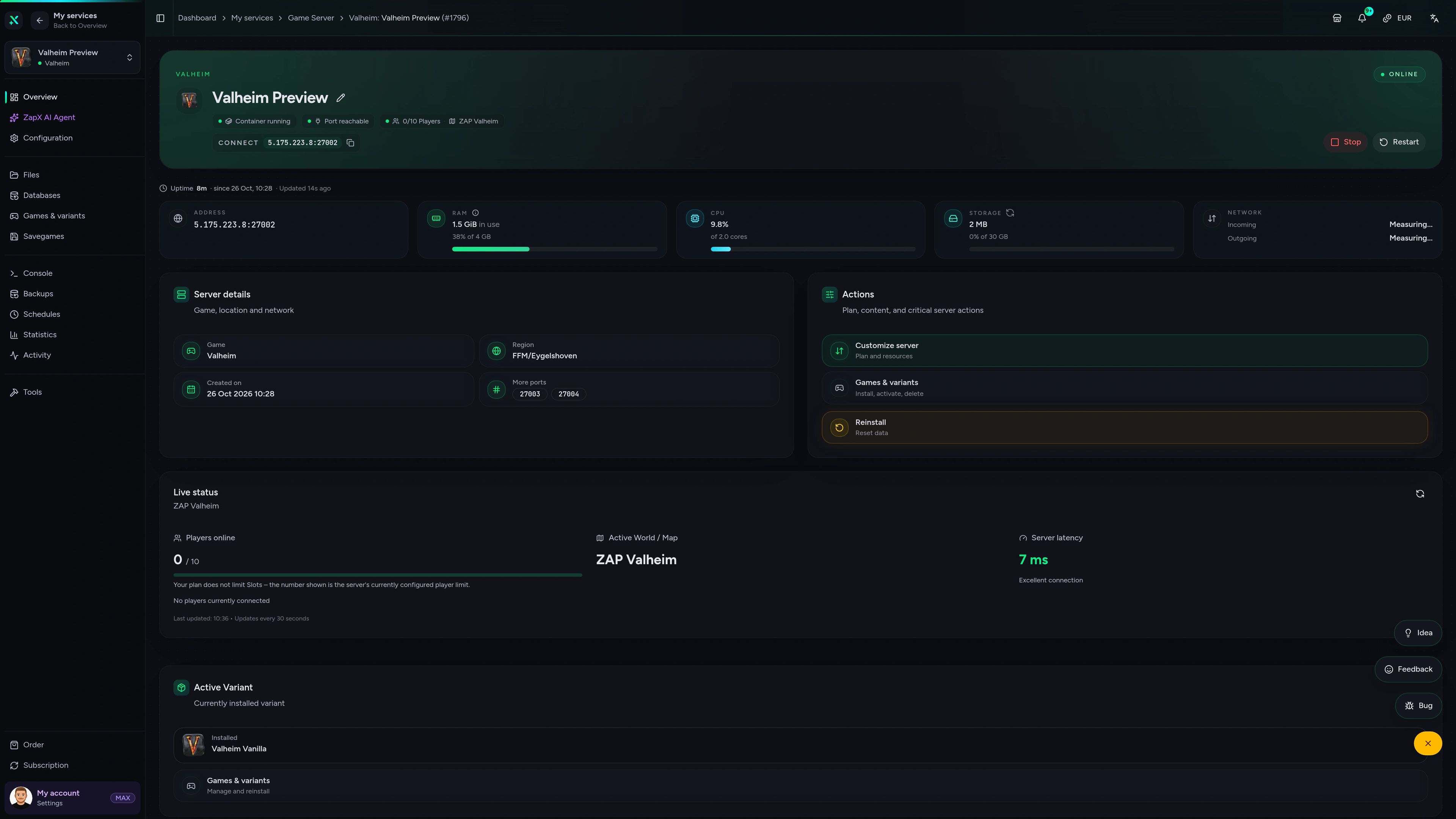
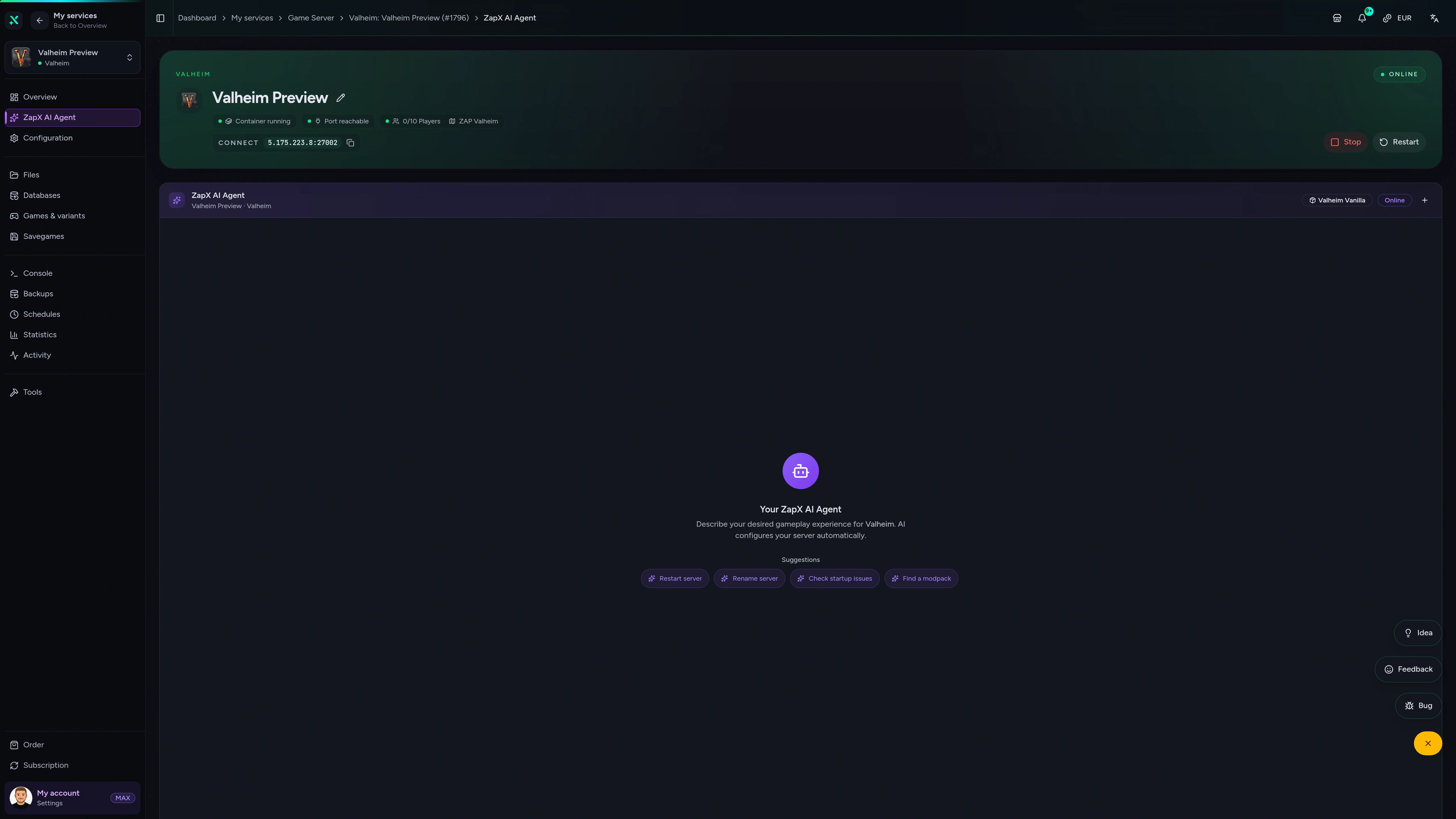
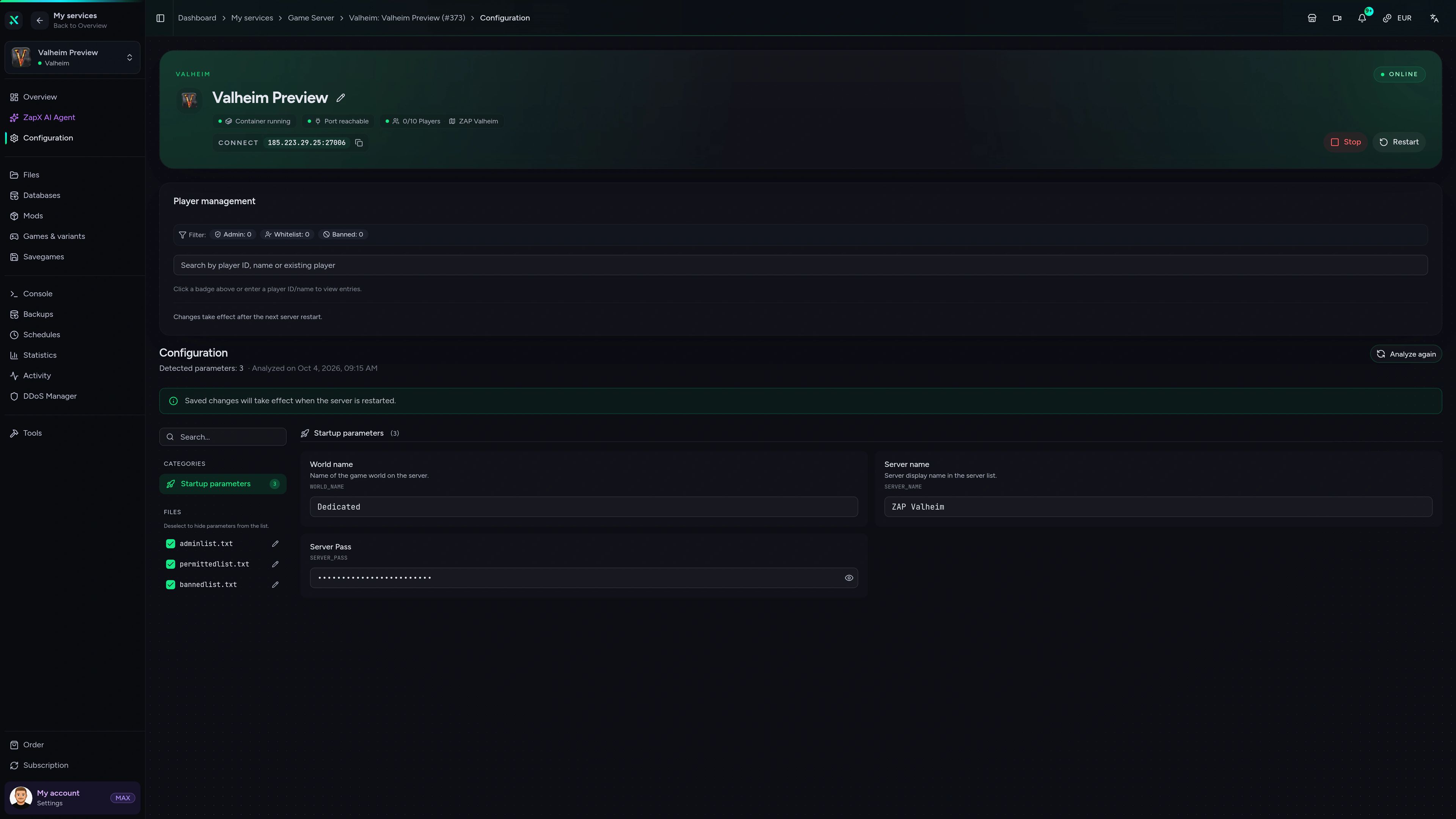
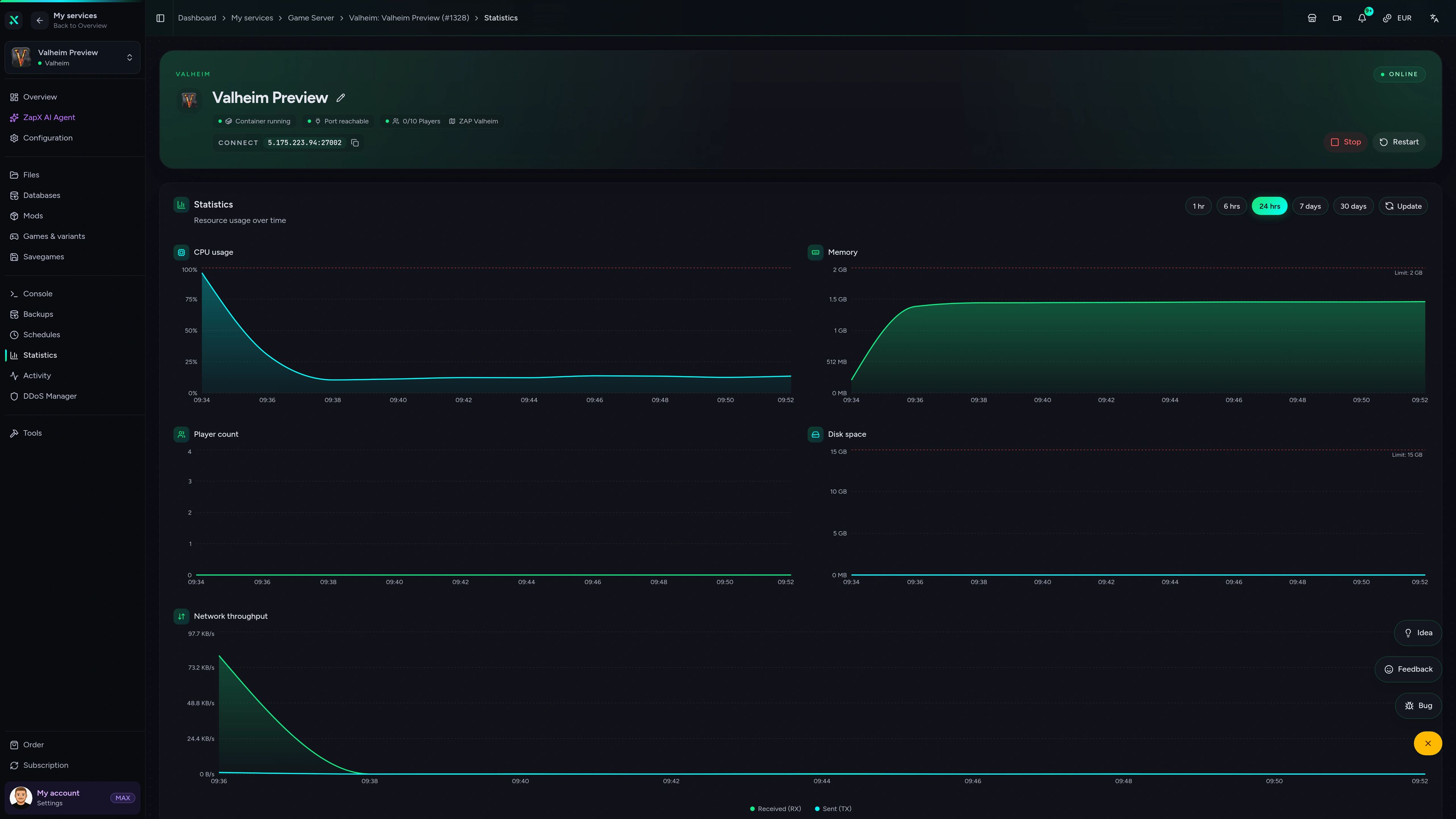
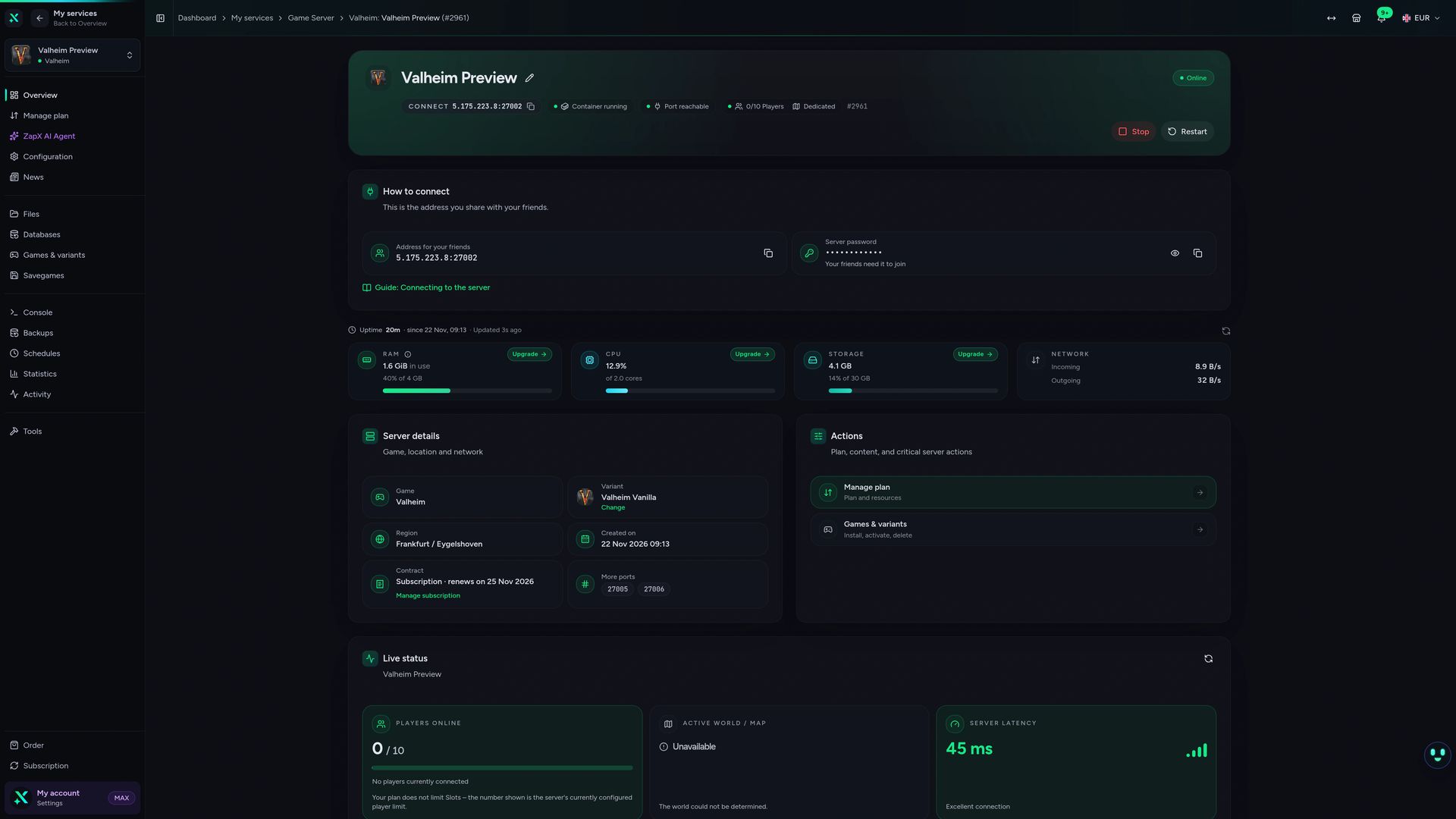
Valheim Game Server – Overview
Overview of the Valheim game server in the ZapX customer panel.
Ask your Valheim server. Get clear next steps.
Use the ZapX AI Agent to understand crossplay settings, read startup errors, and plan safe mod changes and Backups with ZapX Pass before you apply them.
Available with ZapX Pass across supported services on your account.
See ZapX PassZapX AI Agent
panel.zap-hosting.com
Benchmark
See live infrastructure benchmarks instead of guessed specs or copied competitor claims.
High-performance VPS, CPU model depends on the location
Typical VPS plans without a published host CPU
confirmed 2026-07-01
Pick your playstyle
Built for every Valheim group from co-op to mods.
Run a private Viking world with friends, a crossplay group server, or a modded world with Backups via ZapX Pass, without keeping a home PC on around the clock.
Ready to sail?
Launch your Viking world with unlimited slots
Mobile controlComing soon
Keep your Valheim server close on mobile.
Check the server, react faster, and stay in control of your Viking world when you are away from your desk.
Discord management
Manage servers directly in Discord.
Check status, start, stop, and restart via slash command — without leaving your community Discord.


Impressionen
Valheim Screenshots
A glimpse into the game world—its atmosphere, exploration, and the moments your community will experience on the server.
Valheim
4 free tools—right in your browser, no sign-up required.
Also available
We also offer the following games.
Switch between your games anytime for free—Minecraft, FiveM, Rust, and more.
Survival & Creative
Minecraft
Vanilla, Modded & Modpacks
Ready in ~2 min

Roleplay
FiveM
Roleplay server in seconds
One-click installation

Survival
Rust
Wipe-ready game server
Automatic setup
Also available
Switch between your games anytime for free—Minecraft, FiveM, Rust, and more.
98
Available games











Benefit
Unlimited Slots
We don't artificially limit player Slots. Hardware determines capacity.
Scale based on Mods, scripts, and player load instead of paying for a fixed number of Slots.
Start your Viking world without slot tiers.
Choose resources for your world, compare live package prices, and launch with crossplay, mod variants and a daily Backup, all managed in your browser panel.
No setup. No risk. Online in seconds.