
 Private photo Backup on your own VPS
Immich Cloud Hosting on a VPS.
Deploy Immich via Coolify with one click — private photo Backup with root access, NVMe storage and locations in Europe & America.
Or try 3 days from €1.31Pick the 3-day term at checkout · renews every 3 days · cancel anytime

Packages 1–3 of 9
ImmichConfigure yourself
Your project. Your setup.
No package fits? Choose your CPU, RAM and storage—you only pay for the package you put together.
Powerful CPUs
1 Gbit/s uplink included
up to 5 Gbit/s as an add-on
100 Gbit/s host network
Juniper Firewall
DDoS protection
 Visa
 Mastercard
 American Express
 PayPal
 Google Pay
 Apple Pay
 Klarna
 Amazon Pay
A private Google Photos alternative
Immich keeps every photo you take on your own VPS.
Immich backs up every photo and video from your phone automatically and sorts them into one private timeline you can search by person, place, or even a described scene. It is a self-hosted Google Photos alternative with the same easy mobile Backup and sharing. The difference: the library lives on your own VPS instead of inside a closed consumer account, and it stays reachable from any device, wherever you are.
Coolify takes care of the first setup: pick Immich from the marketplace and the server, database, and machine-learning containers deploy together without hand-written Docker Compose files. Root and SSH access stay yours, so you can attach extra storage, put the library behind your own domain, schedule off-server Backups, or bring an existing install over on your terms. A locked-down managed host rarely gives you that flexibility.

Built for real photo libraries
Why Immich fits a scalable VPS
Automatic phone Backup, face grouping, and smart search on one private server, deployed through Coolify and fully yours over SSH.
One-click Immich deployment
Your private photo cloud runs in minutes, with no Compose file to write by hand.
Root and SSH control
Run updates, read logs, and mount storage yourself through direct SSH access.
Automatic phone Backup
New photos and videos reach your library without manual exports or cables.
Face recognition
Find every photo of a person without tagging a single picture by hand.
Smart search by description
Describe a scene in plain words and find matching shots, no tags needed.
Videos that play anywhere
Phone clips play smoothly in any browser, as Immich transcodes them when needed.
Locations in Europe and America
Your server. Your location.
4 data centers in Europe and America — choose the location closest to your users.
Europe

America

What you can do with Immich
Build a private photo cloud
Immich is built for self-hosted photo and video libraries, with automatic phone Backup, face grouping, shared albums, and fast search for long-term archives.
Immich
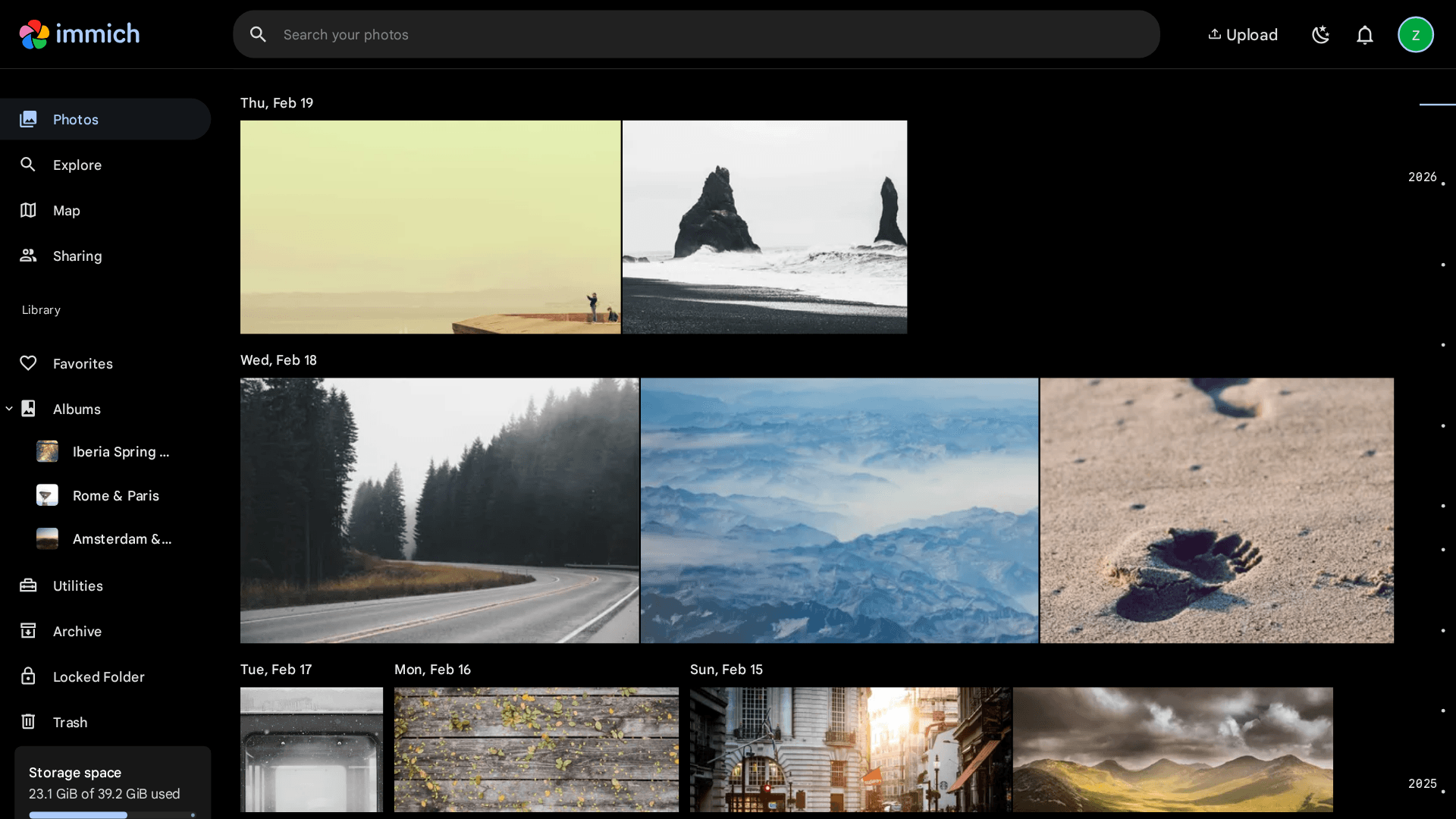
Immich
Media Gallery
Browse photos and videos in one clean visual grid so a growing archive stays easy to scan instead of turning into a folder maze.

Get started now
Immich on your VPS in minutes — no complicated setup.
Backups & snapshots
With ZapX Pass, your VPS stays restorable.
ZapX Pass unlocks snapshots for quick rollback, Restore, manual Backups, and longer retention for daily Backups.
Backups with ZapX Pass
SECURED- Manual Backups
- Keep daily Backups longer
Snapshots with ZapX Pass
CAPTURED- Snapshot before deployment
- Jump back immediately
- Snapshot with RAM
More control with ZapX Passextra storage, restore, Pass perks, and Lifetime VPS without activity checks
Reviews
What customers say about ZAP-Hosting
Real feedback on support and setup.
Great Service & User Experience
I had applied for partnership at ZAPX and the process and user panel is absolutely fire and very much friendly. Apart from that i have been using their VPS machine for quite a while and it has been great with almost no downtime.

 ZAP-HostingReply

great prices, good specs
the interface was great, migration was flawless and the interface is very user friendly. support team was very helpful aswell
 ZAP-HostingReply
I've been with them for a few years
I've been with them for a few years, and they're one of the best. The lifetime servers have really helped me, and now they've added auto-backup. 10/10!
 ZAP-HostingReply

FAQ
Frequently asked questions about Immich
Answers to the most important questions before you start.
Can I deploy Immich on a VPS without setting everything up manually?
Yes. Order the VPS, open One-Click Apps in the panel, and launch Immich from the Coolify marketplace. The server, Postgres database, Redis, and machine-learning containers deploy together, so you skip writing Docker Compose files and reverse-proxy rules by hand. You can still tune every container yourself afterwards. Learn more about One-Click Apps
What size VPS do I need for Immich?
Immich's documentation lists 2 CPU cores and 6 GB RAM as the minimum, with 4 cores and 8 GB recommended. That suits one or two users with photo Backup and face recognition. Heavy video uploads or large re-indexing jobs need more RAM and CPU. Size storage for your media plus headroom for thumbnails and transcoded clips.
How much does Immich cloud hosting cost?
Immich itself is free, open-source software, and its optional supporter license is a donation that unlocks no extra features. What you pay for is the VPS package you choose, with live prices shown in the shop. A single-user archive can start on a smaller package, while large family libraries need more storage. Longer billing periods lower the effective monthly rate.
Do I get full server control and root access with Immich hosting?
Yes. You get root and SSH access to the whole VPS, not a locked-down appliance. Apply Immich updates on your own schedule after reading the release notes, inspect container logs, mount extra storage, or tune the reverse proxy. Face recognition and smart search run on your own server instead of a third-party AI service.
Are Backups included for an Immich VPS?
Backups, snapshots, and restores for your VPS come with a ZapX Pass. For an irreplaceable photo archive, also keep an off-server copy of your media folder and an Immich database dump, and test a restore once so you know recovery actually works.
Can I move an existing Immich installation to a hosted VPS?
Yes. Copy your upload folder and a dump of the Immich Postgres database to the new VPS, restore both into the fresh stack, and keep the same Immich version during the move. Check thumbnails, search, and shared links, then point your domain's DNS record at the new server to switch over. How to edit DNS records
Which server location should I choose for my Immich VPS?
Choose from locations in Europe and America and pick the one closest to you and the people you share albums with, so uploads and timeline scrolling stay fast. Many North American households start with Ashburn. Your library stays in the location you pick.
Is a VPS better than running Immich on home hardware or choosing a fully managed host?
For many privacy-first buyers, yes. Home hardware can work, but remote access, upload bandwidth, router setup, power, and Backup discipline are all on you. A fully managed host is simpler, but you usually trade away root access and storage flexibility. A VPS is the middle ground: easier to keep online from anywhere, but still yours to tune.
Any more questions?
Contact SupportZapX Panel
See the VPS behind your Immich hosting at a glance.
Use the ZapX panel to handle the VPS side of your Immich deployment, from console access to core service checks and protection features.
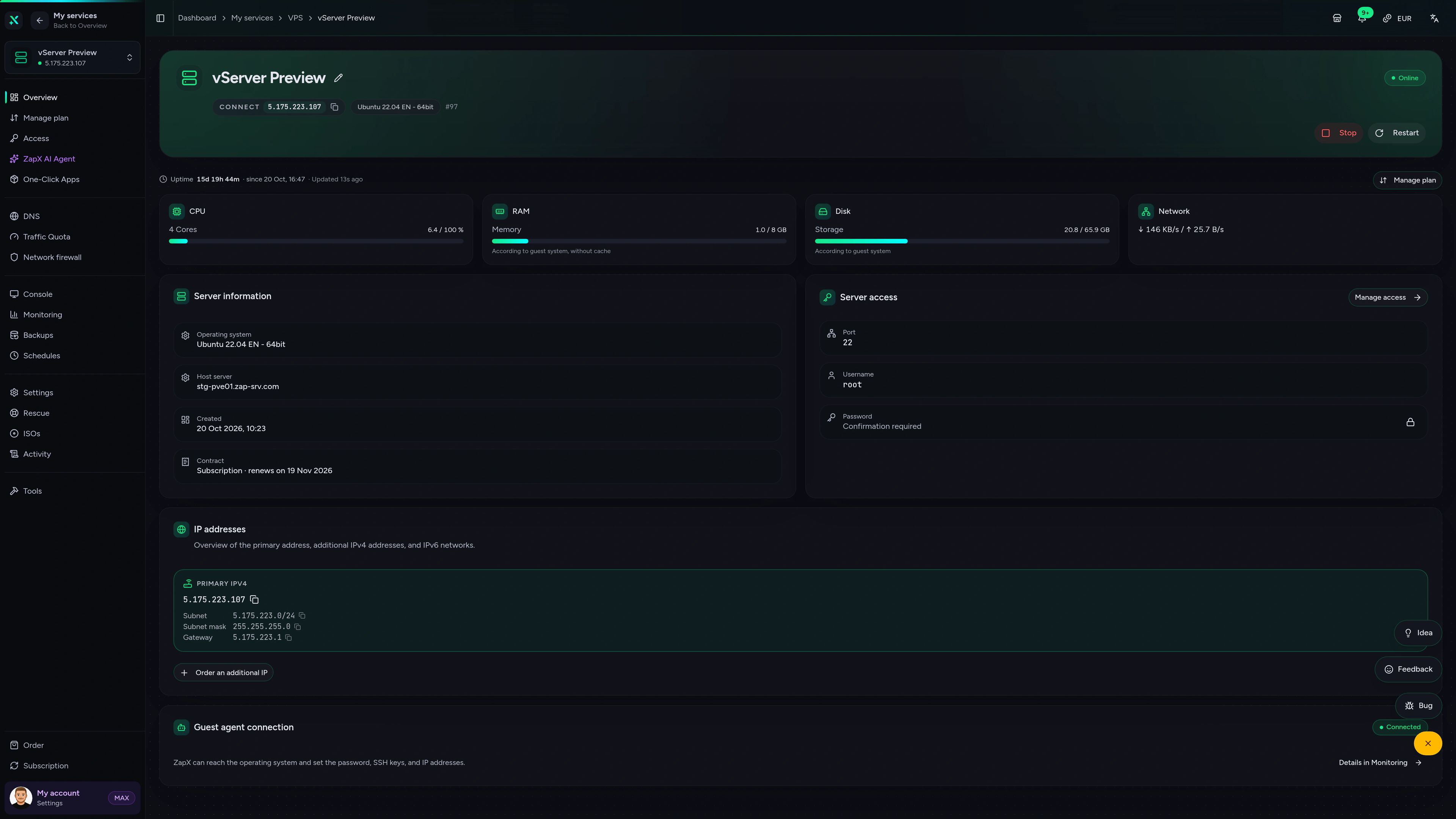
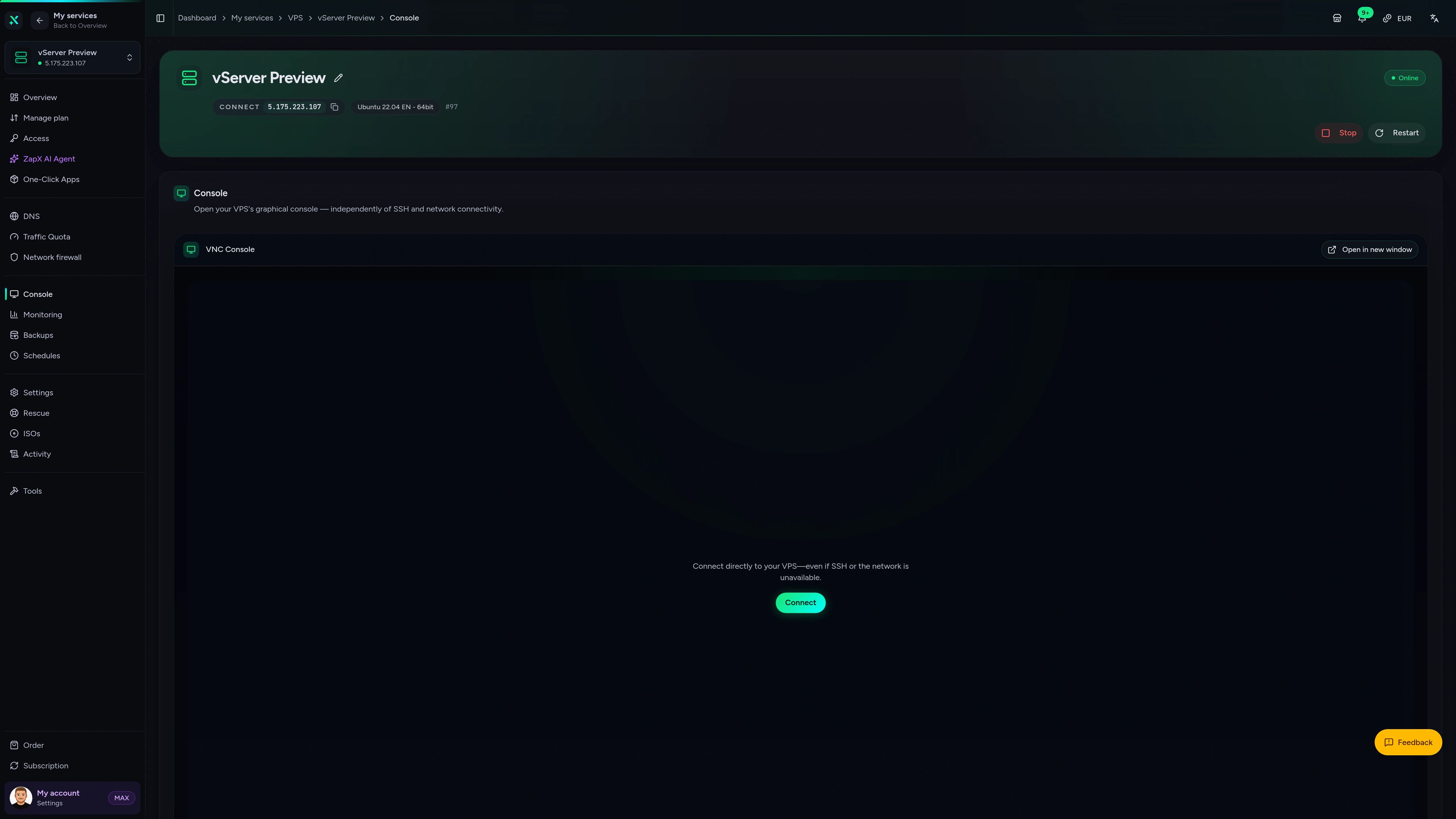
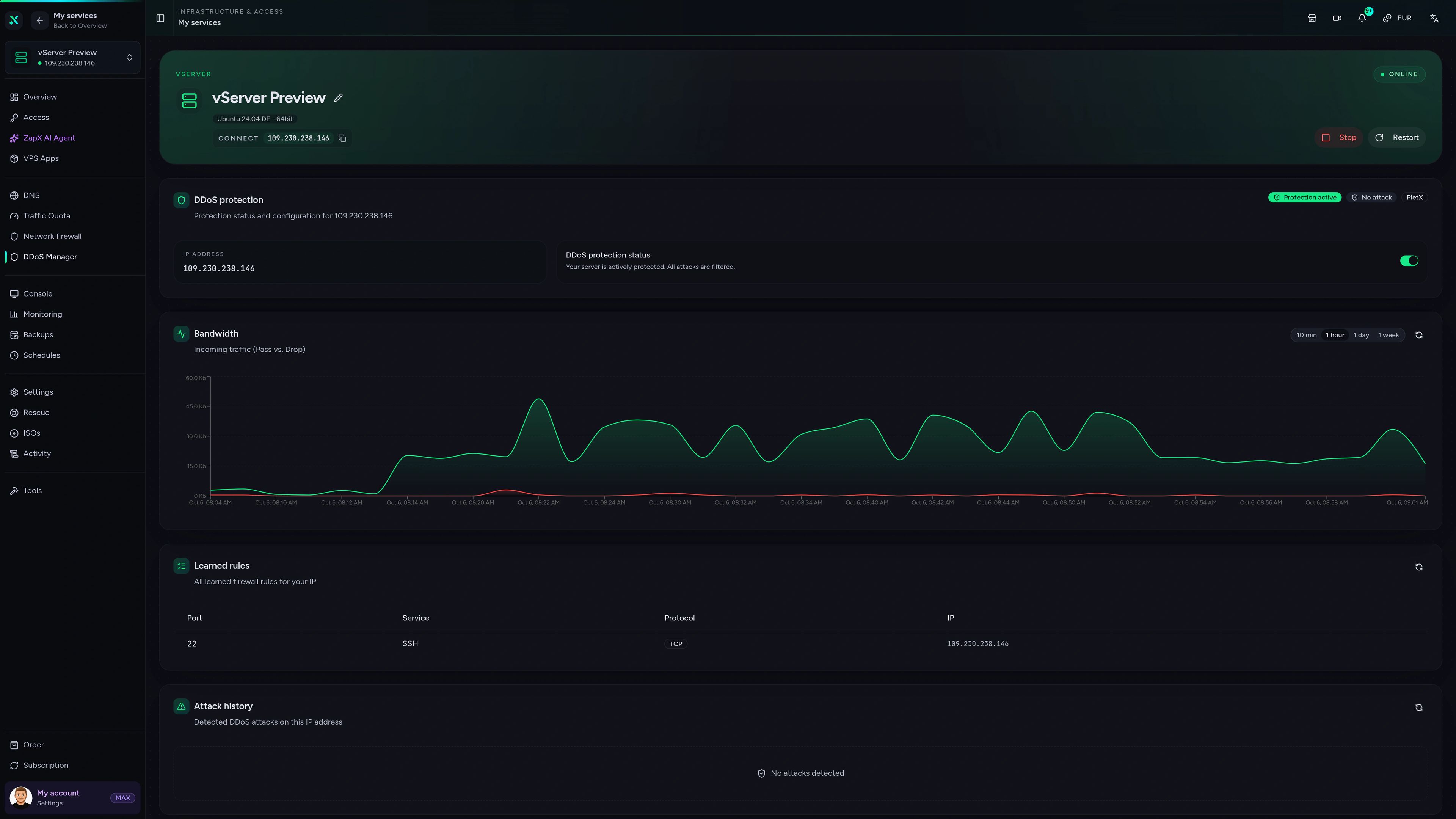
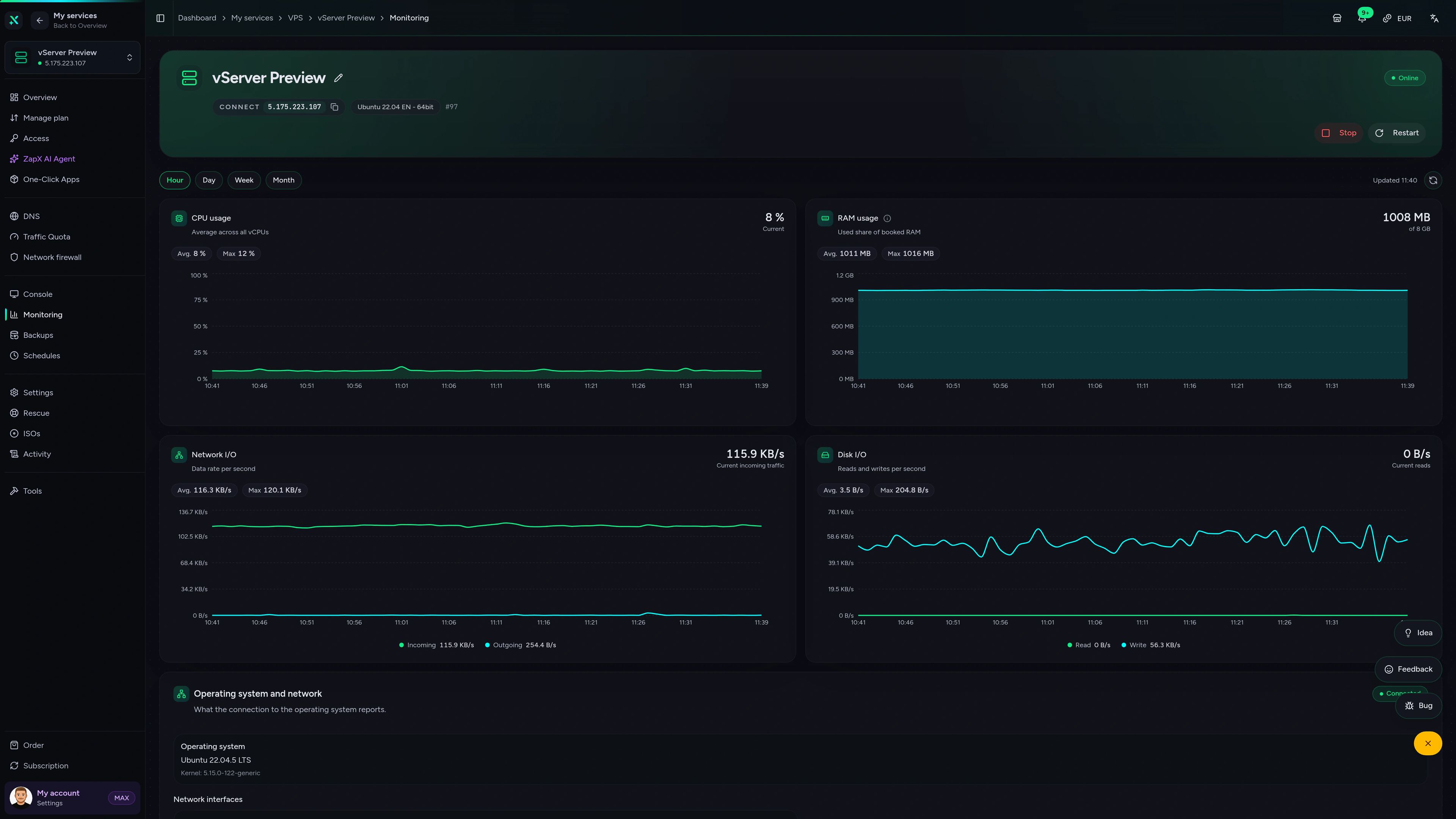
VPS – Overview
CPU, RAM, disk and network usage, server details, root access and IP addresses of your VPS at a glance.
Questions about your Immich VPS?
Use the ZapX AI Agent for practical guidance when you are sizing storage, checking imports, or planning the next safe admin step.
More guided diagnostics with ZapX Pass.
View ZapX PassZapX AI Agent
panel.zap-hosting.com
Infrastructure signal
The measured CPU and disk numbers show how quickly thumbnails render, face scans finish, and a big phone upload clears the Immich job queue on this VPS.
High-performance VPS, CPU model depends on the location
Typical VPS plans without a published host CPU
confirmed 2026-07-01
Real Immich workloads
Immich cloud hosting built for real photo libraries
These are the Immich workloads that matter on a VPS: private Backup, shared albums, multi-device uploads, and a clean switch away from consumer photo clouds.
Ready to launch?
Start your private Immich cloud today.
Mobile appComing soon
Manage your Immich VPS on the go.
Use the ZapX mobile app to check the VPS behind your Immich deployment when you are away from your desk.

Also available
We also offer the following apps.
WireGuard, Coolify, monitoring, and more — one-click setup on your VPS.

Private Cloud
Nextcloud
Nextcloud is a self-hosted, open-source platform that provides file storage, collaboration, and communication tools for seamless data management.
Automatic setup

Automation
n8n
n8n is an extendable workflow automation tool.
Ready in ~2 min

VPN & Network
WireGuard Easy
The easiest way to run WireGuard VPN + Web-based Admin UI.
Ready in ~2 min

Media Server
Plex
Plex organizes video, music and photos from personal media libraries and streams them to smart TVs, streaming boxes and mobile devices.
Ready in ~2 min

Password Security
Vaultwarden
Vaultwarden is a password manager that allows you to securely store and manage your passwords.
No manual configuration

Website & Blog
WordPress with MariaDB
WordPress is open source software you can use to create a beautiful website, blog, or app.
Ready in ~2 min
Also available
WireGuard, Coolify, monitoring, and more — one-click setup on your VPS.
768
Available apps


Benefit
All apps included
The app marketplace is included with your VPS — no extra charge per installation.
Choose your apps in the configurator and get started in minutes.
Move your photos to a cloud you own.
Deploy Immich through Coolify with one click, keep root access to every container, and scale CPU, RAM, and storage as your library grows.
No setup. No risk. Online in 60 seconds.