

VPS plan
ZAP Spark
€7.29/ 30 days
- 4 GB RAM
- 2 CPU
- 60 GB NVMe
- 1 Gbit/s Uplink
You decide which services we may enable for analytics, personalization, and external content.
We use cookies and similar technologies on our website to personalize content, embed external media, and better understand how individual areas are used.
Necessary cookies
These entries support essential functions such as security, stability, and form processing.
Optional sections
Your data may be processed with your consent or on the basis of legitimate interests. In the cookie settings, you can reject or explicitly allow each optional category.
Some services process personal data in third countries. By consenting, you also agree to this transfer. You can find more information in our Privacy Policy.
You can reopen and change your selection at any time. · 1.0.2
 Self-hosted workflow automation
Self-hosted n8n in one click via Coolify, with root access, NVMe storage, DDoS protection and locations in Europe & America.
Packages 1–3 of 9
n8nConfigure yourself
No package fits? Choose your CPU, RAM and storage—you only pay for what your project actually needs.
Powerful CPUs
100 Gbit/s host network
Juniper Firewall
DDoS protection
 Visa
 Mastercard
 American Express
 PayPal
 Google Pay
 Apple Pay
 Klarna
 Amazon Pay
What is n8n VPS hosting?
n8n connects the apps you already use and takes over the busywork: a new form entry lands in your CRM, a Slack alert fires when a payment fails, or an AI agent sorts incoming support email before you open your inbox. With n8n VPS hosting at ZAP-Hosting, the n8n Community Edition runs on your own KVM VPS, installed in one click through the Coolify-based One-Click Apps instead of a hand-built Docker setup.
Because the server is yours, you decide what runs on it. Run as many workflows and executions as your resources allow, add community nodes, connect Postgres or Redis for queue mode and connect via SSH whenever you want to read logs or tune environment variables. Your credentials and workflow data stay on your own VPS instead of a shared SaaS tenant, and Coolify lets you run more self-hosted tools right next to n8n.

Features
Build flows visually, plug in AI agents and trace every run node by node — on a VPS where you hold the root keys.
Repetitive tasks turn into flows that run on a schedule or on every event.
Failing steps are easy to find because each run shows its path node by node.
AI agents classify, summarize and answer for you, using the models you choose.
CRM, email, databases and APIs work together in one place without glue code.
You see exactly what each node returns before a workflow goes live.
Failed runs reach you right away through error workflows to chat or email.
Locations in Europe and America
4 data centers in Europe and America — choose the location closest to your users.

Inside n8n
n8n combines a visual workflow builder with real code when you need it, so you can automate business processes and AI agents without hitting SaaS execution limits.
n8n
n8n
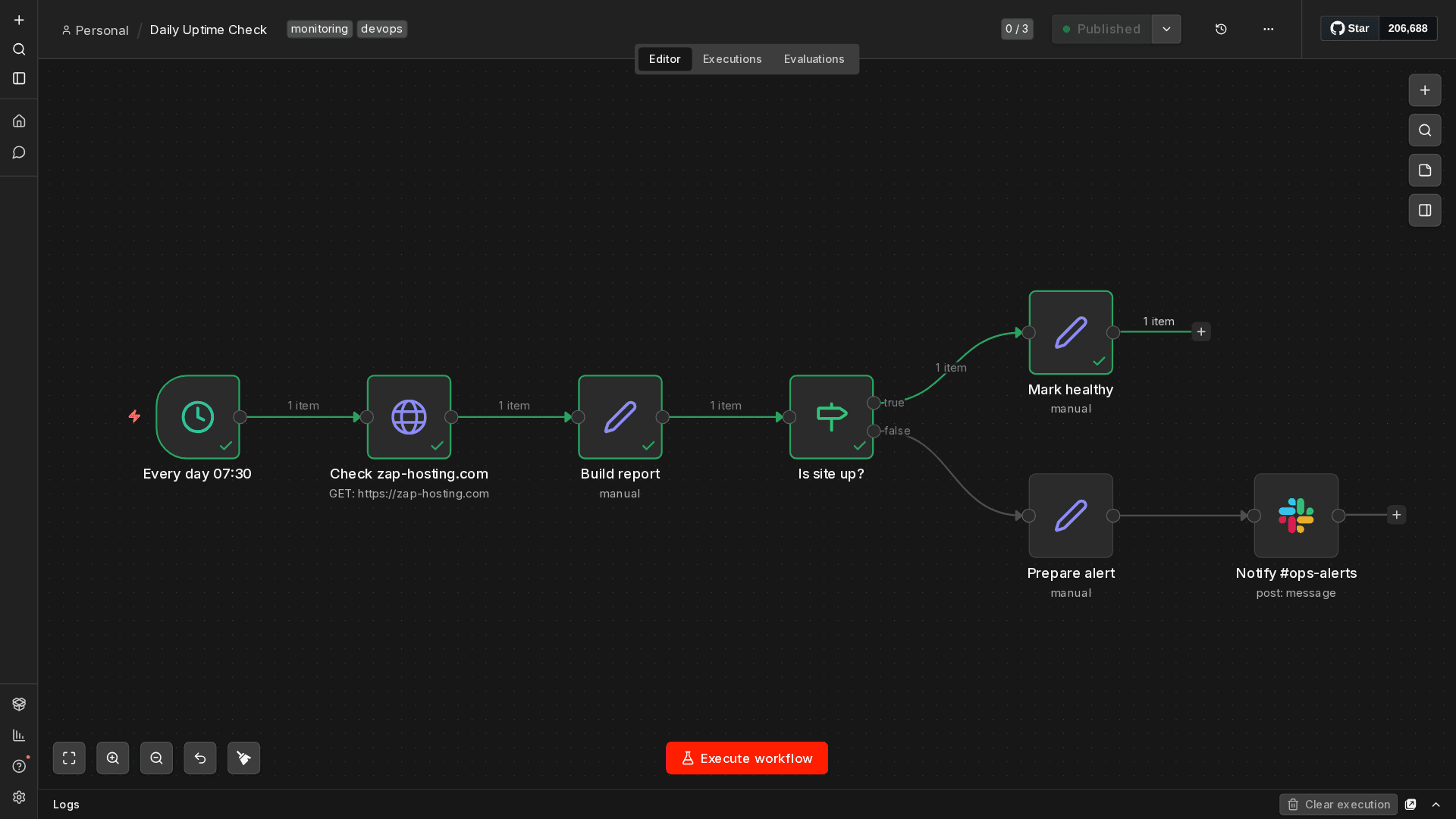
Drag-and-drop workflow canvas
Lay out your automation as connected nodes on one canvas. Every node handles a single task, and the connection lines show exactly how data moves from trigger to final action, so complex flows stay readable.
Get started now
n8n on your VPS in minutes — no complicated setup.
Backups & snapshots
Snapshots let you roll back quickly. ZapX Pass unlocks Restore, manual Backups, and longer retention for daily Backups.
More control with ZapX Passextra storage, restore, Pass perks, and Lifetime VPS without activity checks
Reviews
Real feedback on support and setup.
FAQ
Answers to the most important questions before you start.
With self-hosted n8n you pay for the server, not per execution. The n8n Community Edition has no license fee, so the only cost is the VPS plan you pick. You can choose from VPS plans that scale by RAM, vCPU and NVMe storage. The pricing cards on this page show live prices.
That depends on your workload. Webhook and schedule flows with a few integrations run fine on the smaller plans. AI agent workflows, large files or many parallel executions need more RAM. Queue mode with Postgres and Redis adds services that need memory of their own. Start with a plan that fits your current load, leave some headroom and upgrade later if you need to.
Open your VPS in the panel, go to the Apps tab and install n8n with one click. The Coolify-based One-Click Apps pull the official n8n image, create persistent storage and start the editor. After that you set up your owner account, point your own domain at the service if you want one, and start building workflows. Read the One-Click Apps guide
Yes. Export your workflows from n8n Cloud or your old host as JSON, either in the editor or with the n8n CLI, and import them on your new instance. Credentials are encrypted with the old instance's key, so either re-create them or migrate them and reuse the same N8N_ENCRYPTION_KEY. Then reactivate the workflows and update the webhook URLs in connected services.
You can choose from VPS locations in Europe and America. Pick the one closest to the APIs, services and people your workflows talk to, or the one that meets your data residency needs. Many North American teams start with a US location. Any location gives low latency as long as it is close to the systems you connect.
Every VPS gets a daily automatic Backup, and with ZapX Pass you can also create manual Backups and restore them. Your n8n data itself is your own responsibility: export your workflows regularly or use SSH and your own tools to back up the n8n data volume and the database. Learn how Backups work
Yes. The n8n Community Edition puts no limits on workflows or executions, so your VPS resources are the only ceiling. You get full root access on a KVM VPS. That means you can connect via SSH, set environment variables, install community nodes and run Postgres, Redis or other apps next to n8n through Coolify. Manual n8n setup guide
In Coolify you update n8n by setting a newer version tag for the n8n image and redeploying the service. Read the n8n release notes before major versions, and take a Backup or workflow export first so you can roll back if a node changes its behavior.
Any more questions?
Contact SupportZAPX Dashboard
Monitor resources, open the console and manage protection for the VPS that runs your n8n instance.
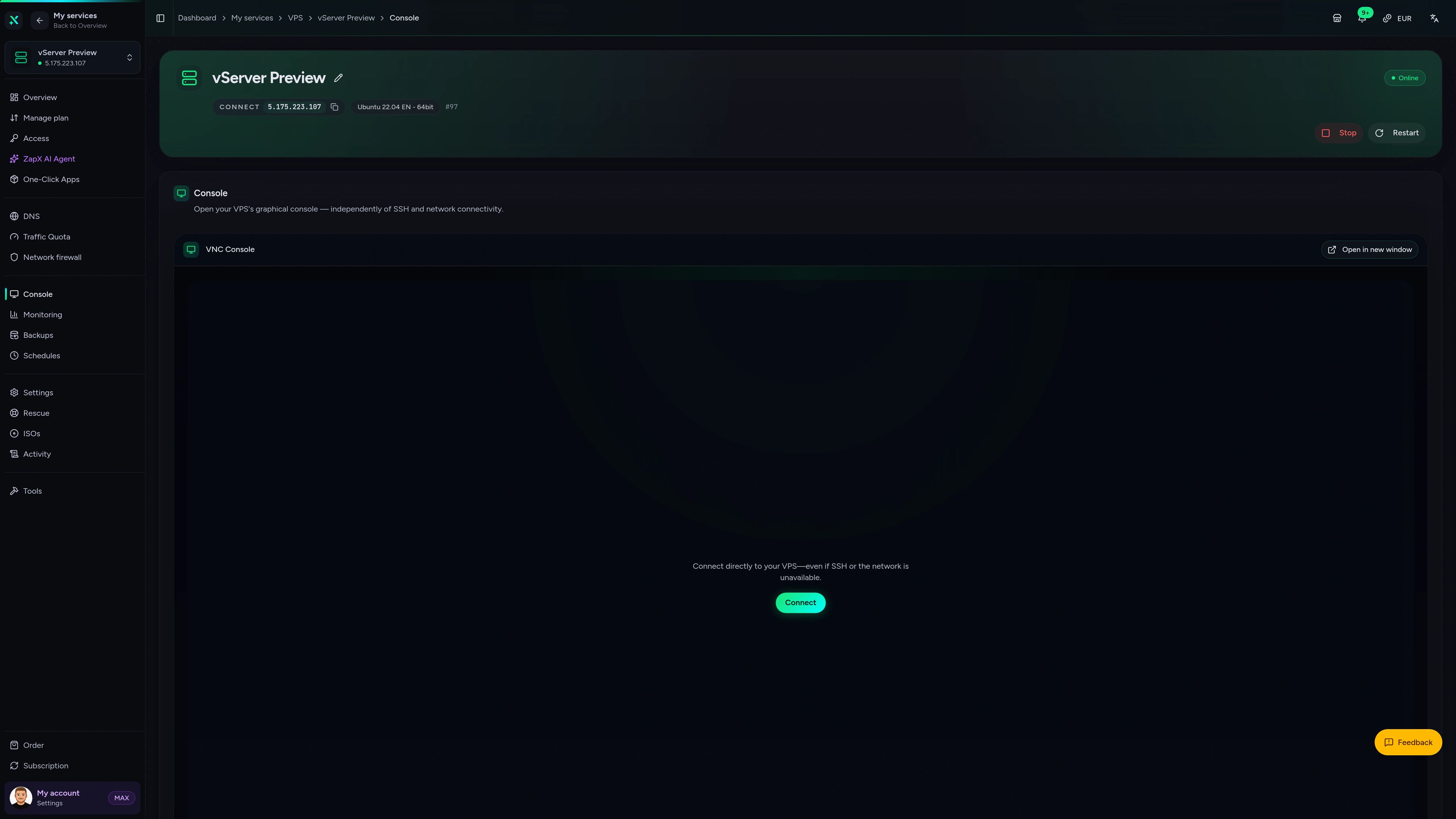
VPS Console tab
VPS Console tab
Get clear explanations and safe next steps for your n8n VPS, from slow executions to webhook errors, right inside the VPS panel.
The ZapX AI Agent is part of ZapX Pass, together with Backup restores and extra Backup slots for your VPS.
Discover ZapX PassZapX AI Agent
panel.zap-hosting.com
Performance
CPU and NVMe headroom keeps webhook flows responsive and lets parallel AI agent runs finish without stalling behind each other.
High-performance VPS, CPU model depends on the location
Typical VPS plans without a published host CPU
confirmed 2026-07-01
Use cases
From AI support triage to deployment alerts: these are typical ways builders put an n8n VPS to work every day.
Ready to automate?
Launch your n8n VPS in one click
ZapX appComing soon
Check status, resources and Backups of the VPS behind your n8n instance from anywhere, even when you're away from your desk.
Also available
WireGuard, Coolify, monitoring, and more — one-click setup on your VPS.

Private Cloud
NextCloud is a self-hosted, open-source platform that provides file storage, collaboration, and communication tools for seamless data management.
Automatic setup

vpn
The easiest way to run WireGuard VPN + Web-based Admin UI.
Ready in ~2 min

media
Plex organizes video, music and photos from personal media libraries and streams them to smart TVs, streaming boxes and mobile devices.
Ready in ~2 min

Password Security
Vaultwarden is a password manager that allows you to securely store and manage your passwords.
No manual configuration

cms
WordPress is open source software you can use to create a beautiful website, blog, or app.
Ready in ~2 min

media
Self-hosted photo and video management solution.
Ready in ~2 min
Also available
WireGuard, Coolify, monitoring, and more — one-click setup on your VPS.
755
Available apps
Benefit
The app marketplace is included with your VPS — no extra charge per installation.
Choose your apps in the configurator and get started in minutes.
Install n8n in one click via Coolify, keep full root control and run your workflows without execution limits.
No setup. No risk. Online in 60 seconds.
© 2026 ZAP-Hosting GmbH
 Preferred source on Google