 Terraria
 Map Viewer: view your world map online
Open your Terraria world file (.wld) and view the entire world map with biomes, ores, Chests and the Dungeon. Zoom, find ores and Life Crystals, and save as PNG—free, no sign-up, entirely in your browser, with nothing uploaded.
Built by Dimitri Heissler
Found a world? Play it with friends on your own Terraria server.
Expected result
What the Terraria Map Viewer gives you
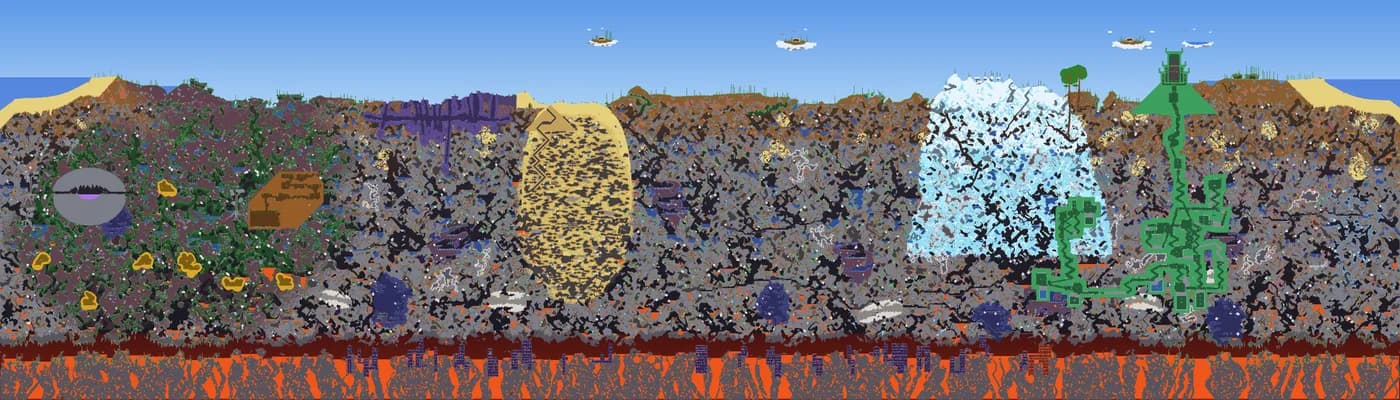
The viewer reads your .wld file in the browser and shows the complete world map at one pixel per tile. It also displays world data such as size, difficulty, evil biome, spawn point and Dungeon; counts of each ore and gem, Life Crystals, altars, chests and town residents; and the proportion of each biome. Example: The sample world “ZAP Beispielwelt” (4,200 × 1,200 tiles) contains 14,290 copper blocks, 96 life crystals and 165 chests. The dungeon entrance is at X 3,522 · Y 246.
- The entire world map, with one pixel per tile, background walls, and liquids
- World data: name, size, difficulty, seed, evil biome, special seeds, spawn point, and dungeon entrance
- Count of each ore and gem, plus the nearest deposits to the spawn point
- Life Crystals, Life Fruits, Demon Altars, and Shadow Orbs with coordinates
- Chests, villagers, and their locations as optional layers
- Share of the world covered by Corruption, Crimson, Hallow, Jungle, Snow, Desert, and Dungeon
Input
The file ZAP-Beispielwelt.wld (2.8 MB), generated with seed “ZAP Hosting”.
Output
World data
- Name: ZAP Beispielwelt
- Size: Small (4,200 × 1,200 Tiles)
- Difficulty: Classic
- Evil: Corruption
- Seed: ZAP Hosting
- Spawn point: X 2,099 · Y 287
- Dungeon entrance: X 3,522 · Y 246
- Chests: 165
- Town NPCs: Logan
Ores (blocks)
- Copper: 14,290
- Lead: 13,081
- Tungsten: 9,061
- Platinum: 5,560
- Demonit: 525
- Hellstone: 27,047
Gems and objects
- Sapphire: 934
- Ruby: 337
- Emerald: 755
- Topaz: 1,234
- Amethyst: 1,477
- Diamond: 241
- Life Crystals: 96
- Demon/Crimson Altars: 30
- Shadow Orbs / Crimson Hearts: 12
Biome distribution
- Jungle: 13.6 %
- Snow & Ice: 6.5 %
- Desert: 5.6 %
- Dungeon: 3.4 %
- Corruption: 1 %
- Glowing Mushroom: 0.2 %
How it works
How to use the Terraria Map Viewer
No login, no download, no upload: choose a world file and the map appears.
Step 1
Find world file
Terraria saves each world as a .wld file, in the Documents\My Games\Terraria\Worlds folder on Windows or the tModLoader\Worlds folder for tModLoader. On a rented server, open the world folder using the file manager or FTP.
Step 2
Select file
Drag the .wld file into the box above or click it to select the file. It is read only in your browser. No world file handy? Load the sample world.
Step 3
Explore map
Pan the map with your mouse, finger or arrow keys, and zoom with the mouse wheel, pinch gesture or plus and minus keys. Hover to see coordinates, depth layer, depth in feet and block type.
Step 4
Find ores and save map
Under “Find on map”, tap an ore, gem or object such as a Life Crystal. Locations appear as rings, and the six nearest the spawn point are listed. Use “Save as PNG” to download the entire map as an image.
Features
View your Terraria world: find ores, Chests and biomes
The Map Viewer shows you more than the in-game map and answers common questions about your world.
Entire world instead of player map
The viewer reads the .wld file and shows every block in the world, including areas you haven't explored in the game. You can show or hide background walls and liquids such as Water, Lava, Honey and Shimmer.
Find ores near the spawn point
The viewer shows counts for every ore and gem in your world and for objects such as Life Crystals, Life Fruits, Demon Altars and Shadow Orbs. Adjacent ore blocks are grouped into veins, and the six locations nearest the spawn point are listed.
World data at a glance
The viewer reads the size, difficulty, seed, Hardmode status, evil biome, special seeds, spawn point, Dungeon entrance, and numbers of Chests and signs directly from the file.
Read-only and local
The file is read in a background thread in your browser. It is not uploaded or modified, so the viewer cannot damage your world.
World file
Where is my Terraria world file?
Each world is a file with the .wld extension, with a backup file ending in .bak alongside it.
Windows
%userprofile%\Documents\My Games\Terraria\WorldsmacOS
~/Library/Application Support/Terraria/WorldsLinux and Steam Deck
~/.local/share/Terraria/WorldstModLoader (Windows)
%userprofile%\Documents\My Games\Terraria\tModLoader\WorldsRented server
World folder in the file manager or via FTPMore tools
More free game tools
Seed Map
Biome map calculated directly from your seed — pannable, with a search for the nearest occurrence.
Built by Rugile Rutkauskaite
Valheim Map
Enter a seed and see the entire Valheim world: biomes, spawn point, boss altars, the traders Haldor and Hildir, and the Bog Witch. Calculated in your browser and checked against the game.
Built by Marvin Kluck
Server Configuration Generator
Describe serverconfig.txt to the ZapX AI Agent in your own words or set each option manually — with a live preview for your rented Terraria server.
Built by Florian Galz
World Map Viewer
Upload your Core Keeper world file and explore the entire map with biomes, pan, and zoom — all in your browser, with no upload to a server.
Built by Justin Schuessler
FAQ
Frequently asked questions about the Terraria Map Viewer
Quick answers about world files, privacy, search, and supported versions.
Select your world's .wld file to display the map directly in your browser.
The Terraria Map Viewer reads the world file (.wld) in your browser and draws each tile as one pixel. You can see oceans, floating islands, biomes, the Dungeon, caves and the Underworld, and zoom and pan the map with a mouse, keyboard or two fingers. A Small world has 4,200 × 1,200 tiles, Medium has 6,400 × 1,800 and Large has 8,400 × 2,400.
No, the file never leaves your browser.
Reading, unpacking, and rendering all run locally in a background thread in your browser. No server request transfers or stores your world, and you need neither an account nor a login. The viewer does not modify the file; it only reads it.
Windows: Documents\My Games\Terraria\Worlds.
On Windows, worlds are in “Documents\My Games\Terraria\Worlds”; on macOS, in “~/Library/Application Support/Terraria/Worlds”; and on Linux and Steam Deck, in “~/.local/share/Terraria/Worlds”. For tModLoader, the “Worlds” folder is inside the “tModLoader” subfolder of the Terraria folder, so on Windows it is in “Documents\My Games\Terraria\tModLoader\Worlds”. On a rented server, you can find the world in the server's world folder, accessible through the file manager or FTP. Consoles and phones do not allow file access, so you cannot retrieve the .wld file from them.
Yes, for worlds from Terraria 1.4.0.5 (file format 230) onward, tested with 1.4.5.3 (file format 316).
The viewer reads worlds from Terraria 1.4.0.5 and newer, in all three sizes and all difficulty modes, including the special seeds Drunk World, For the Worthy, Celebrationmk10, The Constant, Not the Bees, Don't Dig Up, No Traps and Get Fixed Boi. For worlds from 1.3 or the first 1.4.0 versions, open them once in a current Terraria version and save them there. Player maps (.map) aren't supported; use the .wld file for the same world. For tModLoader, open the .wld file from its “Worlds” folder. The viewer does not read the additional .twld file where tModLoader stores Mod data, so content from Mods such as Calamity will be missing from the map.
No, the seed only becomes a map in the game.
Terraria's world generator creates the world from the seed text; this viewer does not recreate that process. Generate the world with your seed in Terraria or on a Terraria server (for example, using the -autocreate option), then open the resulting .wld file here. You'll see the exact map your game uses, including all ores, chests and biomes.
Tap it under “Find on map” to show its locations as rings.
Under “Find on map”, the viewer lists the ores, gems and objects found in your world, such as Life Crystals, Life Fruits, Demon Altars and Shadow Orbs, with their counts. For example, the sample world contains 14,290 Copper blocks and 96 Life Crystals. Click an item to mark its locations. Adjacent ore blocks are grouped into a vein, and the six locations closest to the spawn point are listed. Use the search field to find other blocks. You can show Chests as a separate layer with their positions and names, but the viewer does not show their contents.
It shows the entire world, but your in-game map stays unchanged.
The world file contains every block, including places you've never visited. The viewer therefore shows chests, altars, the Dungeon and biomes without hiding spoilers. It only reads the file and doesn't write anything back, so it won't reveal the in-game map. If you want to discover Terraria without spoilers, wait until you know the world well before using it, or use it to view the map of a world you're planning for your server.
Yes, in a phone or tablet browser, but the world file must come from a PC or server.
The viewer runs in phone and tablet browsers, and you can zoom the map with two fingers. However, the console and mobile versions of Terraria don't give you access to the .wld file, so get it from your PC or server. A Large world (8,400 × 2,400 tiles, around 12 MB) is read in the background and drawn in strips so browsers with size limits can display it. A Large world may still be too much for older phones with little memory.
Yes, use “Save as PNG” to save an image of the entire map.
The “Save as PNG” button exports the entire world map as an image without markers. Small and Medium worlds are exported at one pixel per tile, so a Small world is 4,200 × 1,200 pixels. A Large world is scaled down because it exceeds the image size limit.
Any more questions?
Contact SupportRent your own Terraria server in 60 seconds
Upload your world and keep playing with friends — DDoS protection and full admin control included.
No setup. No risk. Online in 60 seconds.
Looking for more tools? View all Terraria tools
 Preferred source on Google









