 Minecraft Modpack Hosting
Minecraft Expedition in the Sky server hosting.
Expedition In The Sky · Expedition in the Sky set up automatically on your Minecraft server — unlimited slots, DDoS protection, locations worldwide.


Plans and pricing

Gameserver plan
ZAP Spawn
- 2 GB RAM
- 2 CPU
- 15 GB NVMe
- Unlimited Slots

Gameserver plan
ZAP Scout
- 4 GB RAM
- 2 CPU
- 30 GB NVMe
- Unlimited Slots


Gameserver plan
ZAP Ranger
- 6 GB RAM
- 3 CPU
- 35 GB NVMe
- Unlimited Slots

Gameserver plan
ZAP Raid
- 8 GB RAM
- 4 CPU
- 50 GB NVMe
- Unlimited Slots

Gameserver plan
ZAP Guild
- 10 GB RAM
- 4 CPU
- 60 GB NVMe
- Unlimited Slots


Gameserver plan
ZAP Vanguard
- 12 GB RAM
- 5 CPU
- 75 GB NVMe
- Unlimited Slots


Gameserver plan
ZAP Legion
- 16 GB RAM
- 6 CPU
- 100 GB NVMe
- Unlimited Slots


Gameserver plan
ZAP Bastion
- 24 GB RAM
- 8 CPU
- 150 GB NVMe
- Unlimited Slots


Gameserver plan
ZAP Nexus
- 32 GB RAM
- 10 CPU
- 200 GB NVMe
- Unlimited Slots
Packages 1–3 of 9
 minecraft
Configure yourself
Your server. Your power.
No package fits? Choose your RAM, CPU and storage—you only pay for the performance your community actually needs.
Powerful CPUs
100 Gbit/s host network
DDoS protection
Modpack preinstalled
Backups
 Visa
 Mastercard
 American Express
 PayPal
 Google Pay
 Apple Pay
 Klarna
 Amazon Pay
About the modpack
What is Expedition in the Sky?
Expedition In The Sky is a skyblock modpack for Minecraft Java Edition by MasterSloth1, published on CurseForge. Don't mix it up with similarly named packs. You start on a tiny island floating in the void and slowly grow it into farms, machines and automation. On your own server, your whole crew builds that island together, even when you're not online.
Your group decides when you play, who's on the whitelist and which extras you add. The pack is installed automatically when you order, and every package has unlimited slots. You can upload an existing singleplayer island, make a Backup with ZapX Pass before every update and pick the location closest to your friends.

Core features
Modded Minecraft server hosting for your sky island.
Automatic pack setup, unlimited slots and full control over files, Backups and resources for your skyblock run.
Modpack installed for you
Start your skyblock island right away. No need to set up Forge or pack files yourself.
Unlimited player slots
Invite your whole co-op crew. RAM and CPU set the real limit, not a slot package.
Bring your own island
Upload your singleplayer Expedition world and keep building from where you left off.
Backups with ZapX Pass before every change
With ZapX Pass, save a restore point before pack updates or extra mods so you can always roll back.
More RAM as your pack grows
Is your late-game automation getting heavy? Add RAM and CPU without starting a new world.
Locations worldwide
Host your island close to your group, wherever your friends play from.
Only for Minecraft
More control over your Minecraft world
Try other modpacks, manage your players and have ZapX Maker build your own mods straight from the panel.


Minecraft
Find your next modpack
Explore other packs on CurseForge and install your pick in one click from the panel.
- CurseForge
- Modrinth
- Feed the Beast
- +1
Manage players without commands
Manage your whitelist and operator levels in the panel without typing console commands.
Turn your idea into a mod
Describe your mod and ZapX Maker (ZapX Pass) builds it and deploys it to your server.
- ZapX Maker
Locations worldwide
Your server. Your location.
8 data centers worldwide — choose the location closest to your community.
Europe


America


Asia-Pacific


Reviews
What customers say about ZAP-Hosting
Real feedback on support and setup.




FAQ
Frequently asked questions about Expedition In The Sky
Answers to the most important questions before you start.
How do I set up an Expedition in the Sky server at ZAP-Hosting?
Order a package and the modpack is installed automatically.
Pick a package in the shop and complete your order. Expedition In The Sky is set up automatically with the latest release of the pack. Once your server is running, you'll find the IP and port in the panel. Share them with your crew and start on your island.
- Choose a package
- Pack is installed automatically
- Connection details in the panel
How much RAM does an Expedition in the Sky server need, and how many players can join?
Slots are unlimited. RAM decides how smoothly the pack runs.
Expedition In The Sky is a large Forge pack, so it needs a lot more memory than vanilla Minecraft. Start with the RAM guideline below and keep an eye on usage in the statistics. Every package has unlimited player slots, so the RAM and CPU you pick are the real limit. You can add more RAM when your automation or your crew grows. As a guideline: about 6 GB for 2 players, 10 GB for around 10 players.
- Large Forge pack: plan extra RAM
- Unlimited slots on every package
- Upgrade RAM as you grow
Can I upload my existing Expedition in the Sky world?
Yes, you can bring your singleplayer island with you.
Upload your world folder via file access and set it as the active world. Make sure the world was created with the same pack version as the server so your island, progress and machines load correctly. Make a Backup with ZapX Pass before you swap worlds. How to upload your own world
How do my friends join my Expedition in the Sky server, and does it work on Bedrock?
Same pack version on every client, then connect by IP. Java only.
Every player needs the same Expedition In The Sky version on their PC. The easiest way to get it is the CurseForge app. Then they connect with the IP and port shown in your panel. Expedition In The Sky is a Forge pack for Minecraft Java Edition, so Bedrock players on console or mobile can't join this server. Read the connection guide
- Install the pack via CurseForge
- Match the server's pack version
- Java Edition only
Can I add extra mods or update the modpack later?
Yes, you have full file access to your server.
You can upload extra Forge mods via file access and keep your pack files up to date. Back up your world first. Any mods that also run on the client have to be installed on every player's PC, or they won't be able to join. Install mods and modpacks
- Back up before changes
- Same mods on server and client
Is my Expedition in the Sky server protected against DDoS attacks?
Yes, DDoS protection comes with every Minecraft server.
Every Minecraft server includes DDoS protection, so attacks on the network are filtered before they reach your co-op session. You can check the protection status anytime in the panel's DDoS manager.
Which server locations can I choose?
Locations worldwide — pick the one closest to your players.
Your server can run at locations worldwide. Choose the one closest to where your crew plays for the best connection. Many North American groups start with Ashburn, Dallas or Los Angeles, but you're free to pick any location from the list when you order.
- Worldwide location choice
- Pick based on your players
How does billing work?
Price depends on package, term and location, not per player. Cancel anytime.
The price depends on the package you choose, not on player count, and current prices load live in the shop. When you order, you choose the term that suits you. You can cancel anytime, and the cancellation takes effect at the end of the current term.
- Priced by package
- Live prices in the shop
- Cancel anytime
Any more questions?
Contact SupportZapX Panel
Your Expedition server in the panel.
Backups, console, configuration and live statistics in one place, so you can manage your skyblock server day to day.
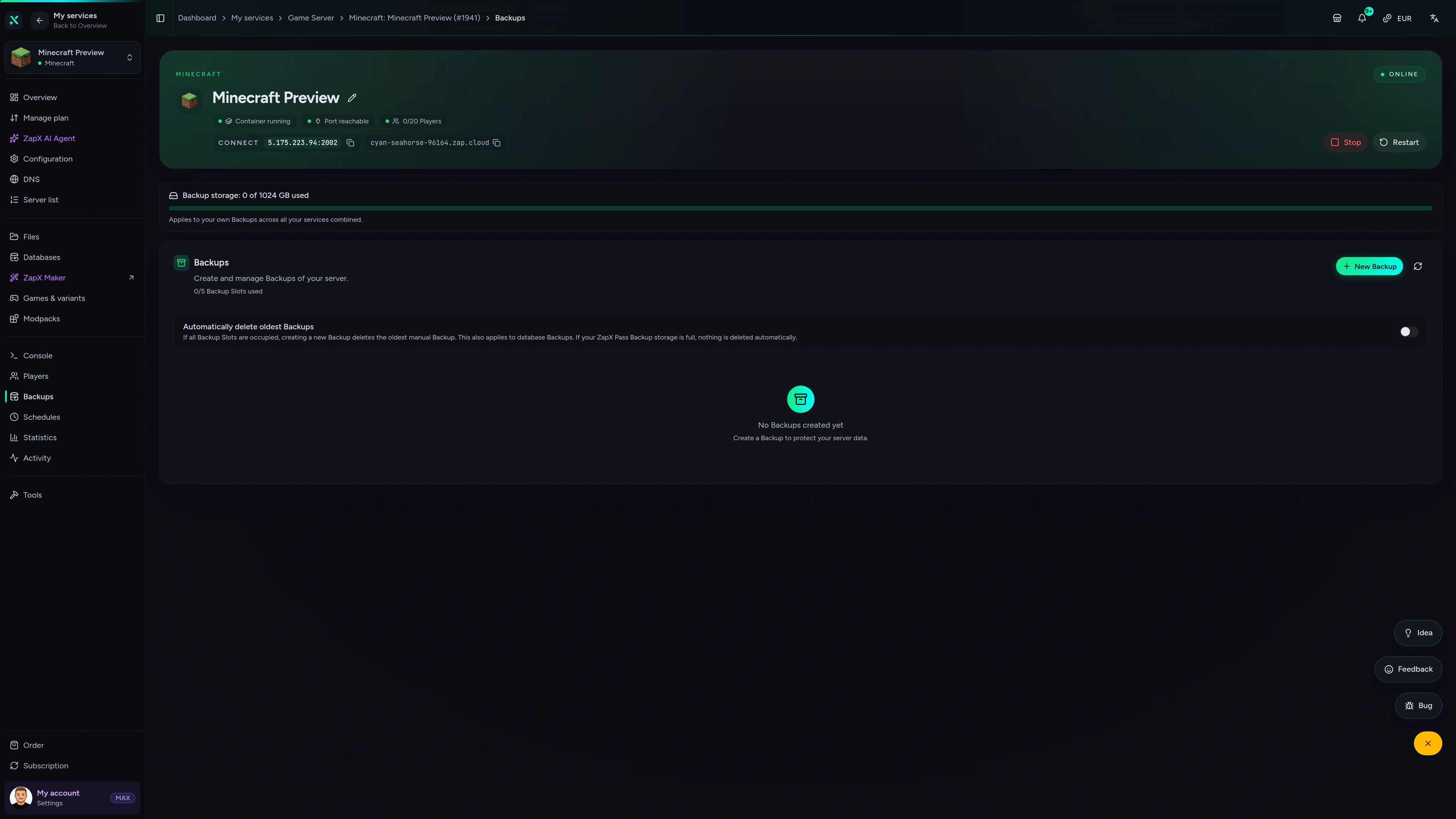
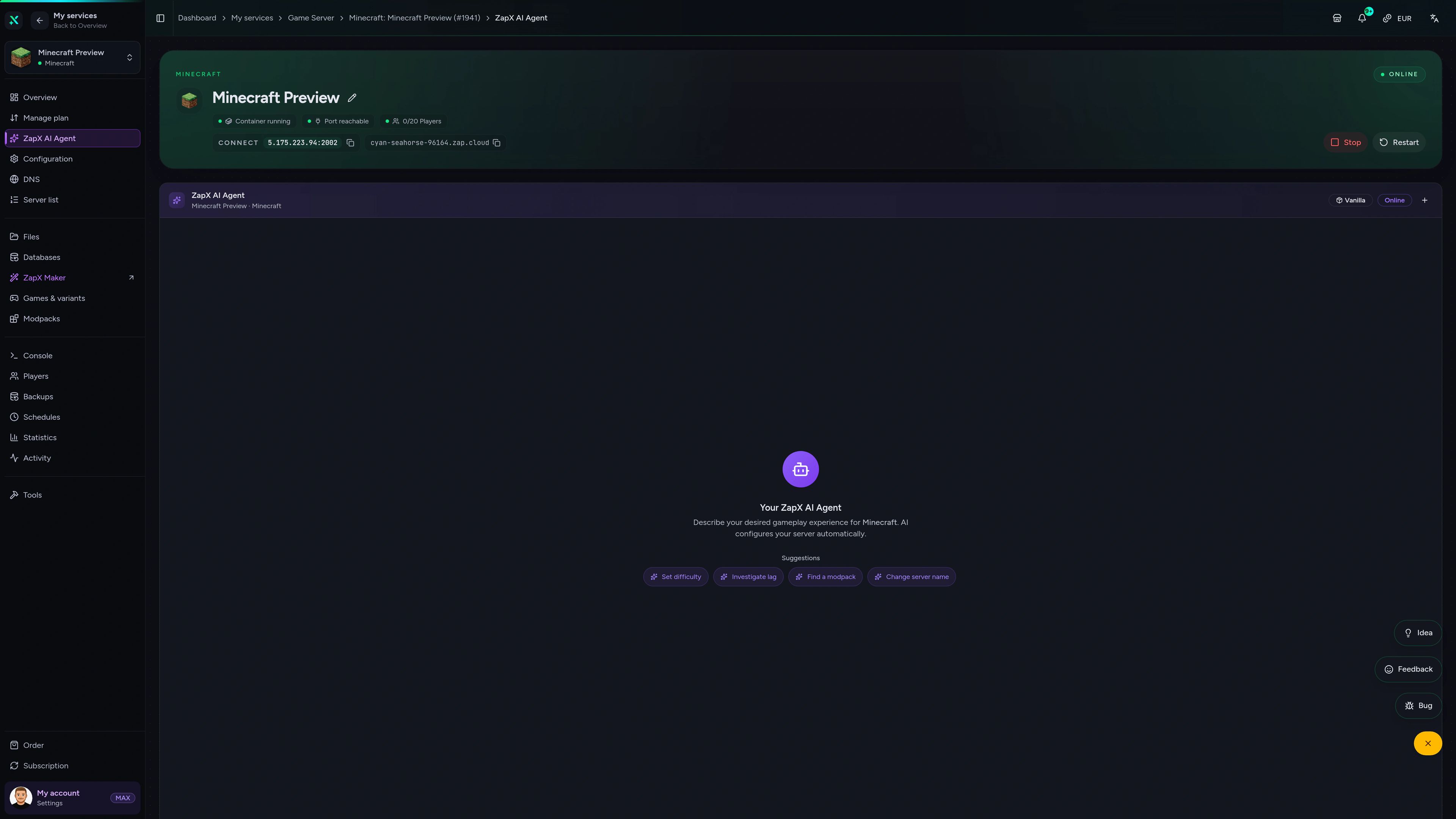
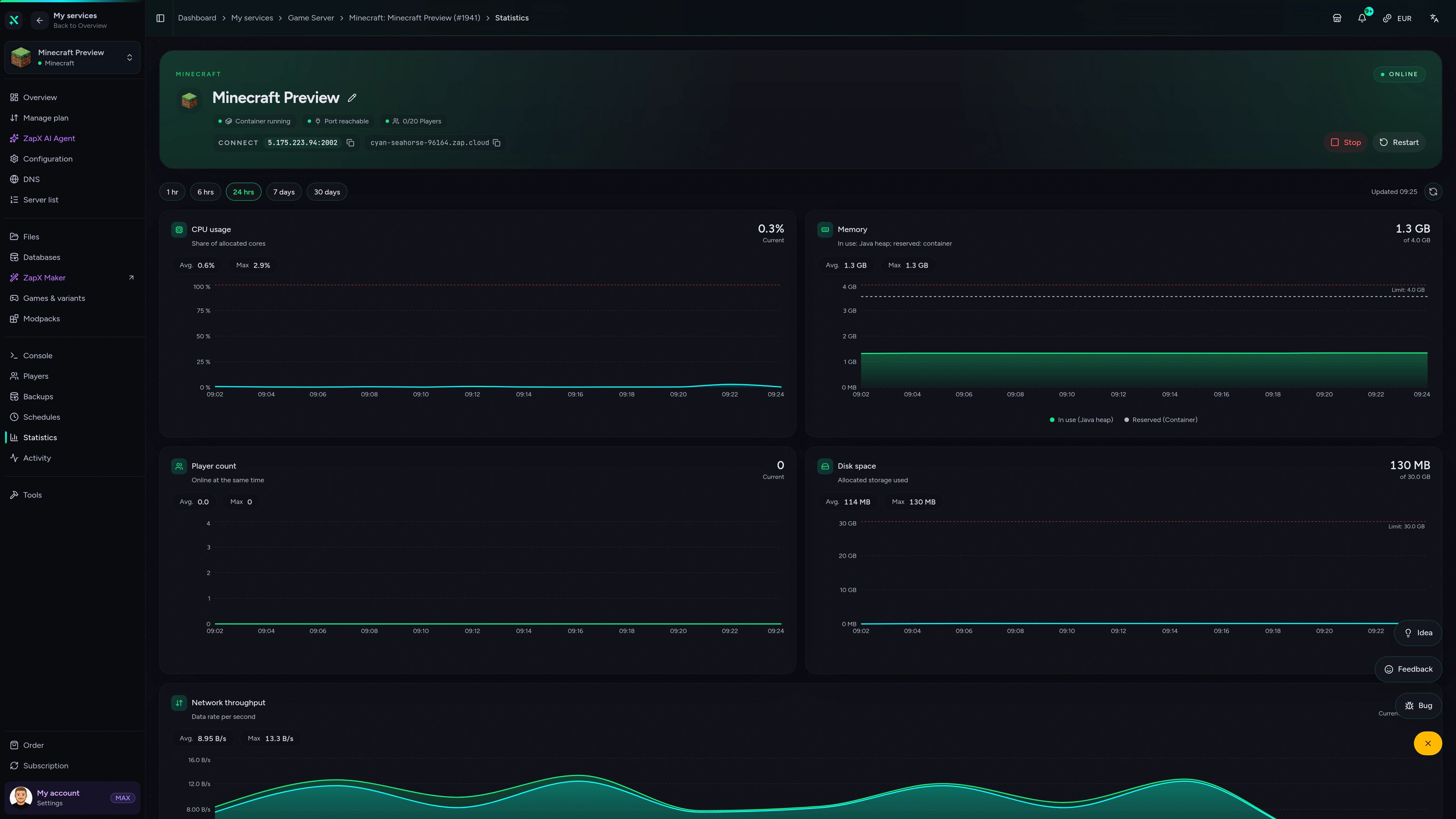
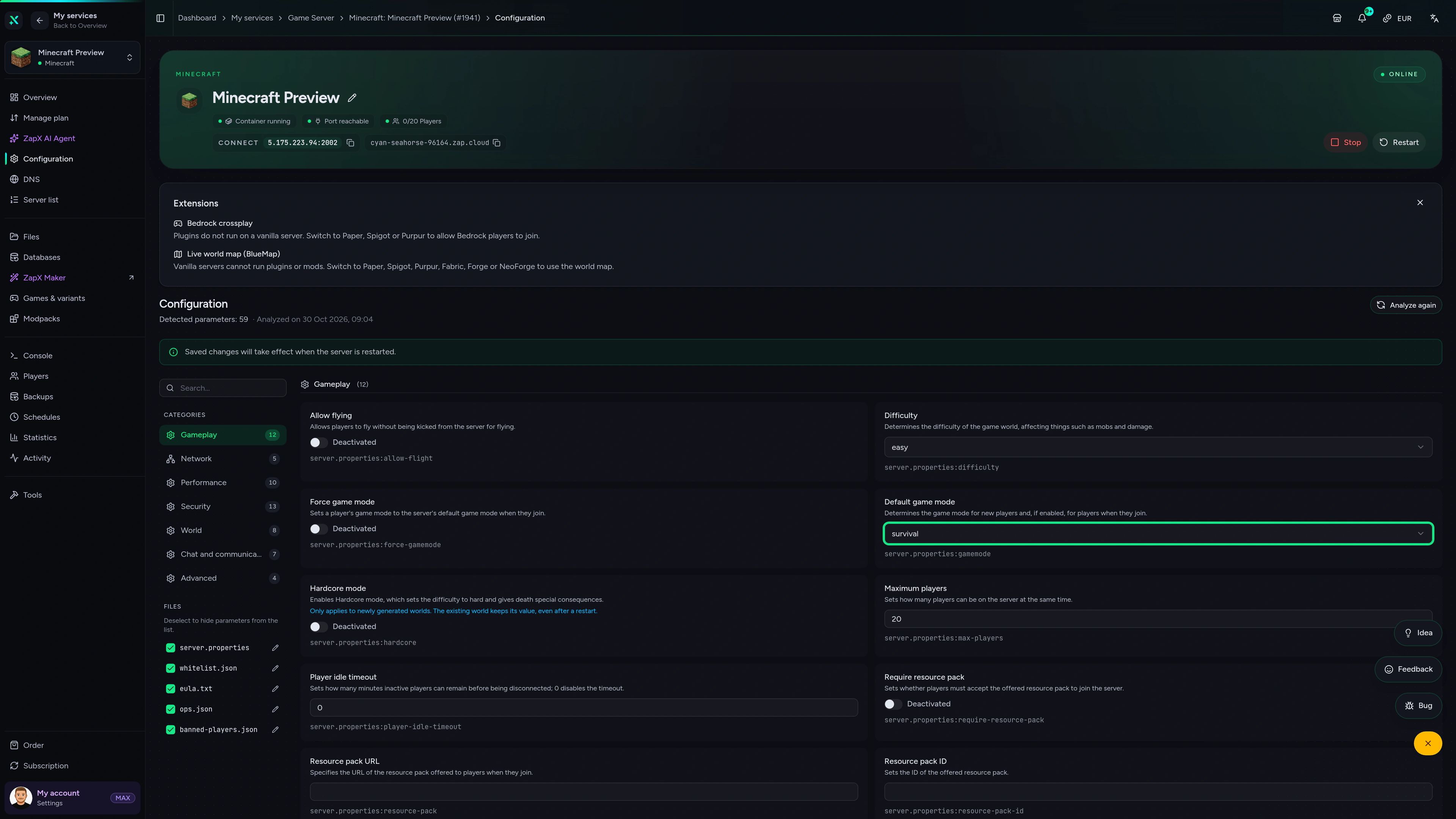
Minecraft Game Server – Backups
Backups of the Minecraft game server in the ZapX customer panel.
Manage your Expedition In The Sky server with ChatGPT or Claude.
Connect ZAP-Hosting to Claude or ChatGPT via MCP and manage your Expedition In The Sky server right in the chat.
Works with
- ChatGPT
- Claude
- Claude Code
- Cursor
- Gemini
What should I do for your server?
Ask anything …
The AI only makes changes after you approve them.
Connect in two steps

Step 1
Connect ZapX
Opens Claude with the connector already filled in. Confirm it there and sign in with your ZAP account.
Step 2
Start a chat
Opens a new chat with this text:
I want to rent a Minecraft server at ZAP-Hosting. Use the ZapX connector by ZAP-Hosting: ask me about player count, version and mods, recommend the right package with its price and then order it with me.
The text then sits in the message box – you still press send there.
Without a Pass you get status, start/stop and, except in ChatGPT, advice and ordering. Files, console and Backups come with a ZapX Pass. Your account is created when you connect.
Stuck on your island server? Ask the ZapX AI Agent.
The ZapX AI Agent knows your server's context. It explains RAM usage, mod mismatches and world uploads for Expedition in the Sky right in the panel.
The ZapX AI Agent is part of ZapX Pass. It's right in your panel, next to your Expedition in the Sky server.
See ZapX PassZapX AI Agent
panel.zap-hosting.com
Performance signal
The benchmark compares network and server response in scenarios close to real modded Minecraft play. The numbers are measured, not promised.
High-performance VPS, CPU model depends on the location
Typical VPS plans without a published host CPU
confirmed 2026-07-01
Expedition use cases
How will your crew play the sky?
A co-op island with friends, a long skyblock run or a careful update with Backups: start with how your crew plays, then match RAM and location to it.
Ready for co-op?
Your island, your crew, online in 60 seconds.
Mobile appComing soon
Your island server in your pocket.
Check the status, restart after an update and keep an eye on your island server, even when you're away from your PC.
Discord management
Manage servers directly in Discord.
Check status, start, stop, and restart via slash command — without leaving your community Discord.


Impressionen
Minecraft Screenshots
A glimpse into the game world—its atmosphere, exploration, and the moments your community will experience on the server.
Minecraft
35 free tools—right in your browser, no sign-up required.
Server variants
More game variants
Curse/Twitch Launcher server hosting
CurseForge Modpack (Benutzerdefiniert)Minecraft SpongeForge server hosting
SpongeForgeMinecraft: Magma server hosting - game information
Arclight (NeoForge)Minecraft: Sponge Vanilla server hosting
SpongeVanilla
Also available
We also offer the following Modpacks.
Popular Minecraft Modpacks — ATM, RLCraft, Pixelmon, and more. See prices in the configurator.

Modpack
All the Mods 10 - ATM10
ATM10 · Tech
Ready in ~2 min

Modpack
Better MC [FORGE] BMC4
BMC4 · Vanilla+
Ready in ~2 min
Modpack
RLCraft
RLCraft · Hardcore
Ready in ~2 min
Also available
Popular Minecraft Modpacks — ATM, RLCraft, Pixelmon, and more. See prices in the configurator.
117,444
Available modpacks





Benefit
Instant setup
Modrinth & CurseForge packs with instant setup in the Minecraft configurator.
Choose a pack and get started in 60 seconds.
Start your sky island today.
Expedition In The Sky set up automatically, unlimited slots, DDoS protection and cancel anytime. Order now and invite your crew.
No setup. No risk. Online in seconds.