
 One-click deploy via Coolify
VPS for OpenClaw AI agents
A VPS for OpenClaw that keeps your AI agent online 24/7 — one-click Coolify deploy, root access, locations in Europe & America.
Or try 3 days from €1.31Pick the 3-day term at checkout · renews every 3 days · cancel anytime

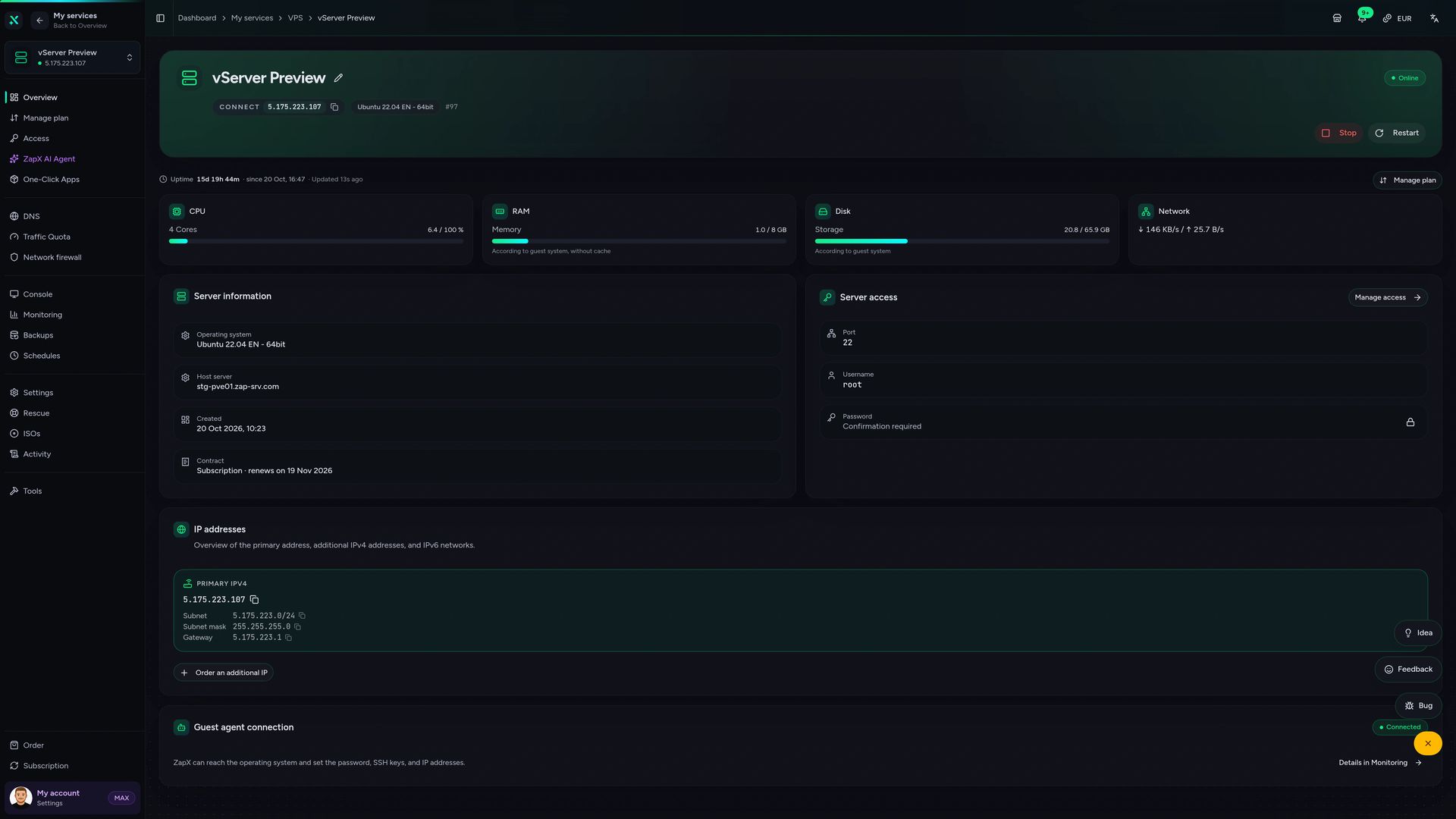
Packages 1–3 of 9
OpenClawConfigure yourself
Your project. Your setup.
No package fits? Choose your CPU, RAM and storage—you only pay for the package you put together.
Powerful CPUs
1 Gbit/s uplink included
up to 5 Gbit/s as an add-on
100 Gbit/s host network
Juniper Firewall
DDoS protection
 Visa
 Mastercard
 American Express
 PayPal
 Google Pay
 Apple Pay
 Klarna
 Amazon Pay
What is OpenClaw?
Your OpenClaw agent, running on your own VPS.
OpenClaw, formerly known as Clawdbot and Moltbot, is an open-source AI agent you talk to in Telegram, WhatsApp, Discord or Slack. It answers questions, writes code, browses websites and runs scheduled tasks for you, even while your laptop is closed. On your own VPS the agent stays online around the clock: pick OpenClaw in the Coolify app marketplace, deploy it with one click as a Docker-based app and connect your AI provider's API key.
Full root access means the agent is yours to shape: install extra skills, put the gateway behind HTTPS, lock it down with firewall rules or run other Coolify apps right next to OpenClaw. Your prompts, memory files and API keys stay on a KVM VPS that only you control instead of a shared platform. And because Coolify manages the containers, redeploying OpenClaw or rolling out a second app takes only a few clicks.

OpenClaw features
What your OpenClaw agent can do 24/7
Chat with your agent in Telegram or Slack, let it run scheduled tasks and switch AI models — all through one gateway on your VPS.
All chat apps, one gateway
Reach the same agent from every messenger you use, with one shared memory.
Your choice of AI model
Use the model that suits each task and pay your provider only for usage.
Proactive check-ins
Get briefings and reminders in your chat without having to ask first.
Scheduled agent tasks
Recurring jobs run on time because your agent never sleeps on the VPS.
Web Control UI
Check status and send commands to your agent straight from the browser.
Root shell for the CLI
Run the OpenClaw CLI, add skills or debug issues with full root access.
Locations in Europe and America
Your server. Your location.
4 data centers in Europe and America — choose the location closest to your users.
Europe

America

Inside OpenClaw
What you can do with OpenClaw
Switch between 20+ AI providers, chat with your agent in Telegram, Discord, Slack or WhatsApp and let it handle browser tasks for you.
OpenClaw
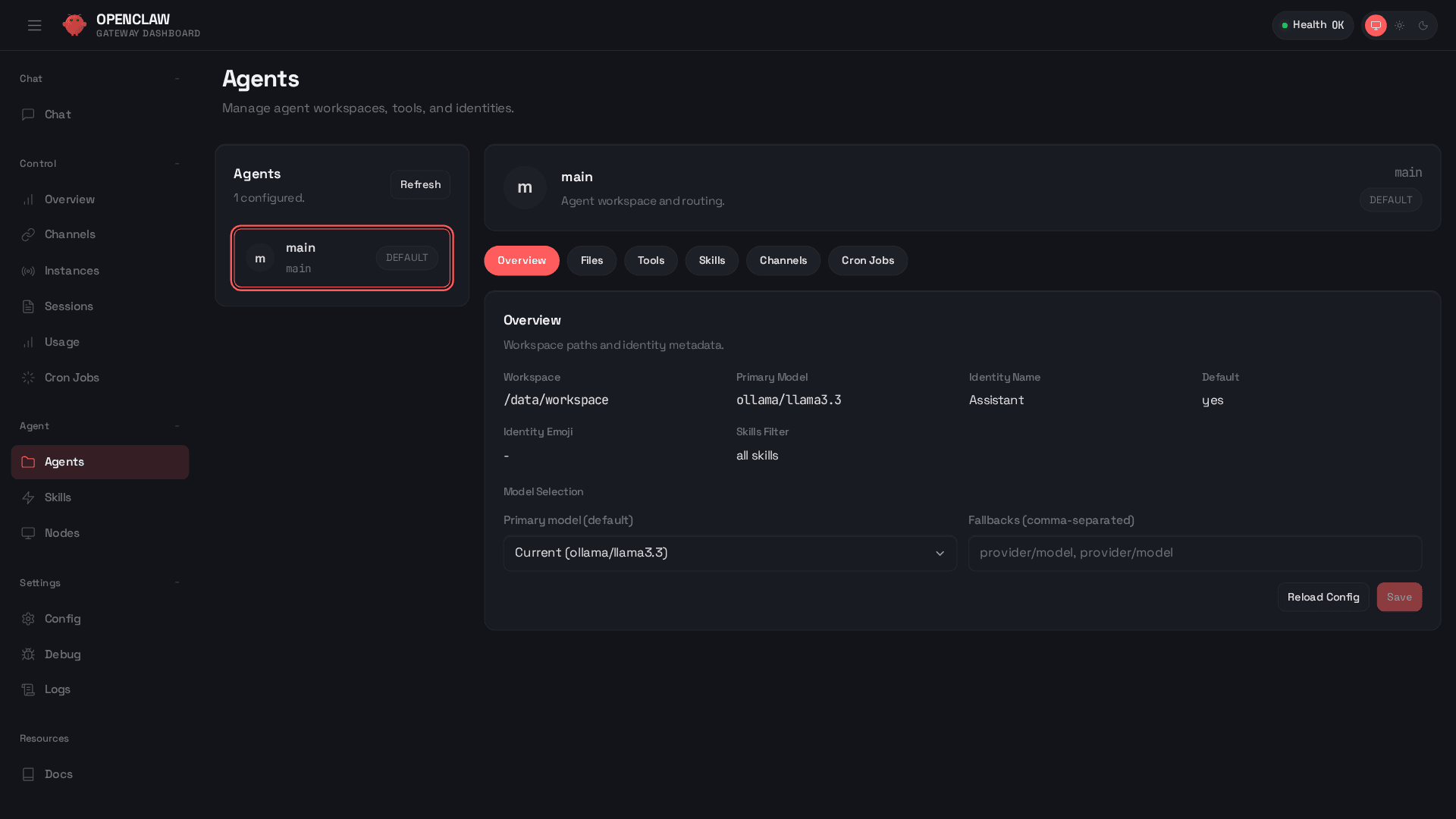
OpenClaw
Pick from 20+ AI providers
Choose the right model provider for each job from one searchable list. Switch from a fast, low-cost model for everyday chat to a stronger one for coding without reinstalling anything. You only pay your provider for the tokens you actually use.

Get started now
OpenClaw on your VPS in minutes — no complicated setup.
Backups & snapshots
With ZapX Pass, your VPS stays restorable.
ZapX Pass unlocks snapshots for quick rollback, Restore, manual Backups, and longer retention for daily Backups.
Backups with ZapX Pass
SECURED- Manual Backups
- Keep daily Backups longer
Snapshots with ZapX Pass
CAPTURED- Snapshot before deployment
- Jump back immediately
- Snapshot with RAM
More control with ZapX Passextra storage, restore, ZapX Pass perks, and Lifetime VPS without activity checks
Reviews
What customers say about ZAP-Hosting
Real feedback on support and setup.

Great Service & User Experience
I had applied for partnership at ZAPX and the process and user panel is absolutely fire and very much friendly. Apart from that i have been using their VPS machine for quite a while and it has been great with almost no downtime.

 ZAP-HostingReply

great prices, good specs
the interface was great, migration was flawless and the interface is very user friendly. support team was very helpful aswell
 ZAP-HostingReply
I've been with them for a few years
I've been with them for a few years, and they're one of the best. The lifetime servers have really helped me, and now they've added auto-backup. 10/10!
 ZAP-HostingReply

FAQ
Frequently asked questions about OpenClaw
Answers to the most important questions before you start.
How do I get OpenClaw running on a ZAP-Hosting VPS?
Order a VPS, open the One-Click Apps section in your panel and pick OpenClaw from the Coolify marketplace. The Docker-based deployment runs with one click. Then add your AI provider's API key and connect a chat app such as Telegram, WhatsApp, Discord or Slack. Read the One-Click Apps guide
- Choose a VPS package and location
- Deploy OpenClaw from the Coolify marketplace
- Add your API key and connect a chat app
Is OpenClaw free, and how much does running it cost in total?
OpenClaw itself is open source and free to use. Your total cost has two parts: the VPS package, with live prices shown in the packages above, and whatever your AI provider charges for the tokens your agent uses. There are no extra license fees for the software.
- Software: open source
- VPS: live price from the shop
- AI usage: billed by your provider
Which VPS package should I choose for OpenClaw?
An agent that only chats and calls cloud AI APIs runs well on an entry package. Browser automation needs noticeably more RAM, and local models need far more CPU and RAM. Packages scale by CPU, RAM and storage, so you can start small and move to a bigger package when your agent needs it.
- Text-only agent: entry package
- Browser automation: more RAM
- Local models: much more CPU and RAM
Are Backups and DDoS protection included?
Yes. Every VPS includes a daily automatic Backup, with or without the ZapX Pass. Custom and manual Backups, snapshots, Backup management and restores are available with the ZapX Pass. DDoS protection comes standard with every VPS. How Backups work
Is it safe to run OpenClaw on a VPS?
Yes, if you set it up with care. Your agent runs on an isolated KVM VPS, separate from your home network and personal files. Keep the gateway token secret, serve the gateway over HTTPS, close unused ports with a firewall and give the agent only the accounts and API keys it really needs. Set up your firewall
- Keep the gateway token secret
- Use HTTPS for the gateway
- Close unused ports with a firewall
Do I get full root access, and can I run other apps next to OpenClaw?
Yes. You get full root access via SSH, so you can install skills, tools and updates yourself or set up OpenClaw manually. Coolify also lets you deploy other marketplace apps, such as an automation tool or a database, on the same VPS right next to OpenClaw. Manual OpenClaw setup guide
Which locations can I choose for my OpenClaw VPS?
You choose from locations in Europe and America when you order. Pick the one closest to you or to the services your agent works with. Many users in North America start with Ashburn, Dallas or Los Angeles, and the full list is shown in the configurator.
Can I cancel my OpenClaw VPS anytime?
Yes. You pick a term when you order and can cancel anytime in your panel. The cancellation takes effect at the end of the current term, and your agent keeps running until then.
Still have questions?
Contact SupportZapX Panel
Your VPS panel at a glance
Console, live statistics and DDoS manager: everything you need to keep your OpenClaw agent healthy.
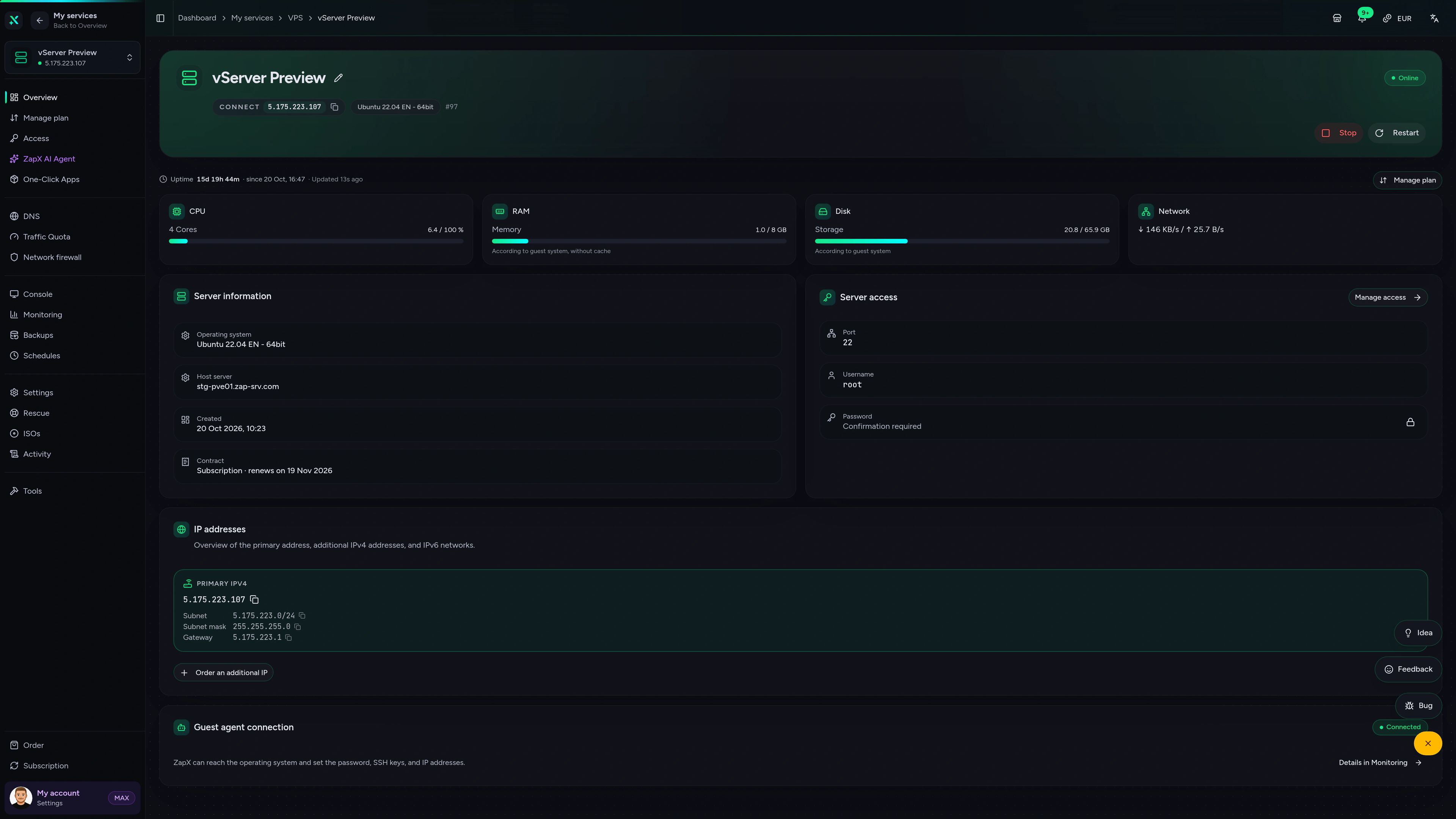
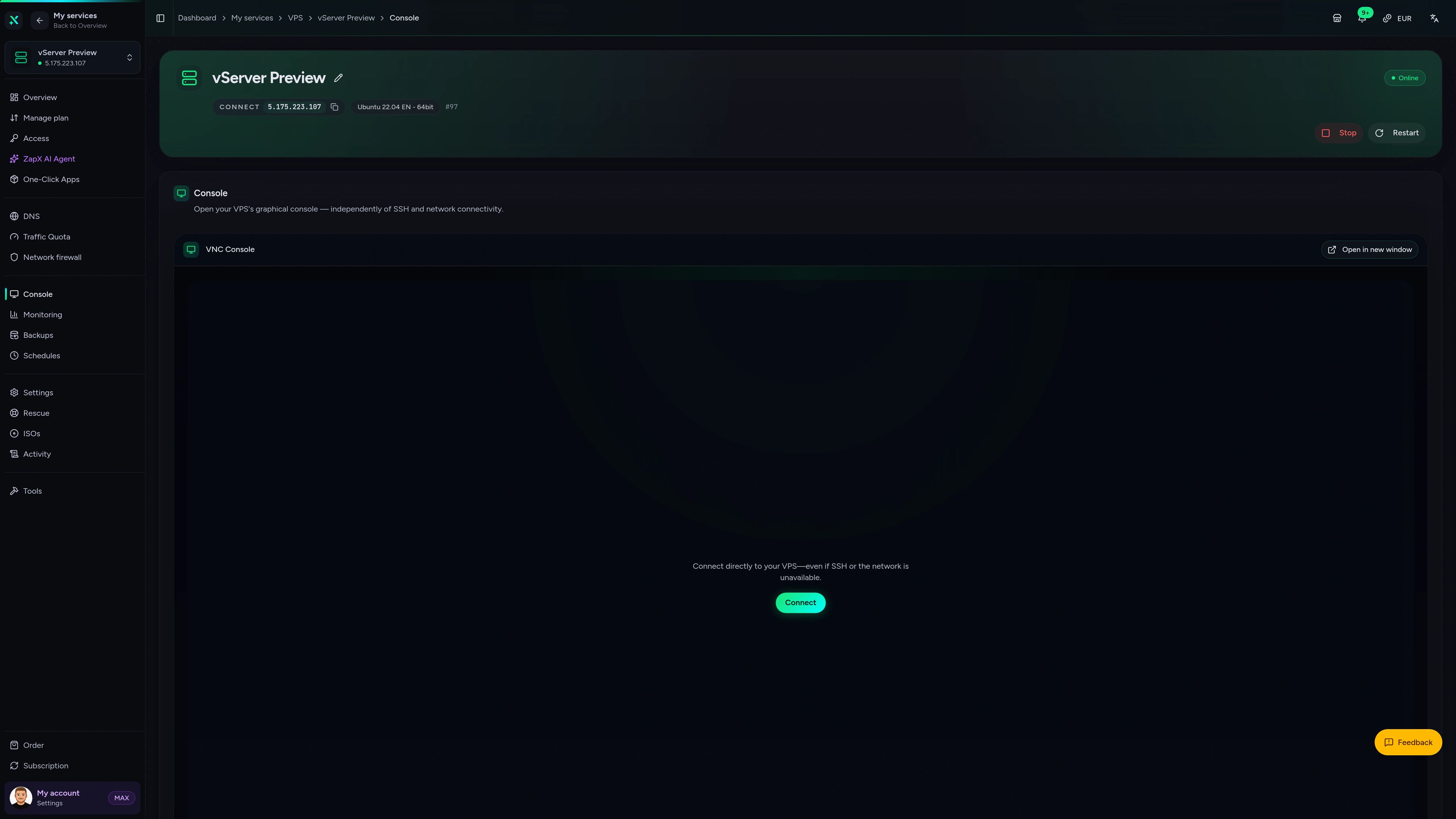
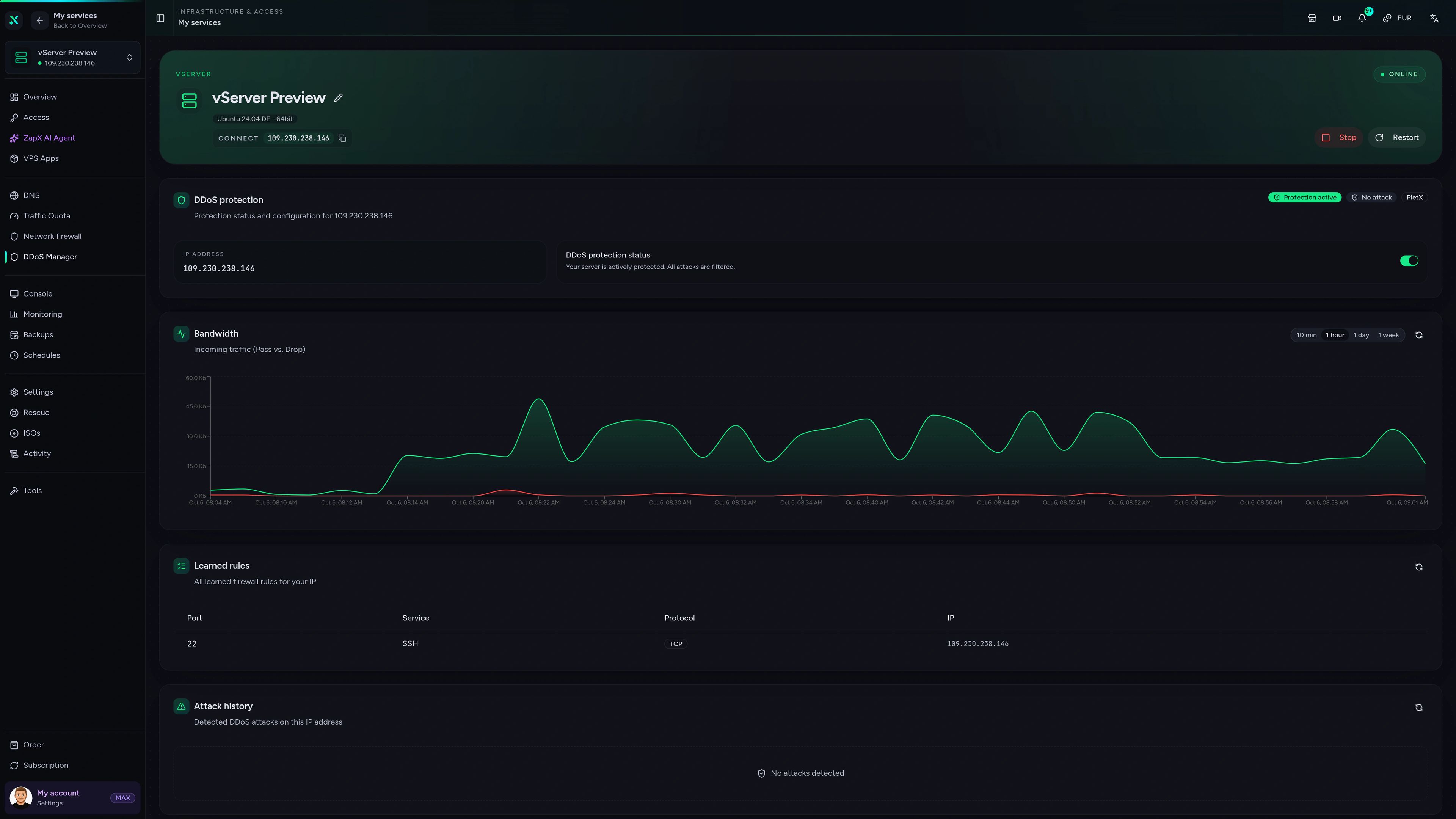
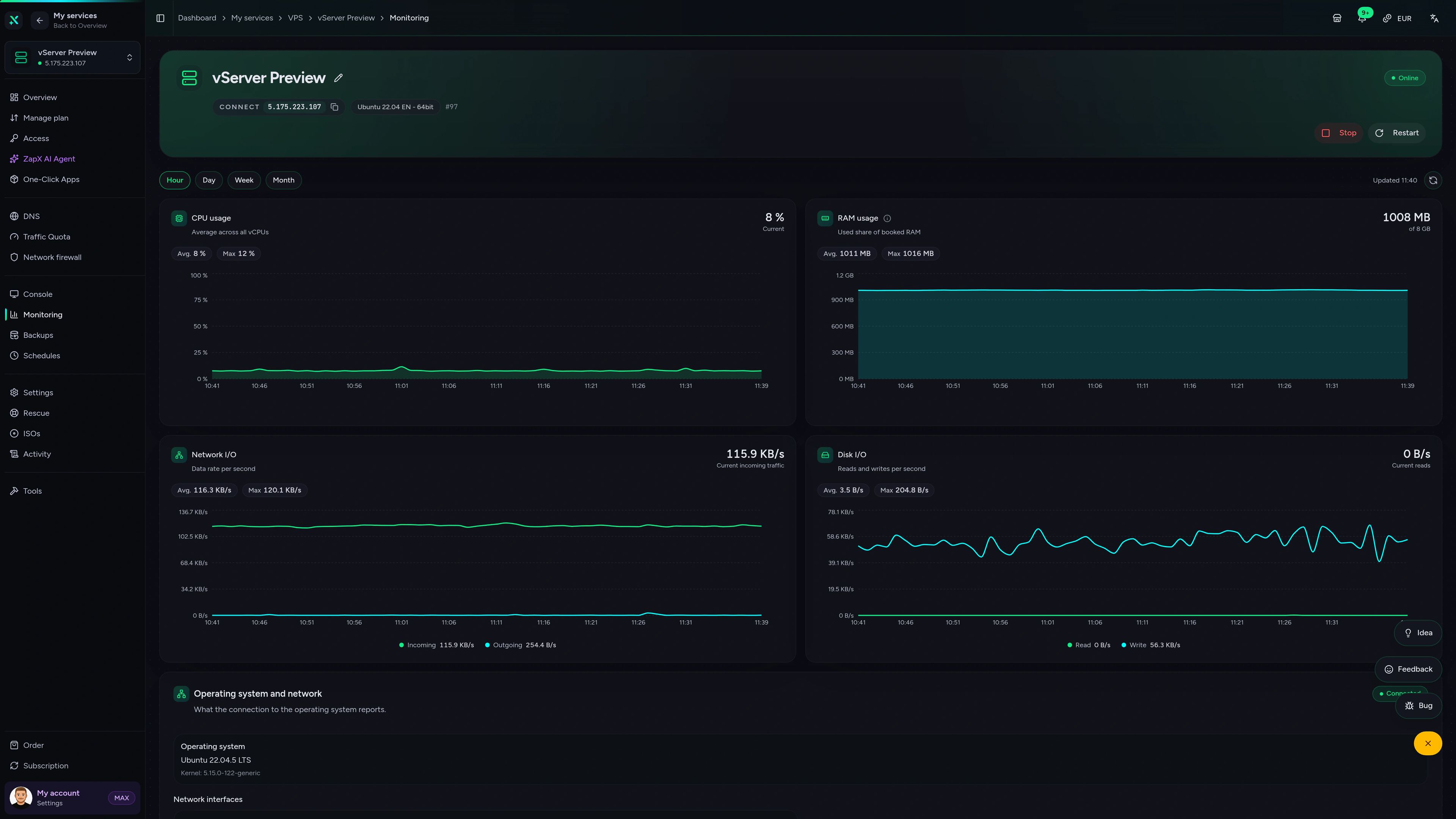
VPS – Overview
CPU, RAM, disk and network usage, server details, root access and IP addresses of your VPS at a glance.
Control your OpenClaw VPS from Claude or ChatGPT.
Connect ZAP-Hosting to Claude or ChatGPT via MCP and manage your OpenClaw VPS right in the chat.
Works with
- ChatGPT
- Claude
- Claude Code
- Cursor
- Gemini
What should I do for your server?
Ask anything …
The AI only makes changes after you approve them.
Connect in two steps


Step 1
Connect ZapX
Opens Claude with the connector already filled in. Confirm it there and sign in with your ZAP-Hosting account.
Step 2
Start a chat
Opens a new chat with this text:
I want to rent a VPS at ZAP-Hosting. Use the ZapX connector by ZAP-Hosting: ask me what will run on it, recommend CPU, RAM and location with the price and then order it with me.
The text then sits in the message box – you still press send there.
Without a ZapX Pass you get status, start/stop and, except in ChatGPT, advice and ordering. Files, console and Backups come with a ZapX Pass. Your account is created when you connect.
Get answers before you change your OpenClaw setup
Stuck on a gateway error or unsure which package fits? The ZapX AI Agent explains logs, suggests next steps and points you to the right settings — you decide what to apply.
The ZapX AI Agent comes with the ZapX Pass, along with custom Backups and snapshots for your VPS.
Learn about the ZapX PassZapX AI Agent
panel.zap-hosting.com
Performance
Fast CPU and disk mean OpenClaw starts browser tasks quickly and keeps answering in chat while scheduled jobs run in the background.
High-performance VPS, CPU model depends on the location
Typical VPS plans without a published host CPU
confirmed 2026-07-01
Use cases
How people put OpenClaw to work
From a personal assistant that sends morning briefings to a team helper in Slack — here's how an always-on agent fits into everyday work.
Ready to deploy?
Get your OpenClaw agent online today.
ZapX appComing soon
Your OpenClaw VPS in your pocket
Check the status of your OpenClaw VPS and restart it from your phone when your agent needs attention, no laptop required.

Also available
We also offer the following apps.
WireGuard, Coolify, monitoring, and more — one-click setup on your VPS.

Private Cloud
Nextcloud
Nextcloud is a self-hosted, open-source platform that provides file storage, collaboration, and communication tools for seamless data management.
Automatic setup

Automation
n8n
n8n is an extendable workflow automation tool.
Ready in ~2 min

VPN & Network
WireGuard Easy
The easiest way to run WireGuard VPN + Web-based Admin UI.
Ready in ~2 min

Media Server
Plex
Plex organizes video, music and photos from personal media libraries and streams them to smart TVs, streaming boxes and mobile devices.
Ready in ~2 min

Password Security
Vaultwarden
Vaultwarden is a password manager that allows you to securely store and manage your passwords.
No manual configuration

Website & Blog
WordPress with MariaDB
WordPress is open source software you can use to create a beautiful website, blog, or app.
Ready in ~2 min
Also available
WireGuard, Coolify, monitoring, and more — one-click setup on your VPS.
768
Available apps


Benefit
All apps included
The app marketplace is included with your VPS — no extra charge per installation.
Choose your apps in the configurator and get started in minutes.
Run OpenClaw 24/7 on your own VPS
No Mac mini or home PC running all night: deploy OpenClaw with one click, connect your chat apps and cancel anytime.
No setup. No risk. Online in 60 seconds.