Skip to content
Free tool

Team Generator: Draw teams & assign groups at random

Use the Team Generator to draw teams and assign groups at random: Add names, choose the number of teams or players per team, and optionally balance teams by skill. Great for LAN parties and clan scrims, or for assigning groups in a class, club, or office. Free, with no sign-up or app required—everything runs in your browser.

Built by Dimitri Heissler

Host your next event on your own Game Server.

0 players

Example result

What the Team Generator shows you

Enter names with skill ratings (1–10), choose the number of teams or team size, and enable “Balance teams by skill”. The generator distributes players so all teams have roughly equal average skill. Two examples created with the actual generator:

Example 1: 12 players across 3 teams

Input: 12 players with skill ratings of 1–9, split by “Number of teams”: 3, with “Balance teams by skill” enabled.
  • Nova, 9
  • Blitz, 8
  • Shadow, 8
  • Pixel, 7
  • Ranger, 7
  • Echo, 6
  • Frost, 5
  • Vex, 4
  • Mango, 3
  • Tiny, 3
  • Luna, 2
  • Orbit, 1

Result

Team 1

Total 21 · Avg. 5.25

  • Nova9
  • Echo6
  • Vex4
  • Luna2

Team 2

Total 21 · Avg. 5.25

  • Blitz8
  • Ranger7
  • Frost5
  • Orbit1

Team 3

Total 21 · Avg. 5.25

  • Shadow8
  • Pixel7
  • Mango3
  • Tiny3

The three teams' total skill scores are 21 / 21 / 21; the difference between the strongest and weakest team is 0.
Example 2: 7 players, maximum 4 per team

Input: 7 players with skill ratings, split by “Players per team”: 4, with “Balance teams by skill” enabled. This creates two teams of 4 and 3 players.
  • Nova, 9
  • Blitz, 8
  • Shadow, 7
  • Pixel, 6
  • Ranger, 5
  • Echo, 4
  • Frost, 2

Result

Team 1

Total 18 · Avg. 6.00

  • Shadow7
  • Pixel6
  • Ranger5

Team 2

Total 23 · Avg. 5.75

  • Nova9
  • Blitz8
  • Echo4
  • Frost2

For teams of different sizes, the generator compares averages (6.00 / 5.75), not totals (18 / 23). Otherwise, the smaller team would always be at a disadvantage.

What it looks like

The Team Generator in action

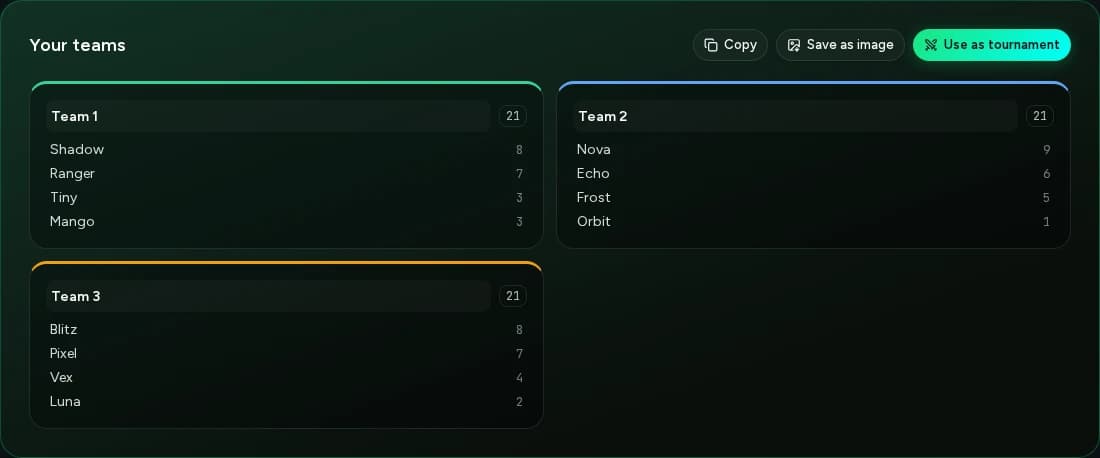
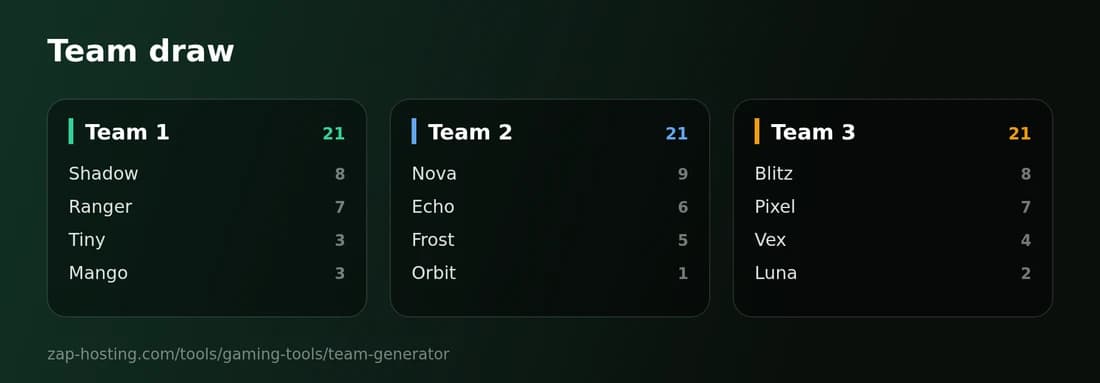
Two screenshots from the actual tool: the result right after the draw and the image you can save.

Screenshot of the Team Generator: three teams of four players, showing their skill values and equal skill totals of 21

Result after the draw

Each team shows its total skill score. You can edit team names, copy the results with one click or add the teams to a tournament.

Saved image of the team draw showing three team cards, player names and skill ratings

Image export

Use “Save as image” to get a ready-to-share PNG of the teams, ideal for posting on Discord or putting up at a LAN party.

Why this tool

Draw teams fairly instead of debating

An overview of the Team Generator’s key features.

Fair random shuffle

Each draw shuffles the list using the Fisher–Yates algorithm and your browser’s Web Crypto API random number generator, without modulo bias.

Balance teams by skill

Enter a skill rating from 1 to 10 after each name. The generator assigns players so the teams are equally strong on average and shows each team’s total skill rating.

Number of teams or team size

Set how many teams you want or how many players should be on each team. Up to 500 players per draw; team sizes differ by at most one person.

Edit and share

You can edit team names in the result. Copy the teams as text or save them as a PNG image for Discord, a class chat, or a noticeboard.

Go straight to the tournament

Add the drawn teams to the Tournament Generator with one click and have them compete in a knockout bracket or groups.

Runs only in the browser

No sign-up, no app. The Team Generator does not send your list to any server and stores it only in your browser’s local storage.

How it works

How to draw teams at random

Three steps to your finished teams.

Step 1

Enter names

Enter one name per line in the “Player list”, optionally with a skill rating from 1 to 10, such as “Nova, 7”. “Load example” shows you the format.

Step 2

Choose how to divide

Under “Split by”, choose either “Number of teams” or “Players per team”, set the number, and enable “Balance teams by skill” if needed.

Step 3

Draw and share

Click “Draw teams”, then use “Draw again” to reshuffle until you’re happy with the teams. You can then change team names, copy the result, save it as an image, or use it in a tournament.

Use cases

Randomly assign teams and groups: what you can use the generator for

From clan scrims to assigning classroom groups.

LAN party, clan scrim, and Discord event

For CS2 or Valorant, set “Players per team” to 5; for Rocket League, set it to 3. Skill ratings make the teams equally strong on average, and you can post the result in Discord as text or an image.

Group assignment for classes, clubs, and offices

The generator can also randomly assign students, club members, or coworkers to groups: Paste a list, choose “Number of teams” or “Players per team”, and draw. The groups are named “Team 1”, “Team 2”, and so on; you can change their names afterward.

Randomly assign tournament teams

Draw the teams and add them to the tournament generator with one click to have them compete in a knockout bracket or groups.

Who goes first? Turn order and captains

The spin wheel and random generator are better for choosing the starting order or individual captains: they pick one entry from your list instead of distributing all names across teams.

Discover more

After the draw: related tools

Tournament bracket for the drawn teams, spin wheel for choosing captains and playing order, and random name picker.

FAQ

Frequently asked questions about Team Generator

Quick answers about drawing teams, assigning groups, and ensuring a fair draw.

Yes. The Team Generator is free, and you don’t need an account or an app. It runs directly in your browser with no installation.

Add your names to the “Player list”, one per line, and under “Split by”, choose either “Number of teams” or “Players per team”. Then click “Draw teams”. With 12 names and 3 teams, you get 3 random groups of 4 people each. Use “Draw again” to reshuffle until you’re happy with the teams. This works for students, club members, and coworkers as well as players.

Enter a rating from 1 to 10 after each name, separated by a comma, semicolon, or tab (e.g., “Nova, 9”), and enable “Balance teams by skill”. The generator looks for an assignment with team skill totals as close as possible—or averages, if team sizes differ. Players without a rating count as 5. If several assignments are equally good, chance decides between them, so “Draw again” can produce different teams.

Team sizes differ by at most one person. With 11 people and 3 teams, the teams have 4, 4, and 3 people. With 17 players and 5 per team, you get four teams with 5, 4, 4, and 4 players. Chance decides which teams get the extra person.

Yes. Choose “Players per team” and set it to 2. With an odd number of people, one person will be alone on a team. If you’d rather have a team of three, choose “Number of teams” and enter half the number of people, rounded down—for 11 people, enter 5.

The list is shuffled using the Fisher–Yates algorithm. The random source is your browser’s Web Crypto API, and the draw avoids modulo bias. Without skill balancing, everyone has the same chance of landing on any team.

Not on a server: The Team Generator does not send your list anywhere. It is stored only in your browser’s local storage so it remains available after a reload. Use “Clear” to delete it.

Yes. Teams are initially named “Team 1”, “Team 2”, and so on. You can change each name in the result. The tool does not suggest team names. If a name contains prohibited terms, copying, saving an image, and creating a tournament are unavailable until you change it. You can share the result as text with “Copy”, as a PNG with “Save as image”, or in the tournament generator with “Use in tournament”.

Any more questions?

Contact Support
Planning an event?

Play on your own server

A Game Server from ZAP-Hosting gives your community custom rules, Mods and Slots—with DDoS protection and setup in 60 seconds.

4.4/5 Trustpilot32,000+ Active serversSince 2010

No setup. No risk. Online in seconds.

Flexible TermCancel anytimeOnline in 60 seconds

Looking for more tools? View all team & organization tools





