 Self-hosted Obsidian sync
Obsidian LiveSync VPS hosting.
Your own CouchDB sync server for every vault: VPS online in 60 seconds, LiveSync deployed with one click via Coolify.

Packages 1–3 of 9
Obsidian LivesyncConfigure yourself
Your project. Your setup.
No package fits? Choose your CPU, RAM and storage—you only pay for what your project actually needs.
Powerful CPUs
1 Gbit/s uplink included
up to 5 Gbit/s as an add-on
100 Gbit/s host network
Juniper Firewall
DDoS protection
 Visa
 Mastercard
 American Express
 PayPal
 Google Pay
 Apple Pay
 Klarna
 Amazon Pay
What is Obsidian LiveSync hosting?
Obsidian LiveSync on your own VPS.
Write a note on your laptop, and seconds later it is on your phone, your tablet and your work PC, without a third-party cloud in between. That is what the Self-hosted LiveSync plugin does for Obsidian: it syncs every change in your vaults in near real time through a CouchDB database, merges simple conflicts and can keep your notes end-to-end encrypted. With Obsidian LiveSync hosting, that CouchDB backend runs on your own VPS.
Setup takes one click: your VPS is online in 60 seconds, then Coolify deploys the LiveSync template in a short extra step, and you connect your first device and share the Setup URI with the others. Because the server is yours, you decide where the database lives, who gets a login and what runs next to it, from more One-Click Apps to your own tools over SSH with full root access.

Self-hosted Obsidian sync
Everything your vaults need to stay in sync.
Near real-time sync with attachments, end-to-end encryption and a browser view of your CouchDB, all on a server you control.
One-click deploy via Coolify
Your LiveSync backend runs without hand-built Docker, CouchDB or proxy setup.
Built-in setup check
Catch a misconfigured server before it breaks sync: the plugin checks your CouchDB.
Near real-time sync
A note written on your laptop shows up on your phone seconds later.
CouchDB admin in your browser
See databases, users and document counts in Fauxton whenever you need them.
Your notes stay private
Only your devices get in, protected by login, HTTPS and end-to-end encryption.
Attachments sync too
Images and PDFs in your vault reach every device along with your notes.
Locations in Europe and America
Your server. Your location.
4 data centers in Europe and America — choose the location closest to your users.
Europe

America

Inside Self-hosted LiveSync
What you can do with Obsidian LiveSync
LiveSync keeps every vault identical on desktop and mobile, resolves edit conflicts note by note and encrypts your notes before they leave your device.
Obsidian Livesync
Obsidian Livesync
Sync status at a glance
The status bar in Obsidian shows whether your vault is connected to your CouchDB, how many changes are going up or down and what is still waiting, so you see right away when a device has fallen behind.

Get started now
Obsidian Livesync on your VPS in minutes — no complicated setup.
Backups & snapshots
With ZapX Pass, your VPS stays restorable.
ZapX Pass unlocks snapshots for quick rollback, Restore, manual Backups, and longer retention for daily Backups.
Backups with ZapX Pass
SECURED- Manual Backups
- Keep daily Backups longer
Snapshots with ZapX Pass
CAPTURED- Snapshot before deployment
- Jump back immediately
- Snapshot with RAM
More control with ZapX Passextra storage, restore, Pass perks, and Lifetime VPS without activity checks
Reviews
What customers say about ZAP-Hosting
Real feedback on support and setup.




FAQ
Frequently asked questions about Obsidian Livesync
Answers to the most important questions before you start.
What is Obsidian LiveSync hosting?
It is a VPS at ZAP-Hosting on which the CouchDB backend for the Self-hosted LiveSync plugin is deployed with one click via Coolify. Your Obsidian vaults then sync through your own server instead of a third-party service, without setting up Docker, CouchDB and a reverse proxy by hand.
How do I set up Obsidian LiveSync on my VPS?
Order a VPS; it is online in 60 seconds. Then deploy Obsidian LiveSync from the One-Click Apps; Coolify needs a little extra time for the install. Install the Self-hosted LiveSync plugin in Obsidian, enter the server URL and CouchDB login on your first device, then create a Setup URI to add every other device. Full root access via SSH is included. Learn more about One-Click Apps
Which VPS package do I need for Obsidian LiveSync?
One-Click Apps on a VPS need at least 2 GB RAM, 2 CPU cores and 30 GB storage, the platform minimum for Coolify and the app. Your needs grow with the number of devices and vaults, with large attachments and with every further app on the same VPS. More storage helps as your vault and the CouchDB revisions grow. You can upgrade the package later.
- Minimum: 2 GB RAM, 2 CPU cores, 30 GB storage
- More storage for large attachments and several vaults
- Upgrade the package later
Do I need a domain and HTTPS to sync on iPhone and Android?
Yes, the Obsidian mobile apps need an HTTPS connection to your CouchDB. Pick a managed subdomain at install, on a platform domain or on your own domain whose DNS ZapX manages in your ZAP account. ZapX creates the DNS records automatically, and Coolify issues the HTTPS certificate via Let's Encrypt. Without a managed subdomain, the app only runs over HTTP without a certificate at a standard URL (http://<service>.<ip>.sslip.io).
- No A or CNAME records to set yourself
- Let's Encrypt certificate issued by Coolify
- Domains ZapX can't manage: add a DNS record by hand
How does a LiveSync VPS compare with the official Obsidian Sync?
Obsidian Sync is the Obsidian team's hosted service: your encrypted notes are stored on their servers, you pay a subscription per account, and they run and update it. With LiveSync on your VPS, the data sits on your own server at the location you choose, you pay a fixed server price and you apply updates from the panel. Use only one of the two per vault so they don't get in each other's way.
How do I keep Obsidian LiveSync up to date?
In the ZapX panel you check the installed app for updates and apply an available update with one click. As a manual alternative, you can redeploy the service in Coolify yourself. Before larger version jumps, read the Self-hosted LiveSync release notes and keep the plugin on all devices on matching versions. With the ZapX Pass you create your own Backup beforehand and restore it if something goes wrong.
Is my LiveSync server backed up?
Yes. A daily automatic Backup of your VPS, including the CouchDB, is included. With the ZapX Pass you create your own Backups and snapshots and restore earlier states yourself. On top of that, every connected device also holds your complete vault. VPS Backups in the Help Center
- Daily automatic Backup included
- Own Backups & restore with ZapX Pass
Are my notes end-to-end encrypted, and which devices can sync?
Yes, once you set a passphrase in the plugin: LiveSync encrypts your notes on the device before they go to the server, so your CouchDB only stores encrypted data. Keep the passphrase safe, because without it the data cannot be read. The plugin works in Obsidian on Windows, macOS, Linux, iOS and Android, and new devices join with the Setup URI.
Where are the VPS locations?
You choose from locations in Europe and America: Frankfurt / Eygelshoven, Ashburn, Dallas and Los Angeles. Pick the location closest to you and your devices; many North American users start with Ashburn, Dallas or Los Angeles. At every VPS location, PletX filters the server traffic to protect your VPS from DDoS attacks.
Can I cancel anytime, and what does it cost?
Yes, you can cancel anytime, and the cancellation takes effect at the end of your current term. Packages start from €7.29/month; the price depends on the package you choose, and a longer term lowers the monthly price. You pay by credit card, Apple Pay, Google Pay or PayPal, and depending on country and currency also with Klarna or Amazon Pay. Renewals and cancellations explained
Any more questions?
Contact SupportZAPX Dashboard
Your LiveSync VPS in the ZapX panel
Console, statistics and settings of your VPS in one place, right next to the Coolify service that runs Obsidian LiveSync.
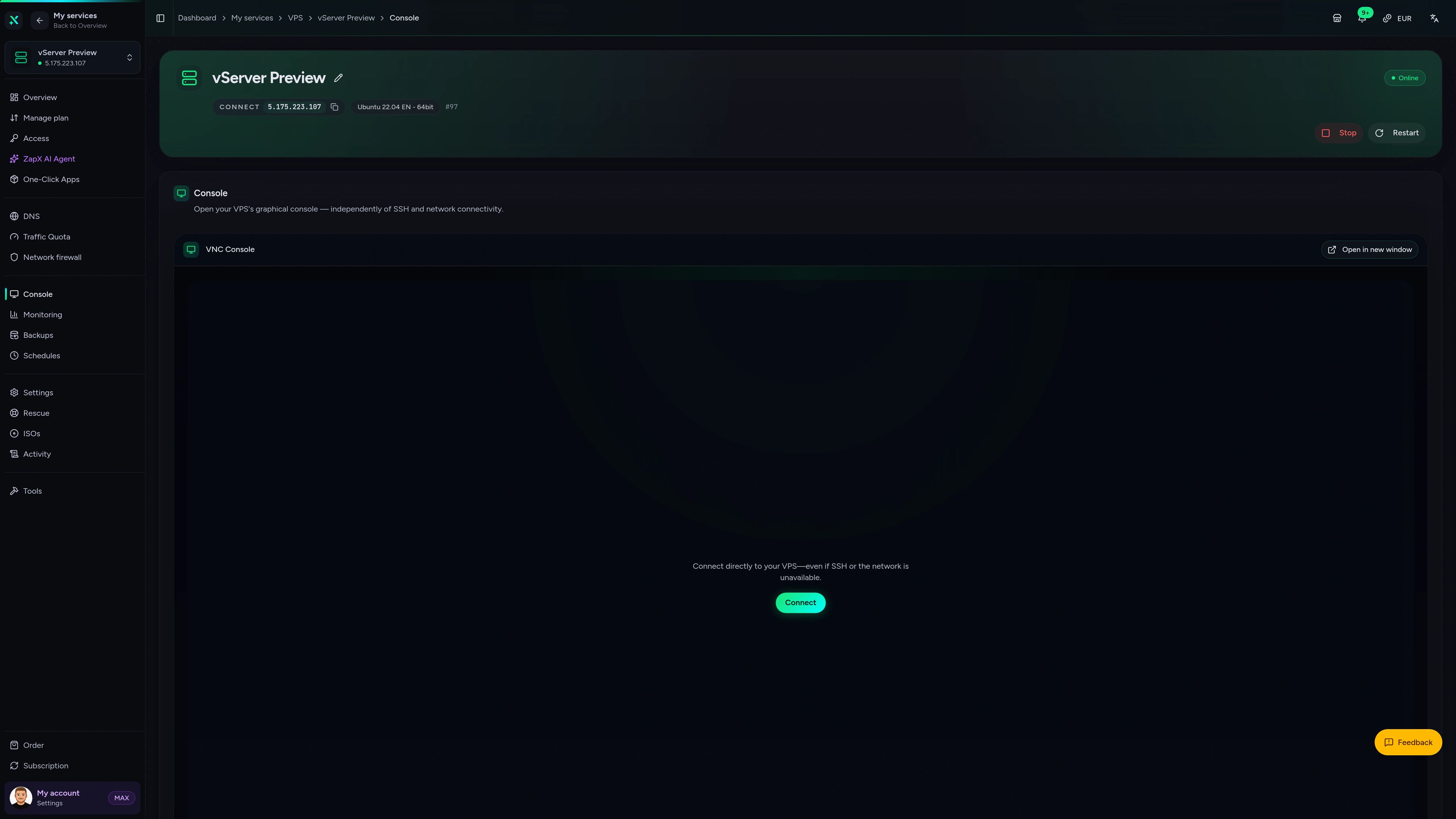
VPS Console tab
VPS Console tab
Help with your LiveSync server from the ZapX AI Agent
The ZapX AI Agent in the panel explains errors, checks your setup and suggests the next step. If you want, it runs steps for you after you confirm them in the chat.
The ZapX AI Agent is part of the ZapX Pass, together with own Backups and restores for your VPS.
Discover ZapX PassZapX AI Agent
panel.zap-hosting.com
Performance
The measured values show how fast your CouchDB answers when several devices push changes at once and how quickly a large vault with attachments loads on the first sync.
High-performance VPS, CPU model depends on the location
Typical VPS plans without a published host CPU
confirmed 2026-07-01
Use cases
Who runs their own LiveSync server
From one personal vault to a shared project wiki: these setups show how people use Self-hosted LiveSync on their own VPS.
Ready when you are
Your notes, your server, synced everywhere.
ZapX appComing soon
Your LiveSync server in the ZapX app
Check the status of your VPS, restart it or look at its resource usage from your phone with the ZapX app, wherever you are.

Also available
We also offer the following apps.
WireGuard, Coolify, monitoring, and more — one-click setup on your VPS.

Private Cloud
Nextcloud
Nextcloud is a self-hosted, open-source platform that provides file storage, collaboration, and communication tools for seamless data management.
Automatic setup

Automation
n8n
n8n is an extendable workflow automation tool.
Ready in ~2 min

VPN & Network
WireGuard Easy
The easiest way to run WireGuard VPN + Web-based Admin UI.
Ready in ~2 min

Media Server
Plex
Plex organizes video, music and photos from personal media libraries and streams them to smart TVs, streaming boxes and mobile devices.
Ready in ~2 min

Password Security
Vaultwarden
Vaultwarden is a password manager that allows you to securely store and manage your passwords.
No manual configuration

Website & Blog
WordPress with MariaDB
WordPress is open source software you can use to create a beautiful website, blog, or app.
Ready in ~2 min
Also available
WireGuard, Coolify, monitoring, and more — one-click setup on your VPS.
766
Available apps


Benefit
All apps included
The app marketplace is included with your VPS — no extra charge per installation.
Choose your apps in the configurator and get started in minutes.
Start your own Obsidian sync server
Order your VPS, deploy Obsidian LiveSync with one click and connect your first device with the Setup URI. Cancel anytime.
No setup. No risk. Online in 60 seconds.