
Node.js Hosting on Your Own VPS.
Install any Node.js version and run Express, Next.js, NestJS or your API with PM2, Nginx and Let's Encrypt. Root access, NVMe storage and Linux online in 60 seconds.
from €7.29 / month · cancel anytime
VPS packages for your Node.js apps
An Express API needs little RAM, while Next.js builds and several apps with a database need more. Upgrade later without losing data.
Plans 1–3 of 9
Configure yourself
Your project. Your setup.
No package fits? Choose CPU, RAM and storage freely and pay only for the package you put together.
Powerful CPUs
1 Gbit/s uplink included
up to 5 Gbit/s as an add-on
100 Gbit/s host network
Juniper Firewall
DDoS protection
 Visa
 Mastercard
 American Express
 PayPal
 Google Pay
 Apple Pay
 Klarna
 Amazon Pay
Why a Node.js VPS
Your Node.js app, your server, your rules
On a VPS you are root: you pick the Node.js version, process manager, web server and database yourself instead of working within the limits of a fixed hosting plan.
Any Node.js version
Install Node.js with nvm or from the NodeSource repository, even several versions side by side.
Express, Next.js, NestJS & more
Websites, REST and GraphQL APIs, WebSocket servers, Nuxt, Fastify or bots: if it runs on Node.js, it runs here.
Keeps running
PM2 or systemd keep your processes alive and restart them after a crash or reboot.
Your domain with HTTPS
Nginx or Caddy as a reverse proxy in front of your app, certificates from Let's Encrypt, IPv4 and IPv6 included.
Database on the same server
PostgreSQL, MySQL/MariaDB or Redis run on the same VPS as your app.
Deploy with Git or Coolify
Deploy with git pull and a script, or with the Coolify one-click app that rebuilds on every push.
One-click apps
Apps for your Node.js project
Deployment platform, browser-based editor, database or headless CMS: install these apps on your VPS in one click.
- CoolifyInstall Coolify as a one-click app on your VPS.View page
- code-serverInstall code-server as a one-click app on your VPS.View page
- PostgreSQLInstall PostgreSQL as a one-click app on your VPS.View page
- SupabaseInstall Supabase as a one-click app on your VPS.View page
- StrapiInstall Strapi as a one-click app on your VPS.View page
- GhostInstall Ghost as a one-click app on your VPS.View page
Web interface
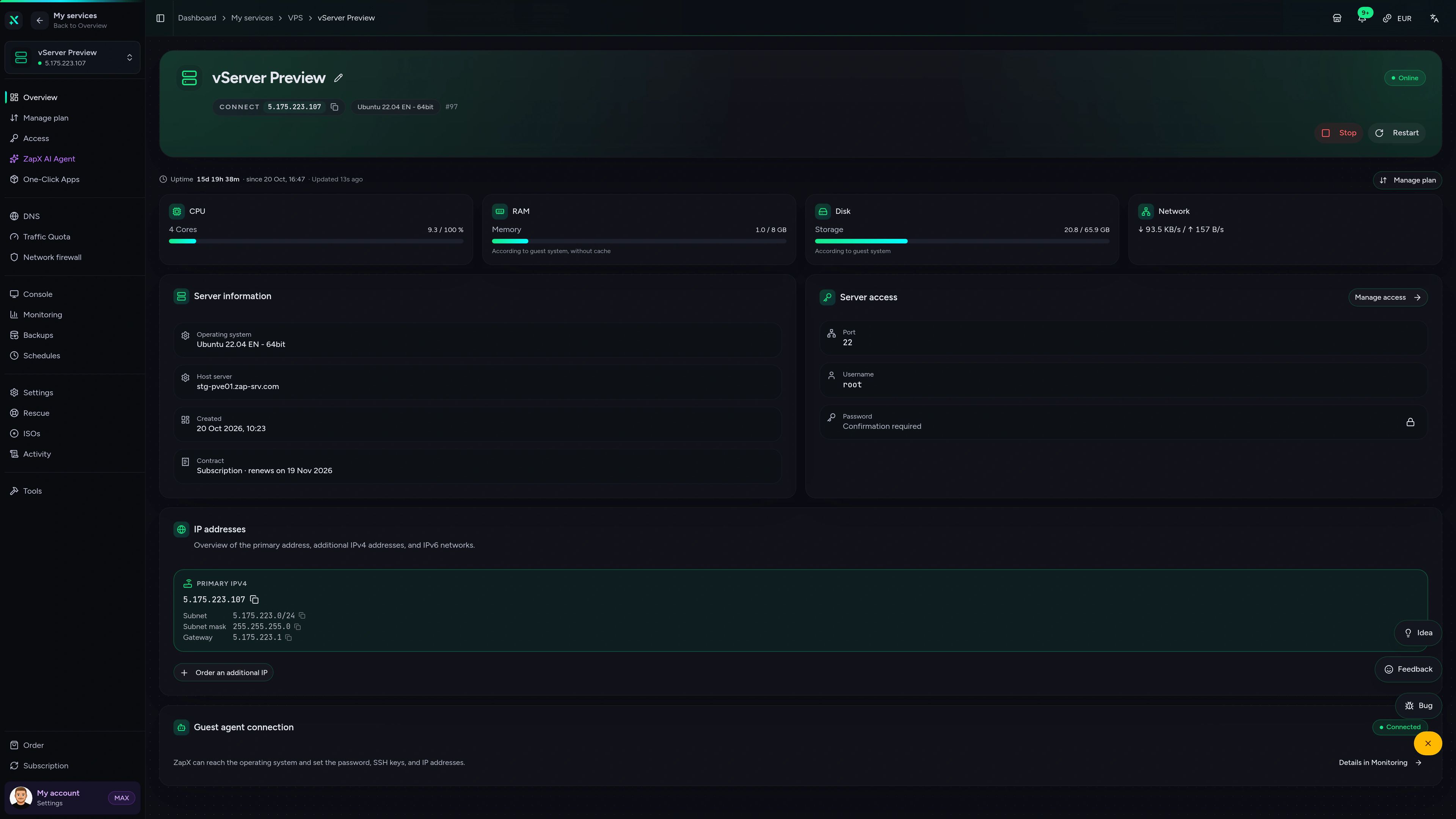
Run your VPS in the ZapX panel.
Overview, browser console, monitoring, firewall and rescue mode in one place, so you manage your VPS without juggling extra tools.
ZAP VPS #42
panel.zap-hosting.com
Live overview & resources
CPU, RAM, storage and network at a glance, plus IPs and status as soon as your VPS is up.
FAQ
Questions about Node.js hosting
Node.js versions, process managers, domains, deployment, other stacks and what you handle yourself as root.
What is Node.js hosting on a VPS?
Your own Linux server with root access, where you install Node.js and your apps yourself.
Unlike shared hosting with fixed limits, you get a complete KVM virtual machine. You install Node.js, your dependencies and services such as Nginx or a database yourself, then run websites, APIs, WebSocket servers or bots on it, as many as your package's resources allow.
Which Node.js version can I use?
Any version: you install Node.js yourself, with nvm or from the NodeSource repository.
With nvm you switch between versions and run projects on different Node.js versions on the same VPS. For server services, the NodeSource package for Ubuntu or Debian is handy because apt updates it together with your other packages. Add npm, pnpm or Yarn as you need them.
How do I keep my Node.js app running?
With PM2 or a systemd service, which restart your app after crashes and reboots.
PM2 runs Node.js processes in the background, restarts them after a crash, spreads an app across several cores in cluster mode and collects the logs. Alternatively, create a systemd unit. Either way, your app keeps running when you close your SSH session.
How do I use my own domain with HTTPS?
Put Nginx or Caddy in front of your app as a reverse proxy and get a certificate from Let's Encrypt.
Point your domain's A and AAAA records to the IPv4 and IPv6 address of your VPS. Nginx or Caddy accept requests on ports 80 and 443 and forward them to your Node.js app, WebSocket connections included. Caddy fetches the certificate automatically; with Nginx, Certbot does the job. Allow HTTP and HTTPS in the firewall in the panel.
How do I deploy my app to the VPS?
With Git directly on the server, or with the Coolify one-click app, which deploys on every git push.
The classic way: clone your repository to the VPS and run the build and a restart after each git pull, by hand, with a script or from your CI pipeline. With Coolify you connect your Git repository once; from then on Coolify builds and starts your app on every push, as a Docker container if you like, with your domain and HTTPS.
Can I also host Laravel, Ruby on Rails or other stacks?
Yes, with root access you install any runtime that runs on Linux.
Next to Node.js you can run PHP with Laravel, Ruby on Rails, Python with Django, Go or Java on the same VPS, installed directly or in Docker containers. The database to go with it, such as PostgreSQL, MySQL/MariaDB or Redis, can run on the same server.
Who takes care of updates and security?
You do: you are root and keep the system, Node.js and your packages up to date.
We provide the VPS, the network and the panel with browser console, firewall, reinstall and rescue mode. Operating system updates, SSH access, firewall rules and the security of your app are up to you. With ZapX Pass you can also create manual backups and take a snapshot before a deploy.
How much does Node.js hosting cost?
VPS packages start at €7.29 per month.
The price depends on the package, the runtime and the location. You rent for 3, 30, 90, 180 or 365 days, and longer runtimes lower the monthly price. If you run out of room, for example because of Next.js builds or more apps, upgrade to a bigger package without losing data.
Still have questions? Our support team is happy to help.
Contact SupportMore VPS pages
More VPS for developers
Python, Ubuntu, Debian, Docker, databases and bots on your own VPS.
- Python VPSDjango, Flask, FastAPI and Python scripts on your own VPS.View page
- Ubuntu VPSA VPS with Ubuntu 20.04 to 26.04 LTS and full root access.View page
- Debian VPSDebian 12 or 13 with root access, lean and stable.View page
- Bot Hosting VPSRun Telegram, WhatsApp and Python bots around the clock on your own VPS.View page
- Docker VPSRun containers and Compose stacks on your own VPS.View page
- Database VPSPostgreSQL, MySQL, MariaDB or Redis on your own VPS.View page
- All VPS plansEvery package, operating system and location on one page.View page
- Windows VPSVPS with Windows Server and Remote Desktop.View page
Your Node.js VPS, online in 60 seconds.
Pick a package with Ubuntu or Debian, install Node.js and take your app live with PM2 and Nginx or with Coolify.
Runtimes from 3 days · Cancel anytime