
Ubuntu VPS Hosting with Full Root Access.
Pick Ubuntu 20.04, 22.04, 24.04 or 26.04 LTS, connect as root via SSH and set up your server with apt, Docker or one-click apps. NVMe storage, online in 60 seconds.
from €7.29 / month · cancel anytime
VPS packages for your Ubuntu server
Choose the package for the software you plan to run, not for Ubuntu itself. Need more later? Upgrade vCores, RAM or storage without losing data.
Plans 1–3 of 9
Configure yourself
Your project. Your setup.
No package fits? Choose CPU, RAM and storage freely and pay only for the package you put together.
Powerful CPUs
1 Gbit/s uplink included
up to 5 Gbit/s as an add-on
100 Gbit/s host network
Juniper Firewall
DDoS protection
 Visa
 Mastercard
 American Express
 PayPal
 Google Pay
 Apple Pay
 Klarna
 Amazon Pay
Why an Ubuntu VPS
The Ubuntu you know, with full root access
You get a freshly installed Ubuntu and set up the server via SSH exactly the way your project needs it: web server, database, bot, containers or your own app.
Four LTS versions
Ubuntu 20.04, 22.04, 24.04 and 26.04 LTS, each as a German or English image.
Root access via SSH
Install packages with apt, configure services and edit any file: you have full control.
Online in 60 seconds
After checkout your Ubuntu VPS is ready for SSH in about 60 seconds.
Docker & snap
Docker, Docker Compose and snap packages run on your VPS just like on any Ubuntu server.
One-click apps
Install Coolify, Portainer, Nextcloud and more with a single click.
Browser console
Locked out of SSH? The browser console in the panel still gets you in, and you reinstall from there too.
One-click apps for Ubuntu
Popular apps for your Ubuntu VPS
Install these apps as one-click apps on your VPS, no manual Docker setup needed.
- CoolifyInstall Coolify as a one-click app on your VPS.View page
- PortainerInstall Portainer as a one-click app on your VPS.View page
- NextcloudInstall Nextcloud as a one-click app on your VPS.View page
- WireGuard EasyInstall WireGuard Easy as a one-click app on your VPS.View page
- Uptime KumaInstall Uptime Kuma as a one-click app on your VPS.View page
- code-serverInstall code-server as a one-click app on your VPS.View page
Operating systems
Windows VPS, Linux VPS or
your own ISO
Select Debian, Ubuntu or Windows Server when you order, and reinstall from the panel whenever you need a clean system. Everything else boots from your own ISO.
 Windows VPS
Web interface
Run your VPS in the ZapX panel.
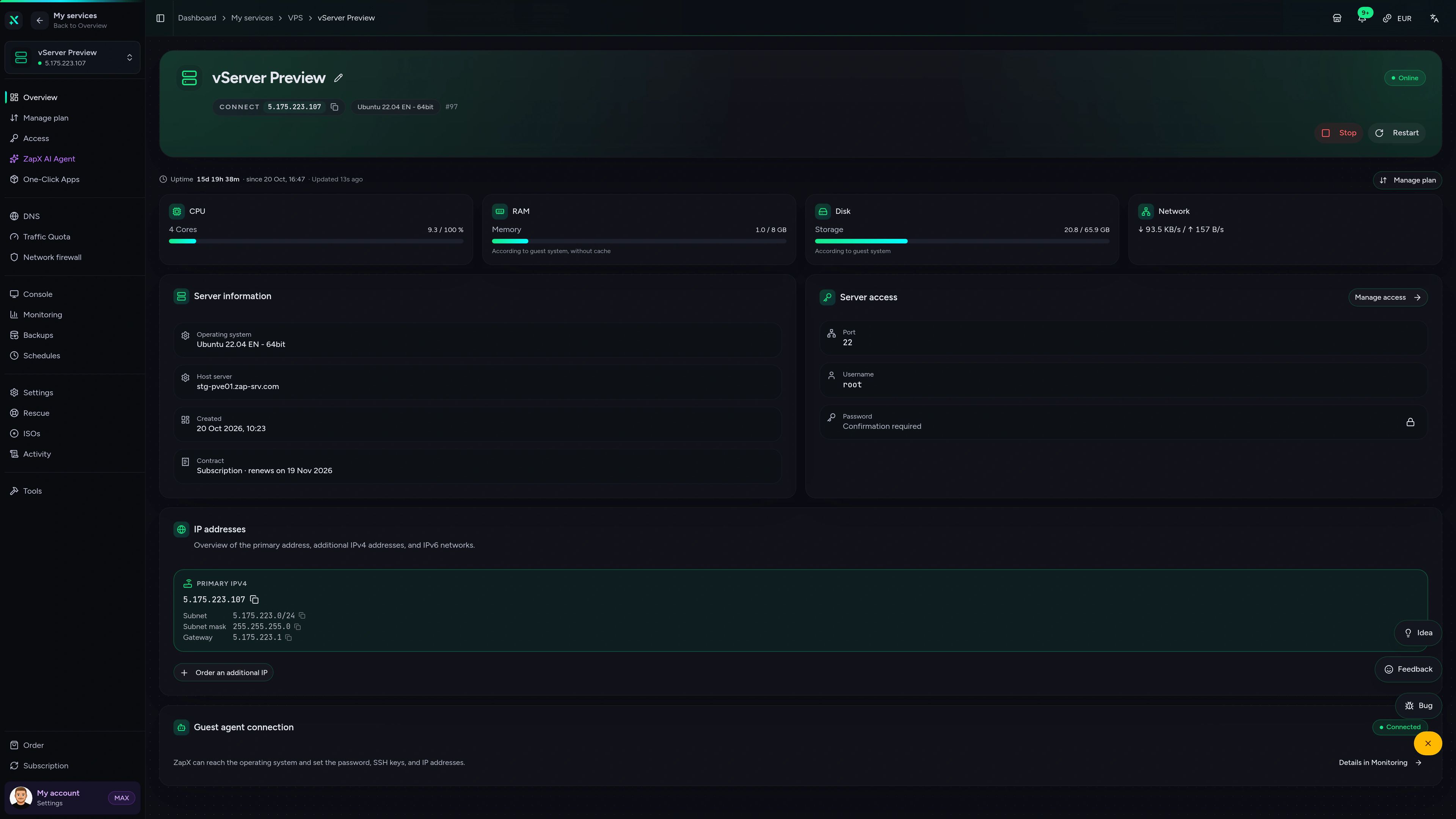
Overview, browser console, monitoring, firewall and rescue mode in one place, so you manage your VPS without juggling extra tools.
ZAP VPS #42
panel.zap-hosting.com
Live overview & resources
CPU, RAM, storage and network at a glance, plus IPs and status as soon as your VPS is up.
 DDoS protection included
PletX premium DDoS protection
for your VPS.
A VPS with DDoS protection built in, not sold as an add-on. PletX filters server traffic with dynamic rules that adapt to how your VPS is used, at Frankfurt / Eygelshoven, Ashburn, Dallas and Los Angeles, at no extra cost.
Partner
PletX
Dynamic filter rules that follow the traffic profile of your VPS.
Included
No extra cost
Active at Frankfurt / Eygelshoven, Ashburn, Dallas and Los Angeles, no add-on to book.
Capacity
Up to 4 Tbit/s
Filtering capacity via Frankfurt and Amsterdam, built for large attacks.
FAQ
Questions about Ubuntu VPS hosting
Ubuntu versions, reinstalling, Docker, package sizing and what you manage yourself.
What is an Ubuntu VPS?
A VPS with Ubuntu as its operating system, where you set everything up yourself as root via SSH.
Your VPS runs on KVM with NVMe storage, its own IPv4 and IPv6 address and Ubuntu as the operating system. You connect via SSH as root, install packages with apt and run web servers, databases, bots or containers. If SSH is not reachable, the browser console in the panel still works.
Which Ubuntu versions can I choose?
Ubuntu 20.04, 22.04, 24.04 and 26.04 LTS, each as a German or English image.
You pick the version at checkout. Besides Ubuntu you can choose Debian 12 and 13 or Windows Server, and in the panel you can also upload your own ISO.
Which Ubuntu version should I use?
For new projects, the newest LTS version, currently Ubuntu 26.04 LTS.
LTS versions get security updates from Canonical over a long period. Older versions such as 20.04 or 22.04 make sense when your software requires exactly that version; check Canonical's release schedule to see how long a version still receives updates.
Can I switch or reinstall the operating system later?
Yes, in the panel you reinstall Ubuntu or switch to another operating system.
A reinstall wipes all data on the VPS, so save your files and databases first; with ZapX Pass you can also create a manual backup or a snapshot. Alternatively you upgrade within Ubuntu to the next release yourself with do-release-upgrade.
Do Docker, snap and one-click apps work?
Yes, you install Docker via apt or snap, or set up one-click apps in the panel.
With root access you decide which packages from apt and the Snap Store you use. Alternatively you install one-click apps such as Coolify, Portainer, Nextcloud, WireGuard Easy, Uptime Kuma or code-server right on your Ubuntu VPS.
Is the Ubuntu VPS managed?
No, you manage the server yourself and get full root access for it.
Updates, the system configuration and the security of your applications are up to you; install security updates with apt or automate them with unattended-upgrades. In the panel you have firewall rules, the browser console and a rescue mode, and PletX DDoS protection is included at every VPS location.
Which package do I need?
That depends on the software you run, not on Ubuntu itself.
A web server, a bot or a small monitoring tool often fits a small package. Databases, several Docker containers or apps like Nextcloud need more RAM and storage. You can upgrade later without losing data; vCores and RAM can also be scaled down again, storage only up.
How much does an Ubuntu VPS cost?
VPS packages start at €7.29 per month.
The price depends on the package, the runtime and the location. You rent for 3, 30, 90, 180 or 365 days, and longer runtimes lower the monthly price; the US locations have regional pricing. Cancel anytime.
Still have questions? Our support team is happy to help.
Contact SupportMore VPS pages
More VPS for your Linux project
Debian, Node.js, Python, DDoS protection and root servers: more pages around your Linux VPS.
- Debian VPSDebian 12 or 13 with root access, lean and stable.View page
- Node.js VPSNode.js apps, APIs and Next.js with root access on your own VPS.View page
- Python VPSDjango, Flask, FastAPI and Python scripts on your own VPS.View page
- DDoS protected VPSAlways-on PletX filtering with up to 4 Tbit/s at every VPS location.View page
- Root server hostingFull root access to your own virtual server.View page
- Docker VPSRun containers and Compose stacks on your own VPS.View page
- All VPS plansEvery package, operating system and location on one page.View page
Your Ubuntu VPS, online in 60 seconds.
Pick a package, choose Ubuntu 24.04 or 26.04 LTS and connect as root via SSH.
Runtimes from 3 days · Cancel anytime