

VPS plan
ZAP Spark
€7.29/ 30 days
- 4 GB RAM
- 2 CPU
- 60 GB NVMe
- 1 Gbit/s Uplink
You decide which services we may enable for analytics, personalization, and external content.
We use cookies and similar technologies on our website to personalize content, embed external media, and better understand how individual areas are used.
Necessary cookies
These entries support essential functions such as security, stability, and form processing.
Optional sections
Your data may be processed with your consent or on the basis of legitimate interests. In the cookie settings, you can reject or explicitly allow each optional category.
Some services process personal data in third countries. By consenting, you also agree to this transfer. You can find more information in our Privacy Policy.
You can reopen and change your selection at any time. · 1.0.2
 Metabase · one-click Coolify deploy
Deploy Metabase in 1 click via Coolify on your own VPS: root access, NVMe storage, DDoS protection, Europe & America locations.
Packages 1–3 of 9
MetabaseConfigure yourself
No package fits? Choose your CPU, RAM and storage—you only pay for what your project actually needs.
Powerful CPUs
100 Gbit/s host network
Juniper Firewall
DDoS protection
 Visa
 Mastercard
 American Express
 PayPal
 Google Pay
 Apple Pay
 Klarna
 Amazon Pay
What is Metabase?
Metabase turns the data in your databases into charts, dashboards and answers that everyone on your team can read, without waiting for an analyst to write SQL. Pick a table, add a filter, and you see revenue by month or signups by channel right away. With Metabase hosting on your own VPS, you deploy the open-source edition in one click from the Coolify app marketplace. The setup wizard opens in your browser as soon as the deploy finishes.
Because the VPS is yours, you decide where Metabase and its PostgreSQL application database live, who can reach them and which data sources they query. Full root access lets you add your own domain, run another database next to Metabase, pin a version before upgrading or connect over SSH to read the logs. Your dashboards, saved questions and query results stay on a server you control instead of on a shared platform.

Metabase features
Build dashboards without SQL, switch to the SQL editor when you need to, and send alerts or scheduled reports by email and Slack, all from your own Metabase.
Metabase and its application database go live together, ready for the setup wizard.
Your whole team sees KPIs as clear charts instead of raw query output.
Analysts write native queries and see the results as tables or charts.
Query production databases and warehouses side by side from one Metabase.
Colleagues find existing dashboards and saved questions instead of rebuilding them.
You hear about a drop in signups before anyone opens the dashboard.
Locations in Europe and America
4 data centers in Europe and America — choose the location closest to your users.

Inside Metabase
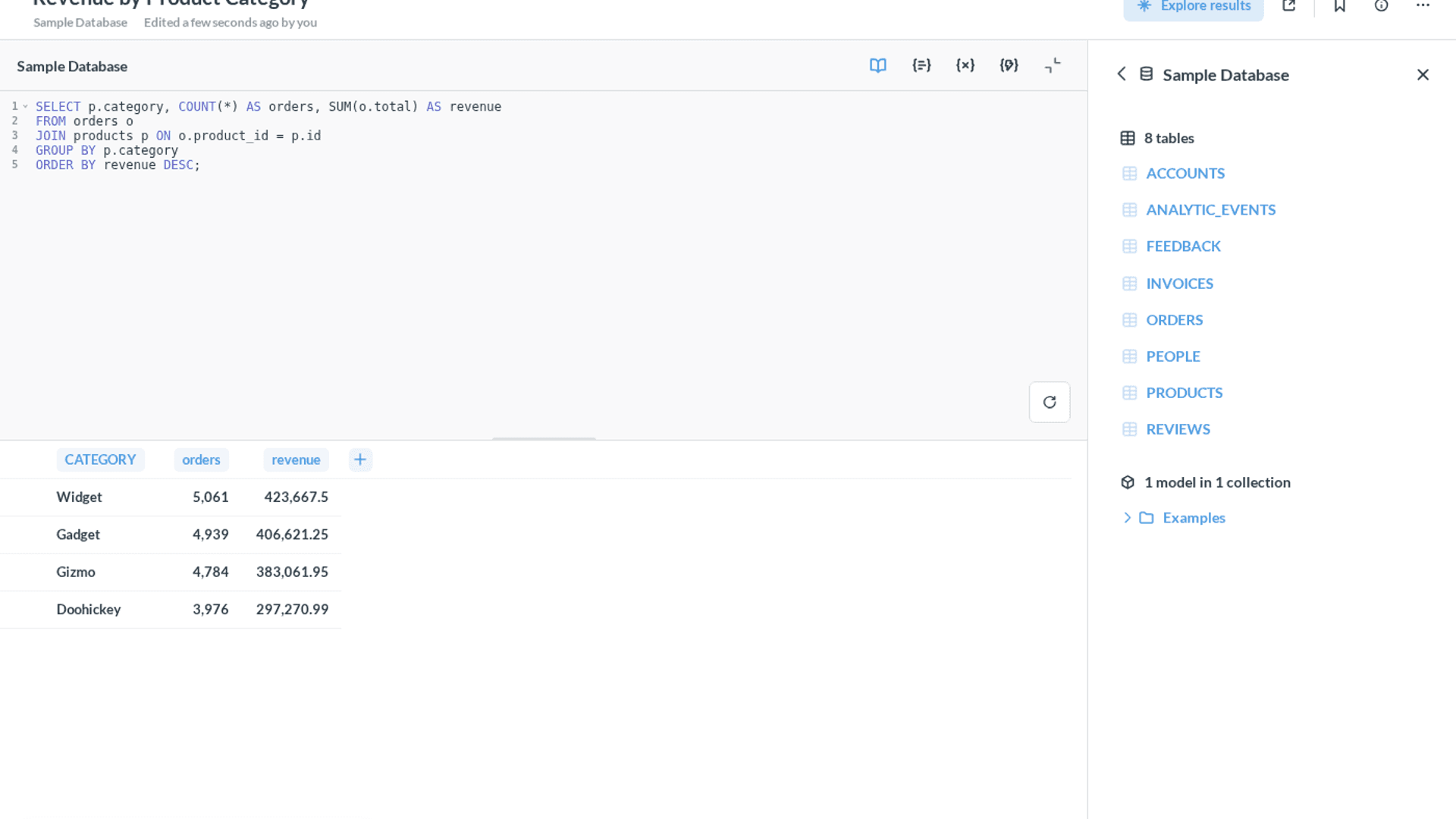
Build questions without SQL or write native queries, then turn them into interactive dashboards, alerts and scheduled reports your whole team can use.
Metabase
Metabase
Native SQL editor
Write queries directly against your connected databases in an editor with line numbers, syntax highlighting and autocomplete. Run the query, check the result table, switch it to a chart and save it as a question your team can reuse.
Get started now
Metabase on your VPS in minutes — no complicated setup.
Backups & snapshots
Snapshots let you roll back quickly. ZapX Pass unlocks Restore, manual Backups, and longer retention for daily Backups.
More control with ZapX Passextra storage, restore, Pass perks, and Lifetime VPS without activity checks
Reviews
Real feedback on support and setup.
FAQ
Answers to the most important questions before you start.
It's the open-source Metabase BI tool running on your own VPS. You deploy it in one click from the Coolify app marketplace, keep full root access and decide which databases it connects to. Your dashboards, saved questions and user accounts stay on a server you control, and a daily automatic Backup is included.
Order a VPS, open the one-click app installer for your VPS and deploy Metabase from the Coolify marketplace. Coolify pulls the Metabase image, starts it together with its application database and gives you a URL. Open that URL in your browser, create the admin account in the setup wizard and add your first data source. Read the one-click app installer guide
Yes. The open-source edition of Metabase has no license fee, so with Metabase hosting you only pay for the VPS it runs on. Paid Metabase editions with extra features are licensed directly from Metabase and can run on the same VPS.
You pay a flat price based on the VPS package (RAM, CPU, storage), term and location, not per user or per dashboard. The current package prices load live from the shop in the packages section on this page. Pick the term that suits you and cancel anytime; the cancellation takes effect at the end of the term.
Metabase is a Java application, so RAM matters most, and its PostgreSQL application database runs alongside it. A smaller package usually works for a few people exploring dashboards. Choose more RAM and CPU if many colleagues work at the same time, dashboards auto-refresh or queries scan large tables. The live statistics in your dashboard show how close you are to the limits.
Metabase connects to common SQL databases and data warehouses, for example PostgreSQL, MySQL, MariaDB, SQL Server, BigQuery, Snowflake and Redshift. Databases on the same VPS or on other servers both work, as long as Metabase can reach them over the network. The Metabase documentation lists every currently supported driver.
Yes. Every VPS gets a daily automatic Backup at a fixed time set by the platform, at no extra cost. With the ZapX Pass you can view and restore these daily Backups, create manual Backups and snapshots, and manage your Backup slots and storage. Higher Pass tiers keep daily Backups longer. How Backups work in the Help Center
Yes. Point an A record of your domain to your VPS IP and enter the domain for the Metabase service in Coolify. Coolify's built-in proxy routes the traffic to Metabase and can request a Let's Encrypt certificate for HTTPS.
ZAP-Hosting runs locations in Europe and America, and you choose one when you configure your VPS. Pick the location closest to your team and your data sources so dashboards stay responsive. Teams in North America often start with Ashburn, Dallas or Los Angeles. The configurator shows every location currently available for the VPS.
Yes. You can cancel your VPS anytime in your dashboard. The cancellation takes effect at the end of your current term, and Metabase keeps running until then, so you have time to export dashboards or your application database.
Any more questions?
Contact SupportZAPX Dashboard
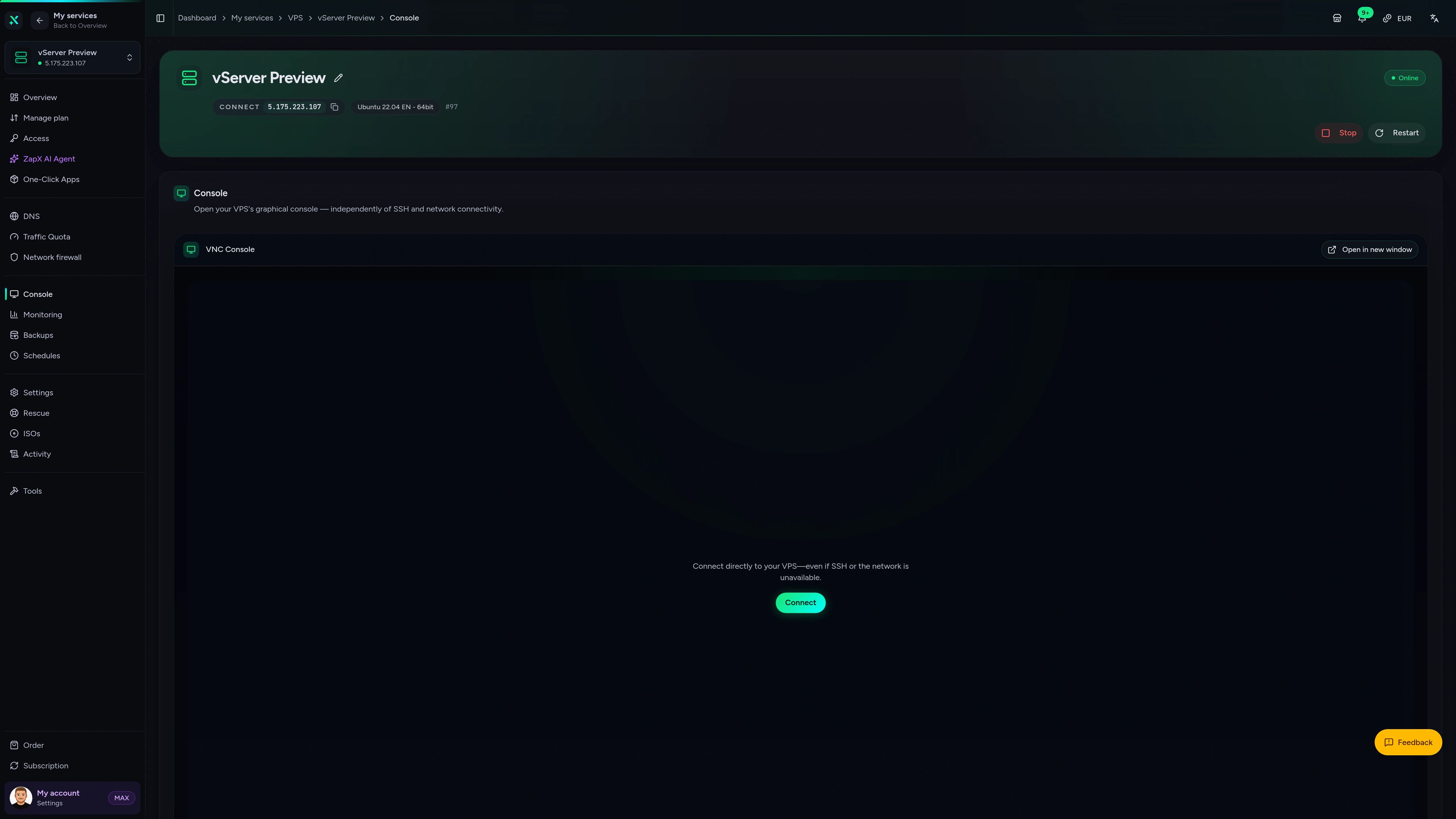
Live statistics, console access and configuration for your VPS, all in one place next to your Metabase deploy.
VPS Console tab
VPS Console tab
Get clear explanations and safe next steps for slow dashboards, data source connections or a failed update, grounded in your own VPS.
The ZapX AI Agent is part of the ZapX Pass, together with Backup restore, manual Backups and snapshots for your VPS.
Discover the ZapX PassZapX AI Agent
panel.zap-hosting.com
Performance
These numbers show how fast heavy dashboard queries return and how many colleagues can explore charts at the same time without Metabase slowing down.
High-performance VPS, CPU model depends on the location
Typical VPS plans without a published host CPU
confirmed 2026-07-01
Use cases
From startup KPI boards to weekly Slack reports, here's how teams use their own Metabase every day.
Ready when you are
Your dashboards, your server, your data.
ZapX appComing soon
Check how your Metabase VPS is doing and act quickly, even when you're away from your desk.
Also available
WireGuard, Coolify, monitoring, and more — one-click setup on your VPS.

Private Cloud
NextCloud is a self-hosted, open-source platform that provides file storage, collaboration, and communication tools for seamless data management.
Automatic setup

automation
n8n is an extendable workflow automation tool.
Ready in ~2 min

vpn
The easiest way to run WireGuard VPN + Web-based Admin UI.
Ready in ~2 min

media
Plex organizes video, music and photos from personal media libraries and streams them to smart TVs, streaming boxes and mobile devices.
Ready in ~2 min

Password Security
Vaultwarden is a password manager that allows you to securely store and manage your passwords.
No manual configuration

cms
WordPress is open source software you can use to create a beautiful website, blog, or app.
Ready in ~2 min
Also available
WireGuard, Coolify, monitoring, and more — one-click setup on your VPS.
755
Available apps
Benefit
The app marketplace is included with your VPS — no extra charge per installation.
Choose your apps in the configurator and get started in minutes.
One-click Coolify setup, full root access and a daily automatic Backup included. Your dashboards and data stay on your own server.
No setup. No risk. Online in 60 seconds.
© 2026 ZAP-Hosting GmbH
 Preferred source on Google