Game server
Rent a game server.Pick a game. Go live.
Game server hosting for 94+ games: unlimited slots, powerful server CPUs and DDoS protection, online in 60 seconds.
from €5.99/mo


 FiveM
FiveM
- 2 GB RAM
- 2 CPU
- 15 GB NVMe
txAdmin preinstalled
Server management in your browser
Database included
Already connected to txAdmin
Resources as a ZIP
Incl. server.cfg & SQL import
 Minecraft
- 2 GB RAM
- 2 CPU
- 15 GB NVMe
One-click modpacks
CurseForge, Modrinth & FTB
Paper, Fabric, Forge
Switch server software
Bedrock crossplay
Set up Geyser in one click
 RedM
RedM
- 2 GB RAM
- 2 CPU
- 15 GB NVMe
txAdmin preinstalled
Server management in your browser
Database included
Already connected to txAdmin
Switch games any time
Each game keeps its data
Up to 100 Gbit/s
Host network by location
DDoS protection
Included in the price
Powerful CPUs
Built for game server load
Online immediately
Ready in 60 seconds
More popular games
- Valheim, from €7.49, Host a Game Server
- FiveM Enhanced, from €8.79, Host a Game Server
- Garry's Mod, from €7.49, Host a Game Server
- Palworld, from €22.99, Host a Game Server
- Minecraft Bedrock Edition, from €5.99, Host a Game Server
- Satisfactory, from €18.99, Host a Game Server
- Hytale, from €10.99, Host a Game Server
- Project Zomboid, from €10.99, Host a Game Server
- BeamMP, from €5.99, Host a Game Server







Online in 3 steps
From checkout to live server.
No setup, no ticket, no waiting. Pick your game, pick your location, play.
- 01
Pick your game
94+ titles with ready-made installs.
- 02
Set your resources
Choose RAM & CPU. Unlimited slots included.
- 03
Go live
Grab the IP and port from the panel, load mods, invite your crew.




 Visa
 Mastercard
 American Express
 PayPal
 Google Pay
 Apple Pay
 Klarna
 Amazon Pay
Not in the mood for dashboards? Just tell your AI.
Connect ZapX to your AI client. In Claude, Cursor or Claude Code the AI advises you, orders your server and manages it for you afterwards – you just confirm. In ChatGPT you manage the servers you've already booked.
Step 1
Connect ZapX
Opens Claude with the connector already filled in. Confirm it there and sign in with your ZAP account.
Step 2
Start a chat
Opens a new chat with this text:
I want to rent a game server at ZAP-Hosting. Use the ZapX connector by ZAP-Hosting: ask me about the game and the number of players, recommend the right package with its price and then order it with me.
The text then sits in the message box – you still press send there.
No account yet? When connecting you sign in with your email, and your account is ready right away.
Advice and ordering (in Claude, Cursor and Claude Code), status checks and starting or stopping servers work without a ZapX Pass. For files, console, backups and more you need a Pass – the AI tells you which one.
Rent a game server on
powerful server CPUs.
Game server hosts with powerful server CPUs, enterprise NVMe and up to 100 Gbit/s per system, designed for responsive gameplay, big modpacks and full lobbies with unlimited slots.
CPU
Powerful server CPUs
Model depends on the location, with high core counts for tick rate, mods and packed maps.
RAM
Sized to your game
Pick the RAM that fits your game, mods and player count, then add more when the lobby grows.
Storage
Enterprise NVMe
Frankfurt / Eygelshoven: 100G Ceph NVMe cluster for fast worlds and Backups.
Network
Up to 100 Gbit/s
Dual 100 Gbit/s NICs on 100G Juniper switches, up to 100 Gbit/s per system depending on the host.
 Game server hosting with DDoS protection
DDoS protection for game servers — PletX keeps you joinable.
Attack traffic is stopped before it reaches your game server while clean player connections pass through. PletX runs at Frankfurt / Eygelshoven, Ashburn, Dallas and Los Angeles, at no extra cost.
Partner
PletX
Game-optimized network protection for game server traffic.
Included
No extra cost
Always on at PletX locations; all other locations include basic DDoS protection. No add-on needed.
Capacity
Up to 4 Tbit/s
Filtering via Frankfurt and Amsterdam: attack traffic out, players in.
PletX locations
EU + US
Frankfurt / Eygelshoven, Ashburn, Dallas and Los Angeles.
Want a Minecraft server and jump straight into your favorite modpack? Pick your pack and the server starts fully configured — right Java version, enough RAM, and mods preinstalled. No manual setup, no troubleshooting.

All the Mods 10 - ATM10
~500 mods, quests and a real endgame — the kitchen-sink classic.
- 2 GB RAM
- 2 CPU
- 15 GB NVMe
- Unbegrenzte Slots
Choose a pack



FiveM
Switching game
Switch games
Minecraft today. FiveM tomorrow.
Switch the game right from the panel without renting a new server. Your server stays, only the game changes.
- Switch anytime in the panel
- Data kept separate per game
- No full re-setup required
Checklist
Comparing game server hosting providers: what matters.
Six criteria to check with any provider before you rent: setup, game catalog, slots, hardware, DDoS protection and runtimes.
What you get
Unlimited player slots,no per-player pricing.
Online in 60 seconds
Automated setup, no waiting on a support ticket.
Switch games
Change the title in the panel, no new order needed.
DDoS protection
PletX at Frankfurt / Eygelshoven, Ashburn, Dallas and Los Angeles, at no extra cost.
Mods & Backups
File manager, modpacks and Backups in the panel. Backup scope depends on ZapX Pass.
Flexible runtimes
Rent for 3 days up to 1 year. You set the length.
Lifetime
Buy once instead of renting, with an active ZapX Pass.
Worldwide locations
Host close to your players in 8 locations.
Unlimited slots
Full lobbies without slot fees. You scale with RAM and CPU.
FAQ
Questions about renting a game server
Cost, slots, runtimes, locations, mods, DDoS protection, Lifetime and choosing a provider.
How much does it cost to rent a game server?
From €5.99/month, depending on game, package, term and location.
You book a package with RAM, CPU and storage, not player slots. The final price depends on the package, the runtime and the location you pick. Choose 3, 30, 90 or 180 days or 1 year; longer runtimes come with a discount.
How much does it cost to rent a Minecraft server?
Minecraft packages from €5.99/mo.
A Minecraft server is priced by package, term and location, with unlimited slots included. The Minecraft page and the shop show which package fits your player count and modpack. Want to pay once instead? Lifetime is available with ZapX Pass.
What should I look for in a game server hosting provider?
DDoS protection, panel, locations, mod support, pricing model and support matter more than price alone.
Check how the provider bills (per slot or by RAM and CPU), which runtimes exist, where the servers are, how DDoS protection works, and whether you get Backups, mod support and reachable support. ZAP-Hosting offers 94+ games, unlimited slots, the ZapX panel with mod and modpack support, Lifetime with ZapX Pass and a 24/7 AI-assisted support chat that hands off to a human, plus PletX DDoS protection at Frankfurt / Eygelshoven, Ashburn, Dallas and Los Angeles.
Do I pay per player slot?
No. Every game server comes with unlimited slots.
You book RAM, CPU and storage instead of player slots. How many players run smoothly depends on the game, mods and map. When your lobby grows, you add RAM and CPU instead of buying slot tiers.
Can I upgrade RAM or CPU later?
Yes. Move to a bigger package when your group grows.
Start small and upgrade the package once your community needs more resources; your slots stay unlimited either way. On subscription rentals, Scale with Me can adjust resources automatically. Game server: upgrade and downgrade
Can I buy a game server with a one-time payment?
Yes. With Lifetime you pay for the server once, and there's no rent for it after that.
Is it still Lifetime if you need a ZapX Pass? Yes. Lifetime servers run with an active ZapX Pass, but the Pass isn't a server subscription: it covers your whole account. Depending on the tier it covers several or unlimited Lifetime servers at once, and it also includes the ZapX AI Agent and Backup slots. Every additional Lifetime server within your slots costs you only its one-time price (except dedicated servers, which also need a Dedicated Lifetime slot). If your Pass ends or you run out of slots, your Lifetime servers are locked, but your Lifetime entitlement stays. Everything is kept fully intact for a while, after that we archive them; you can see the exact dates in the customer panel. With an active Pass and enough slots they are unlocked or restored automatically and you can start them again. Their IP address and port may change. The regular runtimes stay available if you prefer flexibility. Rent or Lifetime: which fits you?
How long can I rent a game server for, and how do I pay?
3, 30, 90 or 180 days or 1 year.
You choose the runtime at checkout, and longer runtimes are cheaper; availability can vary by game. Payments run through Stripe: credit card (Visa, Mastercard, American Express), PayPal, Google Pay, Apple Pay, Klarna or Amazon Pay, depending on your country and currency. Lifetime requires ZapX Pass. All payment methods
Can I rent a game server with locations in the United States?
Yes. 8 locations worldwide to choose from.
Pick the location closest to most of your players at checkout. ZAP-Hosting runs its own US locations in Ashburn, Dallas and Los Angeles as part of a worldwide set, and many US groups start there. Which locations are available depends on the game.
Can I install mods, modpacks and plugins?
Yes, via file manager, FTP or modpack install in the panel.
Upload mods through the browser file manager or, if you prefer, via FTP. For Minecraft, you install modpacks from CurseForge and Modrinth in one click. With ZapX Pass, a backup in the panel saves your progress before you try bigger mods. Mod support varies by game. Minecraft: installing mods and modpacks
Is my game server protected against DDoS attacks?
Yes, at no extra cost.
At Frankfurt / Eygelshoven, Ashburn, Dallas and Los Angeles, PletX filters attacks with game-specific rules, up to 4 Tbit/s via Frankfurt and Amsterdam. Partner locations such as Singapore, Sydney, London and Montreal include basic DDoS protection. PletX DDoS protection at ZAP-Hosting
How quickly is my game server online after I order?
Usually within 60 seconds.
Pick a game and check out. Installation and panel access are set up automatically, so there's no manual setup and no ticket to wait on.
Is renting a game server better than hosting one at home?
For most groups, yes. It runs 24/7 without your PC.
A home server saves the hosting fee, but it costs power and upload bandwidth, exposes your home connection to DDoS attacks and goes offline whenever your PC does. A rented game server stays online 24/7 with DDoS protection, Backups in the panel and support included.
24/7 support available
Contact SupportBuy once. Runs with an active ZapX Pass.
Lifetime is made for communities and long-running projects: one payment for the server instead of monthly rent. Lifetime servers need an active ZapX Pass, which the chart does not include. The chart shows the month from which the server price beats renting.
- Buy once, no monthly server rent (needs an active ZapX Pass)
- Pays off once you run past the break-even month
- Ideal for clans, roleplay servers and long-term modpacks
- ZapX Pass required to unlock Lifetime slots
Example: ~€16.99/mo rent vs €186.89 one-time Lifetime server price. The ZapX Pass that Lifetime requires is not included; it covers your whole account. Actual prices depend on game, package, term and location.
- Monthly rent€408
- Lifetime€187
Premium for your whole account.
ZapX Pass is an account-wide plan: ZapX AI Agent, extended Backups, Lifetime slots and Discord perks across all your services. Compare the plans and get yours in the shop.
Account-wide plan · cancel at end of term · required for Lifetime
ZapX AI Agent
Server help right in the panel, so you get to the fix faster.
Extended Backups
More Backup slots per service, plus a Backup storage limit per account depending on the tier.
Lifetime slots
Unlocks buying and running Lifetime game servers.
No activity checks
No forced logins, no lock for inactivity.
Not tied to old hardware
Your Lifetime servers can move to newer hardware.
Control servers from Discord
Status, start, restart and stop via slash commands. From the Pro Pass.
Claude, ChatGPT, Cursor & Gemini via MCP
Full MCP access: files, console and Backups from the chat.
Discord perks
Community perks and the Exclusive Supporter Chat for Pass members.
Community voices
What players say about ZAP-Hosting
Setup, support and stability, straight from the community.




ZAPX Dashboard
Run your server — no terminal needed.
Live stats, ZapX AI Agent, console and Backups in one browser tab: status and control without a terminal.
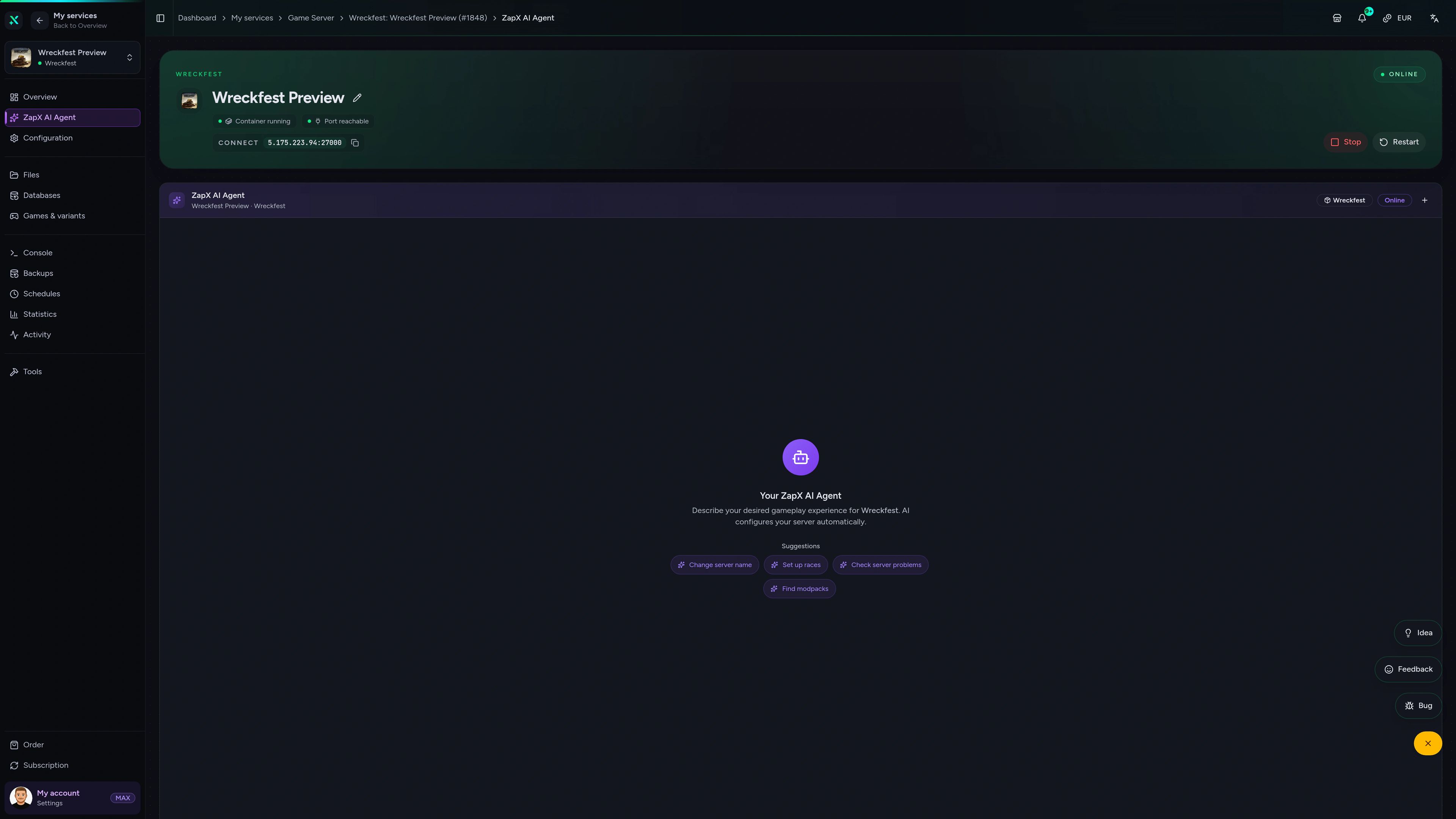
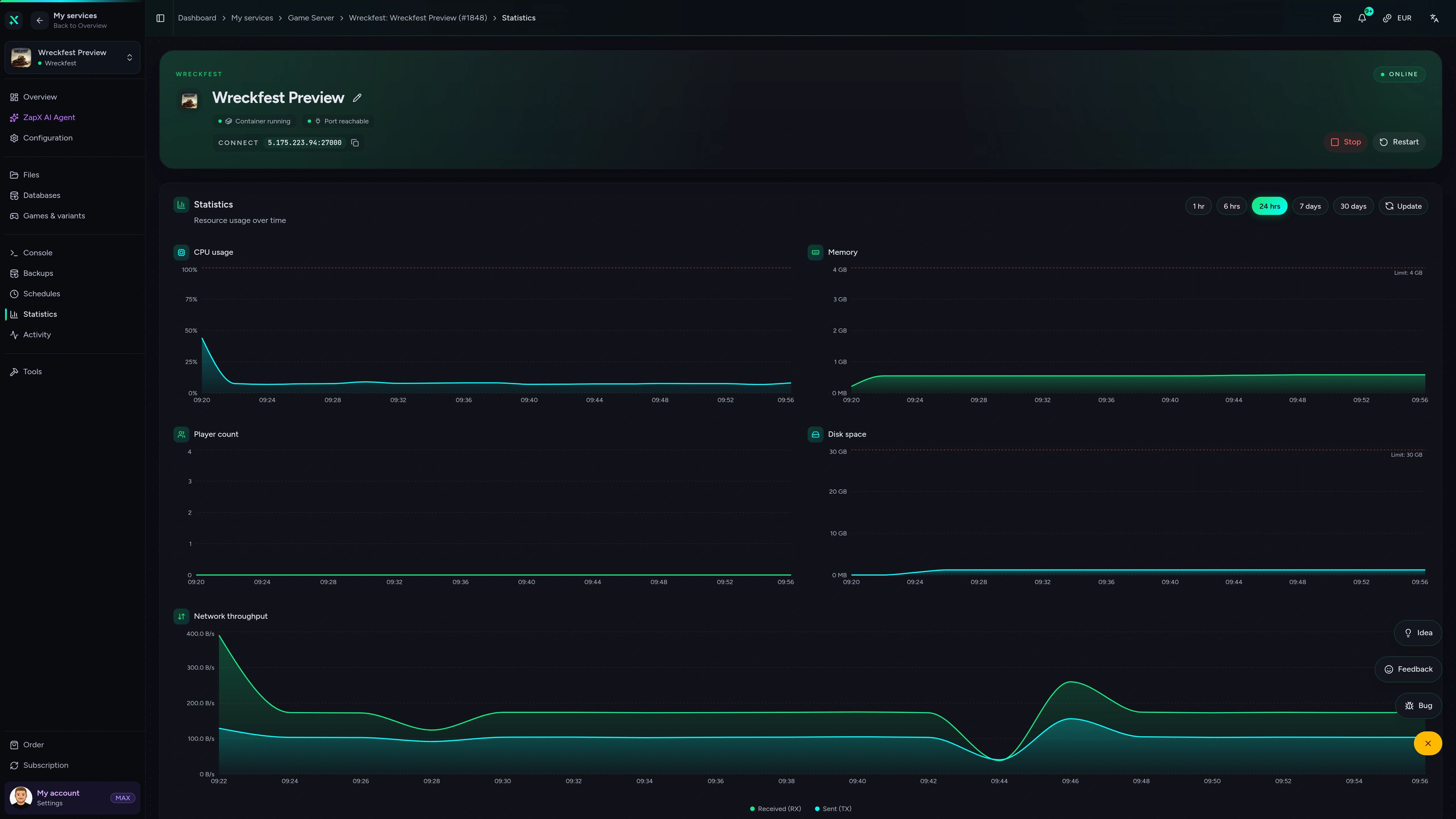
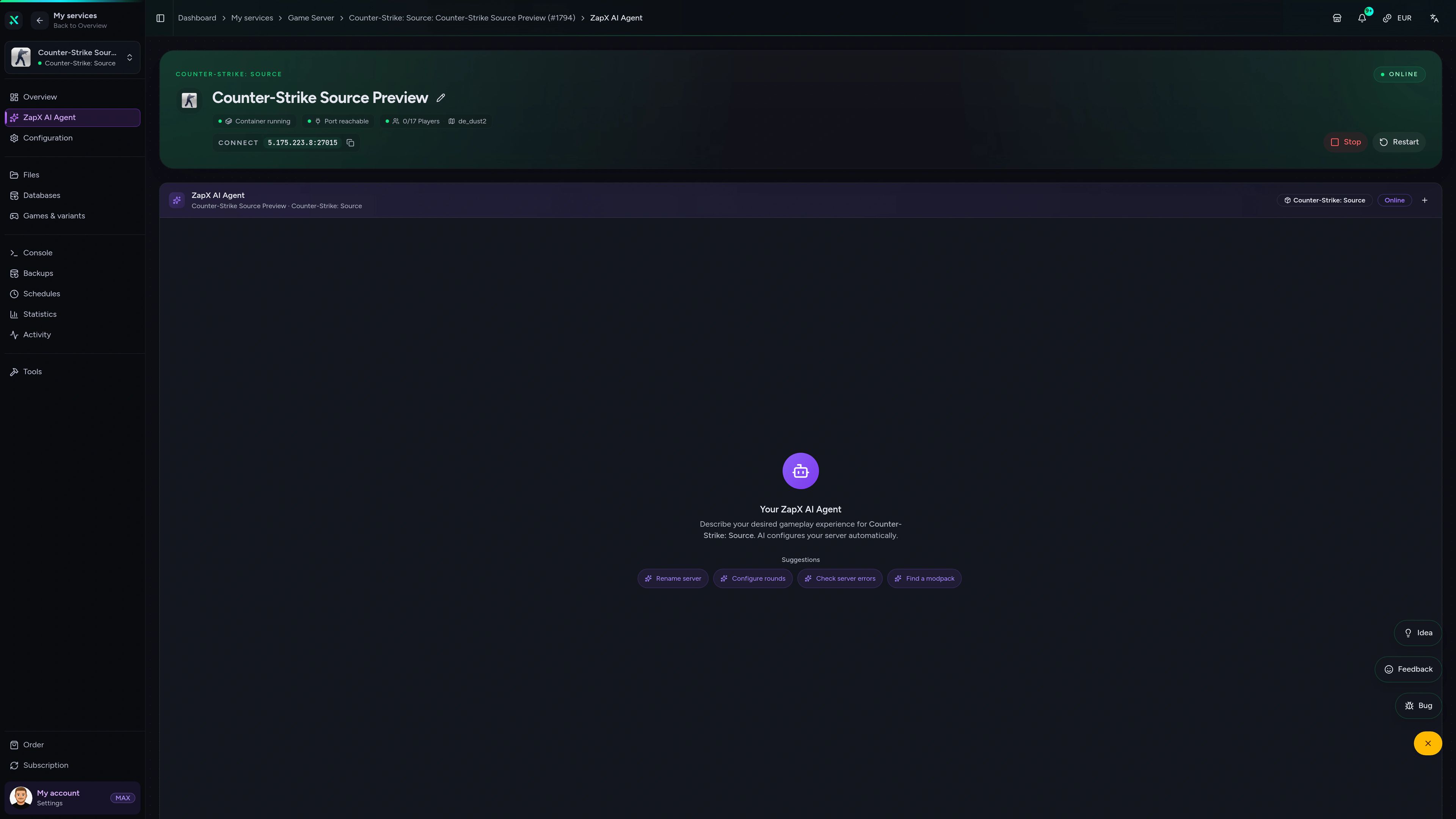
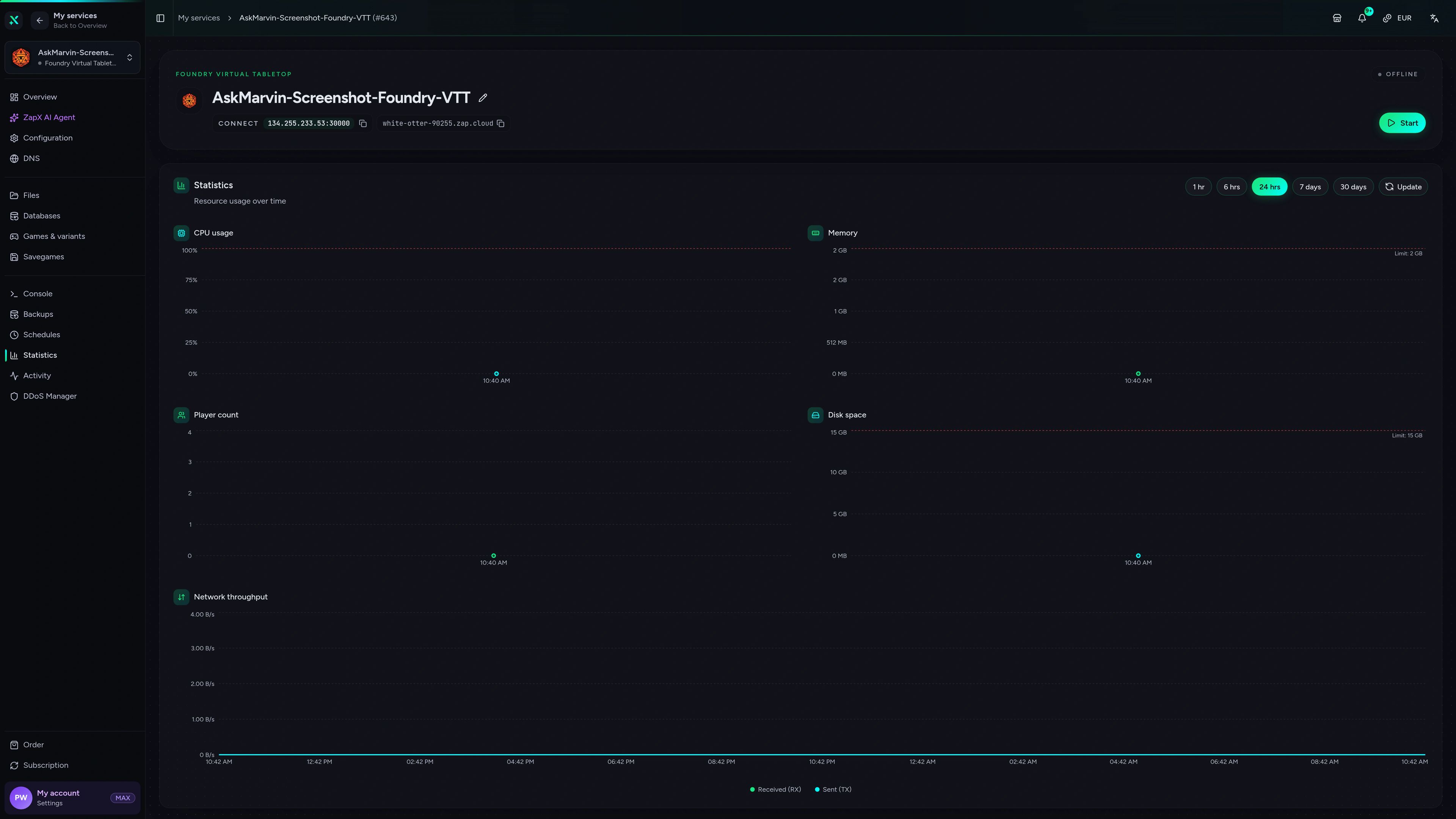
Wreckfest Game Server – ZapX AI Agent
ZapX AI Agent of the Wreckfest game server in the ZapX customer panel.
Files & mods
Mods and files right in the browser.
File manager, modpacks and Backups without needing FTP. FTP stays optional.
Manage files and folders like an FTP client
Locations
Host close to your players — worldwide.
8 locations worldwide. Pick the one closest to your community; many US groups start with Ashburn, Dallas or Los Angeles.
Europe


America


Asia-Pacific


Add-ons
A game server is rarely the whole setup.
Matching products.
Domain, TeamSpeak, VPS or dedicated: products that pair with your game server, all in the same account and panel.
Domain
from €11.90 / year
.com / .net · DNS in the panel
Domain
Game server + domain? Easy connect.
from €11.90 / year
Your crew joins via play.yourdomain.com instead of a raw IP. Set up SRV records and subdomains in the same account, so your game server and domain stay together.
- play.yourdomain.com
- SRV / subdomain
- DNS in the panel
- Same account
- Link in minutes
- Transfer supported
Good to know
Renting a game server explained.
What does it mean to rent a game server?
ZAP-Hosting game server hosting lets you rent a DDoS-protected server for your game with unlimited player slots, priced by package, term and location instead of per slot, across 94+ supported games and 8 locations worldwide.
Renting a game server gets you professional hardware, DDoS protection and a browser panel instead of a PC that has to run all night at home. Setup is automated, so your server is online in 60 seconds. Whether you need a server for one weekend or a home for a long-running community, you pick the game, the package and the location, and you can change them later.
Unlimited player slots: priced by package, term and location
Per-slot pricing makes every extra friend cost more. At ZAP-Hosting every game server has unlimited slots, and you choose RAM, CPU and storage instead. That keeps cheap game server hosting simple: start with a small package and add resources only when your community actually needs them.
Game server rental runs from 3 days to 1 year (3, 30, 90, 180 or 365 days), and longer runtimes come with a discount. A short runtime fits a weekend event or a mod test; a full year fits a clan or a roleplay community.
Renting a game server vs. hosting at home
Hosting on your own PC saves the hosting fee, but it costs power and upload bandwidth, puts your home connection in the line of DDoS attacks and takes the server offline whenever your PC is off. Updates, network setup and hardware upkeep are on you, too.
A rented game server runs 24/7 in a data center with DDoS protection, panel Backups and a 24/7 support chat included. You pay through Stripe with PayPal, credit card and other methods depending on your country, or buy once with Lifetime (ZapX Pass required).
Dedicated game server hosting: what hardware do you get?
Stable tick rates and big modpacks need CPU cores, fast storage and enough bandwidth. Every package gives your game server its own RAM and CPU allocation on hosts with powerful server CPUs.
In Frankfurt / Eygelshoven, storage runs on a 100G Ceph NVMe cluster; other locations use enterprise NVMe SSDs. Hosts connect via dual 100 Gbit/s NICs to 100G Juniper switches, up to 100 Gbit/s per system. Need a whole machine for yourself? Dedicated servers are available at Frankfurt / Eygelshoven.
Your game server hosting provider: what to look for
- Unlimited slots instead of per-slot pricing
- Clear hardware: powerful server CPUs, NVMe, up to 100 Gbit/s
- Switch games on the same server from the panel
- PletX DDoS at Frankfurt / Eygelshoven, Ashburn, Dallas and Los Angeles
- Runtimes from 3 days to 1 year, or Lifetime with ZapX Pass
- Panel with file manager, Backups and console
Ready? Rent a game server and start playing.
Pick a game, set RAM & CPU, go live within 60 seconds.
Online in 60 seconds · DDoS included · Flexible runtimes