Skip to content
Free tool

Sens Converter: convert sensitivity between games

This Sens Converter is a free mouse sensitivity converter. It converts your sensitivity between 31 games and game series, such as from CS2 to Valorant, Apex or Fortnite, and shows cm/360° and eDPI. No sign-up required; the calculation runs entirely in your browser.

Built by Dimitri Heissler

Sens converted? Get your own CS2 server.

Your sensitivity in Valorant

0.377

cm per 360°
43.3 cm
Mouse travel for a full turn
Inches per 360°
17.05 in
eDPI in Counter-Strike 2
960
eDPI in Valorant
301.7

Exact value: 0.3771

Example result

Example: What this Sens Converter shows you

Select the game you're coming from and the game you're switching to, then enter your current sensitivity and mouse DPI. You'll get the matching sensitivity for the new game, plus your mouse travel for a full turn and your eDPI. Two examples:

Example 1: From CS2 to Valorant

Input: Counter-Strike 2 to Valorant, sensitivity 1, 800 DPI

Result

Your sensitivity in Valorant

0.314

cm per 360°
51.95 cmMouse travel for a full turn
Inches per 360°
20.45 in
eDPI in Counter-Strike 2
800
eDPI in Valorant
251.4
Exact value
0.3143
  • Enable Raw Input and disable mouse acceleration, or the conversion will be inaccurate.
Example 2: Percentage slider in Minecraft

Input: Minecraft: Java Edition to Counter-Strike 2, sensitivity 100 %, 800 DPI

Result

Your sensitivity in Counter-Strike 2

6.818

cm per 360°
7.62 cmMouse travel for a full turn
Inches per 360°
3 in
eDPI in Counter-Strike 2
5454.5
Exact value
6.8182
  • Minecraft: Java Edition: Nonlinear scale: The conversion uses the game's formula.
  • Minecraft: Java Edition: Percentage value, as shown by the slider in the game.
  • Enable Raw Input and disable mouse acceleration, or the conversion will be inaccurate.
How it works

How to use the Sensitivity Converter

Go from your old sensitivity to your new one in six steps.

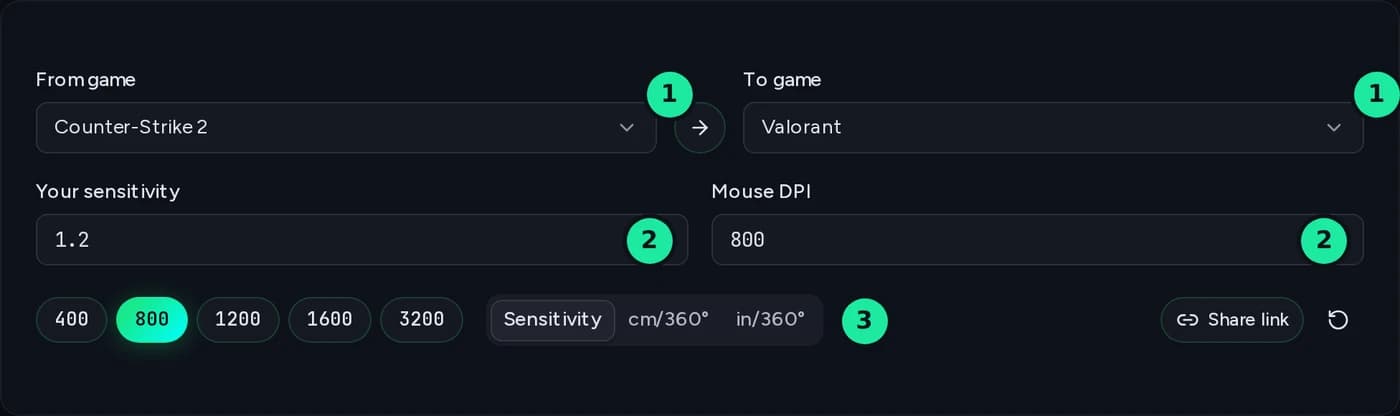
Converter input area: From Game and To Game, sensitivity, mouse DPI and input method, each numbered
  1. 1

    Choose games

    Under “From game,” select the game whose sensitivity you know. Under “To game,” select the game you're switching to. Search also recognizes abbreviations like “cs,” “ow2,” and “bf6.” The arrow between them swaps the two games.

  2. 2

    Enter sensitivity and DPI

    Enter your current sensitivity exactly as shown in the game. In Fortnite, Valheim, and Minecraft, it's a percentage. You can find your mouse DPI in its software or on the manufacturer's website. The buttons below set common values directly.

  3. 3

    Choose input method (optional)

    If you know how far you move your mouse rather than your sensitivity, switch to “cm/360°” or “in/360°” and enter the distance you move it for a full turn.

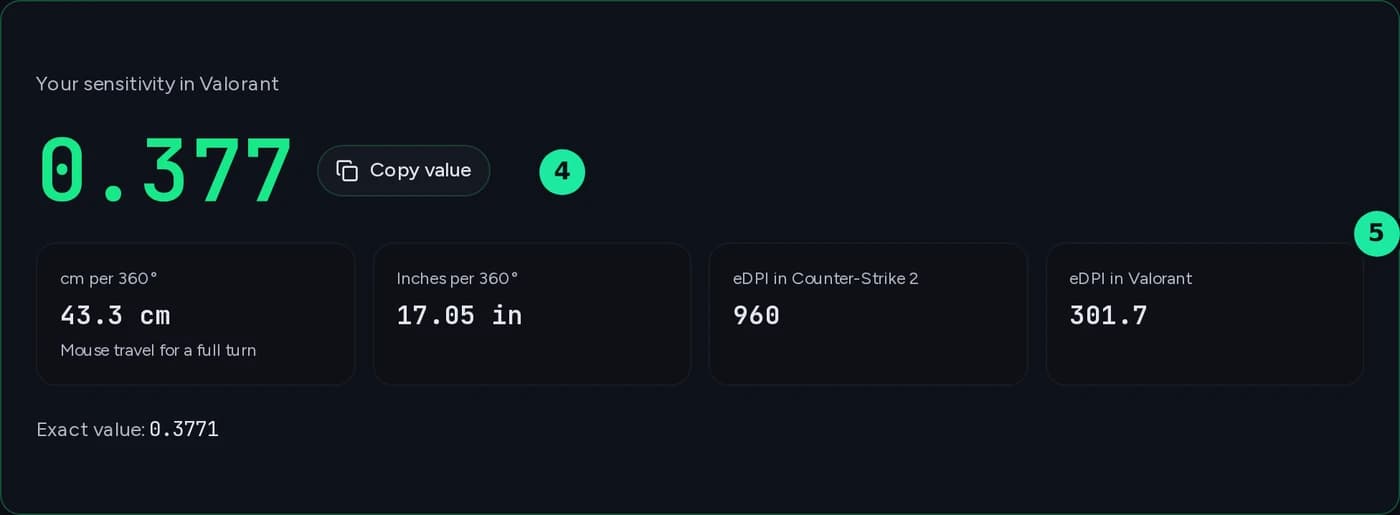
Converter results area: converted sensitivity in the target game, with cm per 360°, inches per 360° and eDPI in both games
  1. 4

    Read result

    The large number is the sensitivity for your new game. Use “Copy value” to copy it to your clipboard. If it has a percent sign, enter the value as a percentage on the slider.

  2. 5

    Check additional values

    Below, you can see the mouse travel for a full turn in centimeters and inches, which stays the same in both games, as well as your eDPI in each game. The exact value shows the extent of rounding. If the difference is noticeable, it is shown as a percentage. Notes such as “Enable Raw Input” or “unverified” appear below the result.

  3. 6

    Enter in-game

    Open the mouse settings in the target game and enter the value. Enable Raw Input and disable mouse acceleration, or the conversion will be inaccurate. Use “Share link” to save the games, value, and DPI in a link for friends or your team.

Popular conversions

The factor applies to hipfire sensitivity at the same DPI and keeps your cm/360° unchanged. Click to open the converter with the game pair.

Method

What is a Sens Converter?

A Sens Converter converts your mouse sensitivity. Each game rotates the camera by a different amount per mouse count, so the same number feels completely different in CS2 and Valorant. The converter keeps the mouse travel needed for a full turn the same, preserving your muscle memory when you switch games.

cm/360°: the measure that matters across games

cm/360° = 360 × 2.54 ÷ (DPI × Sens × Yaw)

The yaw value is the rotation in degrees per mouse count at sensitivity 1.0. That’s why the same sensitivity number means something different in each game: 0.4 at 800 DPI is around 40.8 cm/360° in Valorant but around 129.9 cm/360° in CS2. The converter keeps cm/360° constant and solves the formula for sensitivity in the target game.

eDPI: comparable only within the same game

eDPI is mouse DPI multiplied by in-game sensitivity, so 800 DPI at 0.5 sensitivity gives 400 eDPI. It helps you compare settings with other players in the same game, but says nothing across games. The converter shows it for both games if they use a standard numerical scale.

Changed DPI? Keep the same mouse travel

Select the same game under “From game” and “To game”, then enter your sensitivity with your old DPI. Switch the input type to cm/360° and enter your new DPI: the result is your sensitivity for the new DPI.

What isn't converted

Only horizontal hipfire sensitivity. Scopes, ADS multipliers, and the vertical axis have separate settings for each game.

Verified factors

Every factor marked as verified has been checked against at least two independent sources. The converter marks games whose values haven’t yet been cross-checked as “Unverified” in the results.

Free, no sign-up, in your browser

The calculation runs entirely in your browser, with no account or upload. The converter saves your last input only locally in your browser so you can pick up where you left off next time.

Supported games

Games supported by the Sens Converter

31 games and game series, from Valve shooters and battle royales to survival games. Minecraft and Battlefield don’t use proportional scales, so the converter uses a separate formula instead of a fixed factor.

  • Counter-Strike 2
  • Valorant
  • Overwatch 2
  • Apex Legends
  • Fortnite
  • Call of Duty (Warzone, MW, Black Ops 6)
  • Rainbow Six Siege
  • Marvel Rivals
  • The Finals
  • Destiny 2
  • Team Fortress 2
  • Counter-Strike: Global Offensive
  • Counter-Strike 1.6
  • Left 4 Dead 2
  • Half-Life 2 / Garry's Mod (Source)
  • Titanfall 2
  • Quake Champions
  • Quake Live
  • Rust
  • Insurgency: Sandstorm
  • DayZ
  • Hunt: Showdown 1896
  • 7 Days to Die
  • Valheim
  • Minecraft: Java Edition
  • Battlefield 2042 / V / 1 / 4
  • Battlefield 6
  • Halo: The Master Chief Collection
  • Halo InfiniteUnverified
  • Escape from TarkovUnverified
  • SquadUnverified

Your own server

Host a server for your game

Discover more

More tools

FAQ

Frequently asked questions about the Sens Converter

Quick answers about sensitivity, cm/360°, eDPI and this converter.

A Sens Converter converts mouse sensitivity from one game to the equivalent value in another. Each game scales sensitivity differently, so the same number feels completely different in CS2 and Valorant. The converter keeps your cm/360°—the mouse travel needed for a full turn—the same, preserving your muscle memory when you switch games.

At the same DPI, multiply your CS2 sensitivity by about 0.3143 to get the Valorant value: 1.2 becomes 0.377. Going the other way, multiply Valorant sensitivity by about 3.18 to convert it to CS2: 0.4 becomes about 1.27. Apex Legends uses the same yaw value as CS2, so the sensitivity number carries over 1:1. Fortnite shows sensitivity as a percentage: multiply your percentage by about 0.0794 to get the Valorant value, so 10% becomes 0.794. You’ll find more game pairs under “Popular conversions”; for your own pair, the converter calculates the exact value.

cm/360° is the distance you move your mouse to turn your character a full 360°. The formula is 360 × 2.54 ÷ (DPI × sensitivity × yaw): in CS2, 800 DPI at sensitivity 1.0 gives about 51.95 cm. That’s why 0.4 at 800 DPI isn’t equally fast everywhere: it’s around 40.8 cm/360° in Valorant but around 129.9 cm/360° in CS2. If you already know your mouse travel, enter it directly in the converter as cm/360° or in/360°.

eDPI is your mouse DPI multiplied by your in-game sensitivity, so 800 DPI at 0.5 sensitivity gives 400 eDPI. It’s useful for comparisons within a game, such as with other players’ CS2 settings. It says nothing across different games because each game uses a different yaw value. The converter shows eDPI for both games; for percentage sliders like Fortnite’s and non-proportional scales like Battlefield’s, it shows a dash instead.

Yes, otherwise your mouse travel changes. For proportional scales, new sensitivity = old sensitivity × old DPI ÷ new DPI, so 1.0 at 800 DPI becomes 0.5 at 1600 DPI. To do this in the converter, select the same game under “From game” and “To game”, enter your sensitivity with your old DPI, switch the input type to cm/360° and enter your new DPI. The converter doesn’t recommend a DPI value; it only keeps your mouse travel the same.

No. The converter calculates horizontal hipfire sensitivity—the normal movement of your view with the mouse. Scopes, ADS multipliers, and the vertical axis have separate settings in each game that you need to adjust yourself. The converter does not convert controller sensitivity; it uses your mouse DPI.

Currently 31 games and game series, including CS2, Valorant, Overwatch 2, Apex Legends, Fortnite, Call of Duty, Rainbow Six Siege, Marvel Rivals, The Finals, Rust, DayZ, Minecraft: Java Edition and Battlefield 6. Minecraft and Battlefield don’t use proportional scales, so the converter uses a separate formula instead of a fixed factor. Every factor marked as verified has been checked against at least two independent sources. Halo Infinite, Escape from Tarkov, Squad haven’t yet been cross-checked and are marked as “Unverified” in the results.

Check that Raw Input is enabled and mouse acceleration is disabled in both the game and Windows. Otherwise, the amount you turn won't be proportional to how far you move the mouse. Rounding to the decimal places supported by the game can also cause a small difference, which the converter shows as a percentage when it is measurable. For Rust, DayZ, and Squad, the conversion factor applies at the default FOV; a different FOV changes the turning speed.

Any more questions?

Contact Support
Your own Game Server?

Host your own Game Server in 60 seconds

Enough power for large multiplayer sessions, with DDoS protection and easy Mod and admin management included.

4.4/5 Trustpilot32,000+ Active serversSince 2010

No setup. No risk. Online in seconds.

Flexible TermCancel anytimeOnline in 60 seconds

Looking for more tools? View all gaming tools




