
Mail Server VPS: Host Your Own Email.
Run email for your own domains on your VPS: Stalwart as a one-click app or Postfix and Dovecot with root access, with rDNS right in the panel.
from €7.29 / month · cancel anytime
VPS packages for your mail server
A few mailboxes often fit on a small package; spam filtering, many domains and large mailboxes need more RAM and storage. Upgrade later without losing data.
Plans 1–3 of 9
Configure yourself
Your project. Your setup.
No package fits? Choose CPU, RAM and storage freely and pay only for the package you put together.
Powerful CPUs
1 Gbit/s uplink included
up to 5 Gbit/s as an add-on
100 Gbit/s host network
Juniper Firewall
DDoS protection
 Visa
 Mastercard
 American Express
 PayPal
 Google Pay
 Apple Pay
 Klarna
 Amazon Pay
Why your own mail server
Your domains, your mailboxes, your server
With your own mail server you decide where your mail is stored, how many mailboxes and domains you create and which software runs.
Stalwart as a one-click app
Install Stalwart from the one-click apps: one mail server with SMTP, IMAP and web admin in a single package.
Your own stack with root access
Prefer Postfix, Dovecot and your own spam filter? With root access on Debian or Ubuntu you set up everything yourself.
rDNS in the panel
Set the reverse DNS (PTR) record of your IPv4 and IPv6 address yourself in the VPS panel.
Port 25 after verification
Outgoing ports 25 and 465 are blocked on new VPS until you verify a phone number. After that they open within minutes.
Many mailboxes and domains
Create mailboxes for yourself, your team or several projects and send your apps' transactional mail through your own server.
Your mail stays with you
Your mailboxes live on your VPS. You choose the location: Frankfurt / Eygelshoven, Ashburn, Dallas or Los Angeles.
Web interface
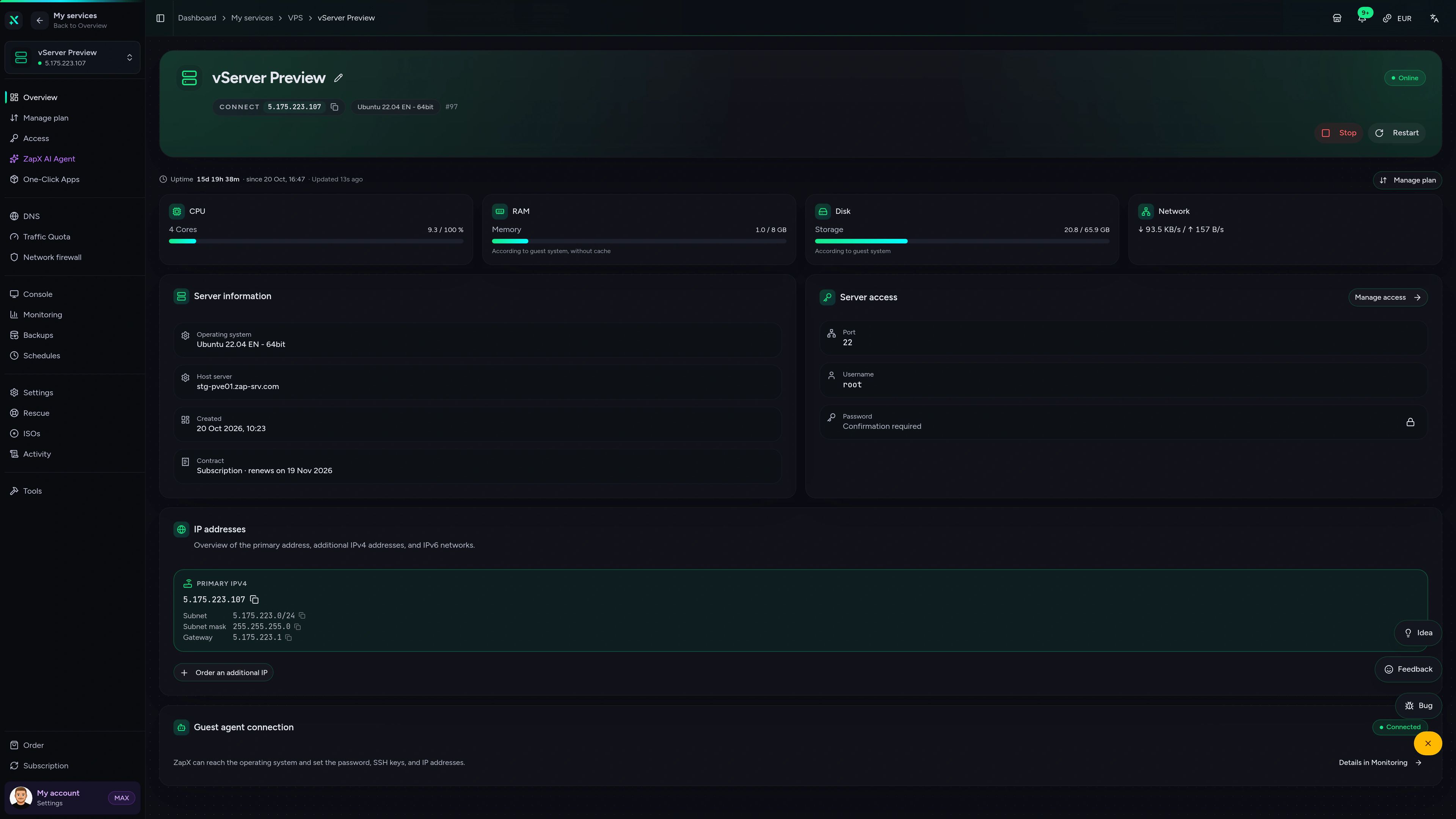
Run your VPS in the ZapX panel.
Overview, browser console, monitoring, firewall and rescue mode in one place, so you manage your VPS without juggling extra tools.
ZAP VPS #42
panel.zap-hosting.com
Live overview & resources
CPU, RAM, storage and network at a glance, plus IPs and status as soon as your VPS is up.
FAQ
Questions about the mail server VPS
SMTP ports, DNS records, rDNS, software and what you take care of as the admin of your mail server.
Can I run my own mail server on a VPS?
Yes. You get root access and your own IPv4 and IPv6 addresses for your mail server.
Your own mail server fits email on your own domain, several domains and mailboxes, more control over your data, or transactional mail sent by your apps. Install Stalwart as a one-click app or set up your own stack.
Is port 25 blocked on the VPS?
Outgoing ports 25 and 465 are blocked on new VPS until you verify a phone number in your account. After that they are unlocked for your whole account within minutes.
Receiving mail (inbound port 25), IMAP and port 587 (submission, also to an external relay) are not affected. Once verified, the unlock applies to every VPS in your account, new and existing.
Stalwart or Postfix and Dovecot: which should I pick?
Stalwart is the quick start; your own stack puts every setting in your hands.
Install Stalwart as a one-click app and you get SMTP, IMAP and a web admin interface in one package. With root access you can instead set up Postfix, Dovecot, a spam filter or an all-in-one stack like Mailcow yourself on Debian or Ubuntu.
Which DNS records does my mail server need?
MX, SPF, DKIM and DMARC at your DNS provider, plus rDNS (PTR) and a TLS certificate.
The MX record points to your mail server, SPF lists who may send for your domain, DKIM signs your mail and DMARC tells receivers how to treat mail that fails those checks. A TLS certificate, for example from Let's Encrypt, encrypts SMTP and IMAP.
Can I set the rDNS (PTR) record myself?
Yes, you set the reverse DNS record of your IP addresses directly in the VPS panel.
Many receiving servers check that the PTR record of your IP matches your mail server's hostname. Need a separate IP for your mail server? Book extra IPv4 addresses under “Manage plan”.
Will my emails land in the inbox?
That depends on your setup; no host can promise it.
Correct DNS records, a matching rDNS, clean sending habits and the reputation of your IP and domain decide whether receivers accept your mail. Sending spam violates our terms of service.
Who takes care of updates and backups?
You do. On your VPS you are the admin of your mail server.
You keep the software, security settings and mailboxes up to date yourself. With ZapX Pass you create manual backups and snapshots in the panel and roll back if an update goes wrong.
How much does a mail server VPS cost?
VPS packages start at €7.29 per month.
The price depends on package, term and location. Rent for 3, 30, 90, 180 or 365 days; longer terms lower the monthly price. A Linux VPS is online 60 seconds after payment.
Still have questions? Our support team is happy to help.
Contact SupportMore VPS pages
More VPS for your project
Newsletters, Linux distributions and protection for your mail server.
- Email Marketing VPSRun Listmonk or Keila on your own VPS for your opt-in newsletters.View page
- Debian VPSDebian 12 or 13 with root access, lean and stable.View page
- Ubuntu VPSA VPS with Ubuntu 20.04 to 26.04 LTS and full root access.View page
- DDoS protected VPSAlways-on PletX filtering with up to 4 Tbit/s at every VPS location.View page
- ListmonkInstall Listmonk as a one-click app on your VPS.View page
- All VPS plansEvery package, operating system and location on one page.View page
- Windows VPSVPS with Windows Server and Remote Desktop.View page
Your own mail server, on your VPS.
Pick a package, install Stalwart or your own stack and run email for your domains.
Terms from 3 days · Cancel anytime