
Popular
VPS plan
ZAP Spark
€7.29/ 30 days
- 4 GB RAM
- 2 CPU
- 60 GB NVMe
 Rokh dedicated server on your own VPS
Your own VPS with root access for setting up Rokh yourself, DDoS protection, locations in Europe & America for your group.
Packages 1–3 of 9
 Your project. Your setup.
Configure yourself
No package fits? Choose your CPU, RAM and storage—you only pay for what your project actually needs.
Powerful CPUs
1 Gbit/s uplink included
up to 5 Gbit/s as an add-on
100 Gbit/s host network
Juniper Firewall
DDoS protection
 Visa
 Mastercard
 American Express
 PayPal
 Google Pay
 Apple Pay
 Klarna
 Amazon Pay
Rokh VPS explained
A ZAP-Hosting Rokh VPS is your own virtual server with full root access. You set up the Rokh dedicated server on it yourself, so your world keeps running 24/7, even after everyone logs off.
Your group gets a server that is fully yours: set the server name, admin password and player limit, edit config files and run a voice server or other tools next to Rokh. Experienced admins can still set everything up by hand if they prefer.
On your own VPS, you set up Rokh yourself with full root access. DDoS protection is included, and you can pick the location closest to your players from our locations in Europe and America.

Why a Rokh VPS
Root access to set up Rokh yourself and reliable resources on your own VPS, so your group can focus on surviving together.
Your group can start planning the first base right away: the VPS is ready 60 seconds after checkout, and you set up the Rokh server yourself.
Set up the Rokh dedicated server yourself on your VPS with full root access, with a guide in the Help Center to help.
Your Rokh world gets the CPU cores and RAM of your package, and live graphs show exactly how much your sessions really use.
Your colony is never far from a restore point: a system Backup runs daily, and ZapX Pass adds your own Backups and restores.
More players or a bigger world? Add more CPU and RAM and keep your Rokh setup running.
Your friends get a smooth connection when you pick the data center closest to them from our locations in Europe and America.
 Setup
On your own VPS, you set up your ROKH server yourself with full root access. The guide in the Help Center helps you along. Prefer some help? With ZapX Pass, the ZapX AI Agent helps you with the setup.
You install the ROKH server yourself and keep full control over files, mods and settings.
Describe your goal in the chat: the ZapX AI Agent supports you step by step with the setup. Available with ZapX Pass.
Locations in Europe and America
4 data centers in Europe and America — choose the location closest to your community.


Reviews
Real feedback on support and setup.
FAQ
Answers to the most important questions before you start.
Yes. You rent your own VPS with full root access and set up the Rokh dedicated server on it yourself, with a guide in the Help Center to help. You control the server name, admin password, server password and player limit, then share the address with your friends.
You rent a regular ZAP-Hosting VPS, and the packages section on this page shows live prices for every tier. You choose a term from 3 days up to 1 year. Longer terms come with a discount, and where available you can pick a Lifetime option with ZapX Pass.
That depends on how many players join and how big your world grows. Start with the package that fits your group and watch RAM and CPU usage in the panel. If more friends join or your world gets larger, you can add more RAM and CPU at any time.
A managed game server comes preconfigured with a game panel. A Rokh VPS is your own virtual server with root access: you set up Rokh yourself, and you keep full control over files, settings and extra tools like a voice server. Learn more about VPS in the Help Center
Usually within 60 seconds of checkout. During the order you choose the location closest to your players from our locations in Europe and America. Once the VPS is online, you set up the Rokh server yourself with full root access.
Yes. You get full administrator access to your VPS via SSH or Remote Desktop, depending on the VPS image you choose at order. That means you can edit Rokh config files, manage firewall rules and run extra tools next to your server. Connect to your VPS via SSH
Yes, your VPS gets an automatic system Backup every day. With ZapX Pass you can also create your own Backups and restore them whenever you need, which is handy before you change settings or start a new world.
Yes. DDoS protection is included with your VPS, so attacks are filtered before they reach your Rokh server and your group can keep playing. How the protection works depends on the location you choose. Read more in the Help Center
Any more questions?
Contact SupportZAPX Dashboard
Console, resource statistics and Backups for your VPS in one panel, right in your browser.
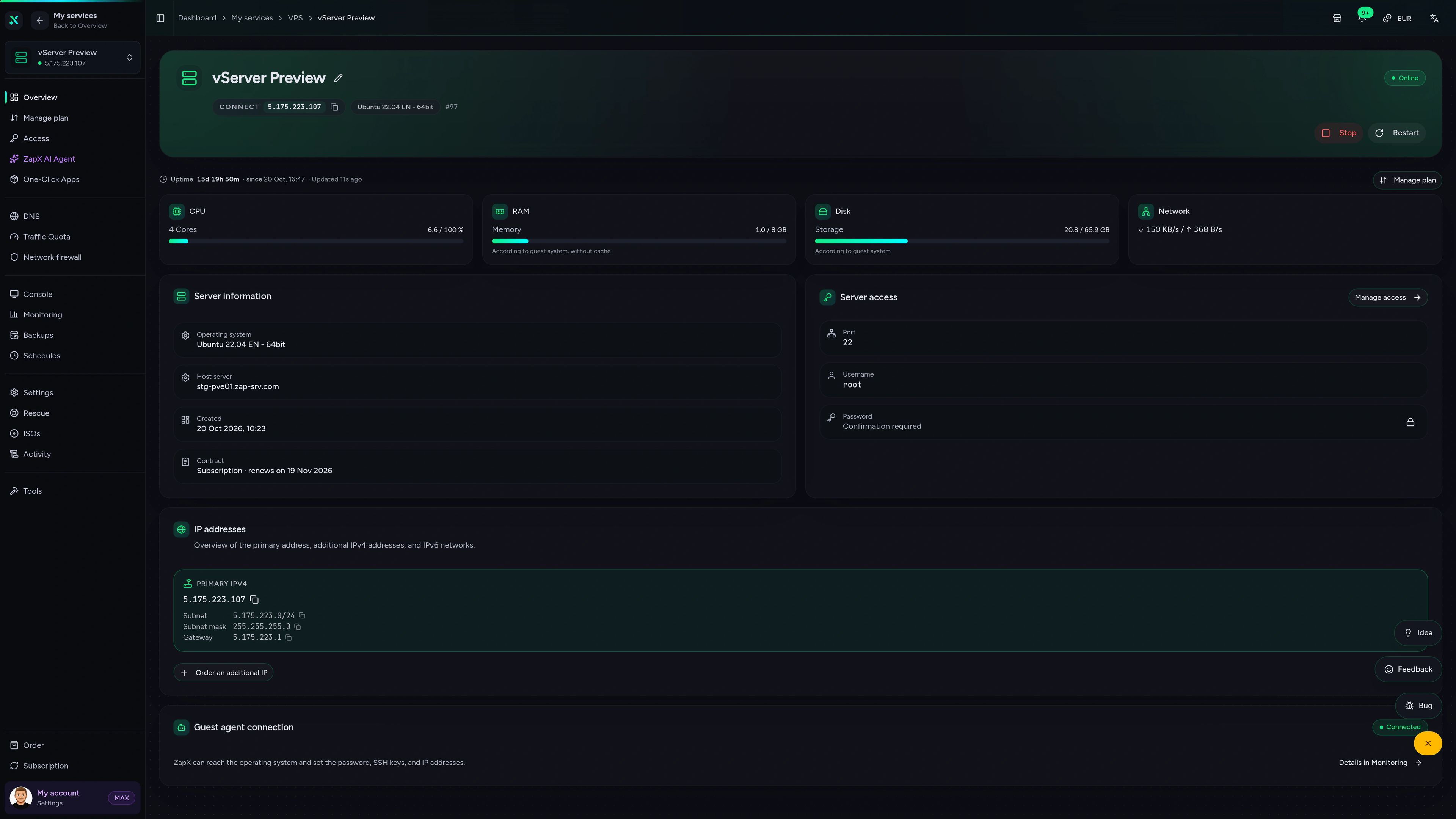
VPS DDoS Manager tab
VPS DDoS Manager tab
Ask the ZapX AI Agent about ports, resources or Backups on your VPS. It explains what's going on and suggests safe next steps. Every change stays your decision.
The ZapX AI Agent is part of ZapX Pass. It explains and suggests next steps, and on request it runs them on your VPS after you confirm, or you apply them yourself.
Discover ZapX PassZapX AI Agent
panel.zap-hosting.com
Performance
Measured results from our VPS hardware next to typical market values, so you know what your Rokh server runs on.
High-performance VPS, CPU model depends on the location
Typical VPS plans without a published host CPU
confirmed 2026-07-01
Play Rokh your way
Your own VPS, where you set up the Rokh server yourself with full root access. Then you shape the server around how your group plays.
Ready for Rokh?
Keep your Rokh world online around the clock
ZapX appComing soon
Keep an eye on your VPS from anywhere and react quickly when your group needs you.
Impressionen
A glimpse into the game world—its atmosphere, exploration, and the moments your community will experience on the server.
Your own VPS with root access, where you set up the Rokh server yourself, and DDoS protection included. Pick a location close to your players.
Full root access. No risk. Cancel anytime.
© 2026 ZAP-Hosting GmbH
 Preferred source on Google