
Forex VPS Hosting for MetaTrader.
Forex VPS hosting with Windows Server: keep MetaTrader 4, MetaTrader 5 and your Expert Advisors running around the clock, with Remote Desktop, NVMe storage and full admin access.
from €7.29 / month · cancel anytime
Affordable VPS packages for your MT4 & MT5 terminals
Windows Server needs at least 50 GB of storage and more RAM than Linux, so a mid-size package suits one or two terminals. Need room for more terminals later? Upgrade without losing data.
Plans 1–3 of 9
Configure yourself
Your project. Your setup.
No package fits? Choose CPU, RAM and storage freely and pay only for the package you put together.
Powerful CPUs
1 Gbit/s uplink included
up to 5 Gbit/s as an add-on
100 Gbit/s host network
Juniper Firewall
DDoS protection
 Visa
 Mastercard
 American Express
 PayPal
 Google Pay
 Apple Pay
 Klarna
 Amazon Pay
Why traders use a forex VPS
Your MT4 terminal keeps running, even when your PC is off
A VPS for forex runs in a data center around the clock, so MetaTrader and your Expert Advisors no longer depend on your own computer, its power supply or your home internet connection.
Windows Server with RDP
Install MetaTrader 4, MetaTrader 5 or any other Windows trading platform yourself and manage it via Remote Desktop.
Runs around the clock
Your Expert Advisors keep working on the VPS while your own computer is switched off or offline.
Access from any device
Connect with Remote Desktop from your PC, Mac or phone, or open the browser console in the ZapX panel.
Four locations
Frankfurt / Eygelshoven, Ashburn, Dallas or Los Angeles: you choose where your forex VPS runs.
Operating systems
Windows VPS, Linux VPS or
your own ISO
Select Debian, Ubuntu or Windows Server when you order, and reinstall from the panel whenever you need a clean system. Everything else boots from your own ISO.
 Windows VPS
Web interface
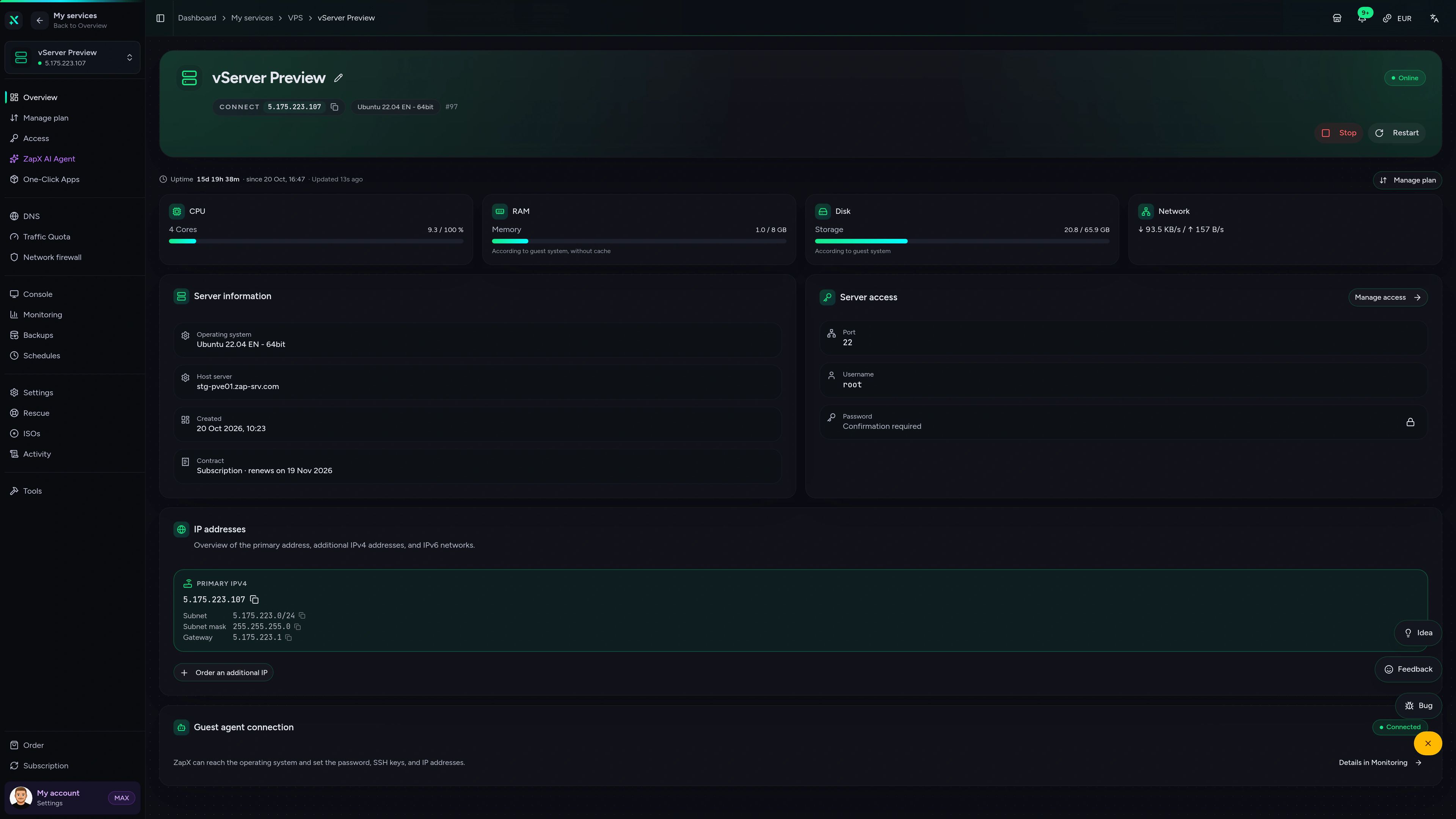
Run your VPS in the ZapX panel.
Overview, browser console, monitoring, firewall and rescue mode in one place, so you manage your VPS without juggling extra tools.
ZAP VPS #42
panel.zap-hosting.com
Live overview & resources
CPU, RAM, storage and network at a glance, plus IPs and status as soon as your VPS is up.
FAQ
Questions about forex VPS hosting
MT4 and MT5, Windows licensing, package sizing, locations and what a VPS does for your trading setup.
What is forex VPS hosting?
A VPS in a data center that runs MetaTrader 4, MetaTrader 5 and your Expert Advisors around the clock.
Expert Advisors only trade while the terminal is open. On a forex VPS, MetaTrader keeps running when you shut down your PC or close the connection. You log in via Remote Desktop to check positions, adjust settings or update an EA.
Can I run MT4 and MT5 on the same VPS?
Yes, on Windows Server several MetaTrader terminals run side by side if your package has enough RAM.
After you connect via Remote Desktop, you install MetaTrader from your broker's website, one terminal per account if you like. Other Windows trading platforms such as cTrader or NinjaTrader run as well. Nothing is preinstalled, so you set up exactly the software you need. Connect to Windows Server via Remote Desktop
Is a Windows license included?
The Windows Server templates are evaluation versions that run for 180 days.
For long-term use you add your own Windows license. Alternatively you run MetaTrader 5 on a Linux VPS with Wine, with no Windows license needed.
How much RAM does a forex VPS need for MT4 or MT5?
For Windows Server, pick a package with at least 50 GB of storage and enough RAM for every terminal.
Windows itself uses more RAM than Linux, and every open terminal, chart and Expert Advisor adds to it. One or two terminals usually fit a mid-size package; for more terminals or heavy EAs, choose more RAM and vCores. You can upgrade later without losing data.
Which location should I choose for my forex VPS?
At checkout you choose Frankfurt / Eygelshoven, Ashburn, Dallas or Los Angeles.
The connection to your broker depends on where your broker's trade servers are located. Check that location with your broker and pick the VPS location yourself; the US locations have regional pricing.
My broker offers a free VPS. Why rent my own?
Your own VPS works with any broker and any number of terminals, with full admin access.
Broker VPS offers are often tied to conditions such as a minimum balance or trading volume. With your own forex VPS you decide which software runs and keep the server when you switch brokers. ZAP-Hosting provides the server, not trading results: execution, spreads and results depend on your broker, your strategy and the market.
Is my forex VPS protected against DDoS attacks?
Yes, PletX DDoS protection is included at every VPS location.
PletX filters server traffic with dynamic rules at no extra cost. Account security at your broker, such as passwords and two-factor authentication, stays your responsibility.
How much does forex VPS hosting cost?
Forex VPS packages start at €7.29 per month.
The price depends on the package you choose, the runtime and the location. You rent for 3, 30, 90, 180 or 365 days, and longer runtimes lower the monthly price. Cancel anytime, or upgrade to a bigger package without losing data.
Still have questions? Our support team is happy to help.
Contact SupportMore VPS pages
More VPS for your trading setup
US and European locations, DDoS protection and the full VPS range for your trading VPS.
- VPS USAVPS hosting in Ashburn, Dallas and Los Angeles with PletX DDoS protection.View page
- VPS NetherlandsVPS in our data centre in Eygelshoven, Netherlands.View page
- DDoS protected VPSAlways-on PletX filtering with up to 4 Tbit/s at every VPS location.View page
- Gaming VPSVPS hosting for gaming: your own game servers, mods and tools with PletX DDoS protection.View page
- All VPS plansEvery package, operating system and location on one page.View page
Your forex VPS, running around the clock.
Pick a package with Windows Server, install MT4 or MT5 via Remote Desktop and let your Expert Advisors run 24/7.
Runtimes from 3 days · Cancel anytime