
 Avorion · Your own VPS
Avorion VPS hosting.
Host your own Avorion dedicated server, set up in one click via the Gameserver Installer, with root access and DDoS protection.
Packages 1–3 of 9
 Your project. Your setup.
Configure yourself
Your project. Your setup.
No package fits? Choose your CPU, RAM and storage—you only pay for what your project actually needs.
Powerful CPUs
1 Gbit/s uplink included
up to 5 Gbit/s as an add-on
100 Gbit/s host network
Juniper Firewall
DDoS protection
 Visa
 Mastercard
 American Express
 PayPal
 Google Pay
 Apple Pay
 Klarna
 Amazon Pay
Avorion VPS explained
What is an Avorion VPS?
Your galaxy stays online 24/7, even after everyone logs off. An Avorion VPS is your own Windows server with full root access, and our Gameserver Installer sets up the official Avorion Dedicated Server on it in one click.
Your crew explores, mines and builds fleets in a persistent galaxy that you control. Set the seed, difficulty and player cap in the server config, add Steam Workshop mods and run admin tools alongside it. Friends join with the IP and port shown in the panel.
Want more on the same machine? Run a second game server, a Discord bot or a stats page next to Avorion. A daily automatic system Backup keeps your galaxy covered.
Why a VPS for Avorion
Everything your galaxy needs to keep running
Root access, fast setup and room to grow: your Avorion VPS runs the way your crew plays, from small co-op runs to large faction wars.
Avorion server set up in one click
Your galaxy goes live fast. The VPS is provisioned automatically and the Gameserver Installer sets up the Avorion server in one click.
Headroom for busy sectors
Sessions stay smooth when every player keeps several sectors active, thanks to powerful server CPUs, your own RAM and fast NVMe storage.
Daily system Backup included
Your galaxy's progress has a safety net. A daily automatic system Backup is included, and the ZapX Pass adds your own Backups and restores.
Bring your existing galaxy
Keep the sectors, ships and stations you already built. Copy your galaxy folder from a single-player save or another host to your VPS.
Grow with your faction
When your crew grows or more sectors stay active, add more RAM and CPU and keep your galaxy.
Locations in Europe and America
Players get low latency when the server sits close to them. Choose Ashburn, Dallas, Los Angeles or FFM/Eygelshoven.
 Setup
Your Avorion server set up in one click.
With our Game Server Installer, you can set up your Avorion server on your VPS in one click — no commands or manual work. Prefer some help? With ZapX Pass, the ZapX AI Agent helps you in the chat.
Game Server installer
One click
Select Avorion in the installer and click Install — the server will be set up automatically.
Together with the ZapX AI Agent
ZapX PassDescribe your goal in the chat: the ZapX AI Agent supports you step by step with the setup. Available with ZapX Pass.
Prefer to set everything up manually?Guide in the Help Center
Locations in Europe and America
Your VPS. Your location.
4 data centers in Europe and America — choose the location closest to your community.
Europe

America

Reviews
What customers say about ZAP-Hosting
Real feedback on support and setup.
Zap has been great for our server.
Zap has been great for our server.
 ZAP-HostingReply


FAQ
Frequently asked questions about Avorion
Answers to the most important questions before you start.
What is an Avorion VPS and how does it differ from a game server?
An Avorion VPS is your own virtual server with full root access. Our Gameserver Installer sets up the Avorion Dedicated Server on it in one click. After that you control everything: server config, Workshop mods, admin tools and other software on the same machine. A managed game server gives you a fixed panel, while the VPS gives you the whole system.
- Full root access to your own VPS
- Avorion set up in one click via the Gameserver Installer
- Room for mods, tools and more servers
Should I use Windows or Linux for my Avorion server, and how is it set up?
Use Windows. The Avorion server from our Gameserver Installer runs on Windows, so your VPS runs Windows too. Choose Avorion in the Gameserver Installer and it sets up the official Avorion Dedicated Server in one click, with no command line needed. Experienced admins can also install it by hand if they prefer; the Help Center guide covers that route. Windows setup guide in the Help Center
- Runs on Windows
- One-click setup via the Gameserver Installer
How much does an Avorion VPS cost?
The price depends on the VPS package, the term you choose and the location. Current prices load live in the package section on this page and in the shop. Terms are 3, 30, 90 or 180 days or one year, and you can cancel anytime. A cancellation takes effect at the end of the current term.
- Live prices per package
- Terms: 3, 30, 90, 180 days or one year
- Cancel anytime
Which VPS package should I pick for my Avorion server?
Avorion's load grows with the number of players online and the number of sectors they keep active at the same time, because every active sector needs RAM and CPU. A small co-op crew needs less RAM. Large factions, many Workshop mods or long-running galaxies need more RAM. If your galaxy needs more resources, you can increase RAM and CPU.
- Small co-op crew: start small
- Big factions and mods: more RAM
- Upgrade when your galaxy grows
How fast is my Avorion VPS ready after ordering?
Your VPS is provisioned automatically right after your order and is usually online in under 60 seconds. The Gameserver Installer then sets up the Avorion server in one click, and your crew connects with the IP and port shown in the panel.
- VPS online in under 60 seconds
- Avorion set up in one click
Which server location should I choose for my Avorion VPS?
Choose the location closest to most of your players, because that keeps latency low for everyone. Your Avorion VPS is available in Ashburn, Dallas, Los Angeles and FFM/Eygelshoven. Many North American groups start with Ashburn, Dallas or Los Angeles.
- Ashburn
- Dallas
- Los Angeles
- FFM/Eygelshoven
Can I move my existing Avorion galaxy to the VPS?
Yes. Copy your galaxy folder from a single-player save or another host to the VPS via Remote Desktop, then start the Avorion server with that galaxy. Your sectors, ships, stations and faction progress come with it.
- Works with single-player saves
- Works with galaxies from other hosts
Are Backups and DDoS protection included with my Avorion VPS?
Yes. Every VPS includes a daily automatic system Backup and DDoS protection. With the ZapX Pass you can also create your own Backups and restore them, which is handy before a big mod update or a galaxy reset. Learn more about Backups
- Daily automatic system Backup
- Own Backups and restores with ZapX Pass
- DDoS protection included
Any more questions?
Contact SupportZAPX Dashboard
Your VPS panel at a glance
Console, Backups and live statistics for your Avorion VPS in one browser tab.
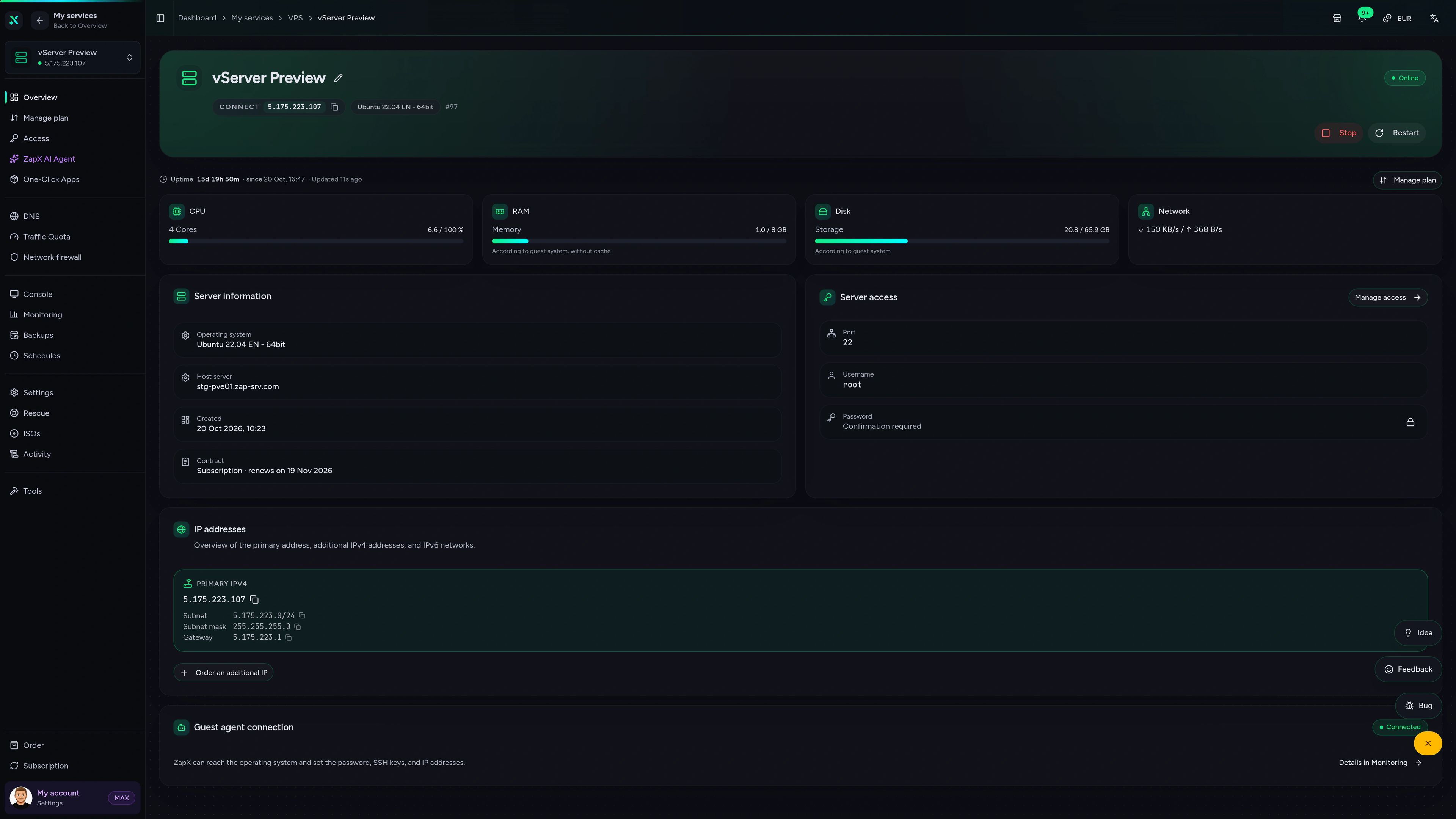
VPS DDoS Manager tab
VPS DDoS Manager tab
Ask about your VPS. Get a clear next step.
The ZapX AI Agent explains Windows settings, firewall rules and resource usage on your Avorion VPS and suggests safe next steps, right in the panel.
The ZapX AI Agent is part of ZapX Pass and applies account-wide to all supported services.
See ZapX PassZapX AI Agent
panel.zap-hosting.com
Benchmark
Real measurements from our VPS fleet compared with a typical VPS provider, so you know what your Avorion galaxy runs on.
High-performance VPS, CPU model depends on the location
Typical VPS plans without a published host CPU
confirmed 2026-07-01
Use cases
What your crew does with an Avorion VPS
From a small co-op galaxy to a modded faction server: set up in one click via the Gameserver Installer, then shaped the way your group plays.

Your galaxy, your rules
Ready to host your Avorion galaxy?
ZapX appComing soon
Your VPS in your pocket
Check on your Avorion VPS from your phone. See its status and resources wherever you are.
Impressionen
Avorion Screenshots
A glimpse into the game world—its atmosphere, exploration, and the moments your community will experience on the server.
Host your Avorion server on your own VPS
Rent a VPS, set up Avorion in one click via the Gameserver Installer and invite your crew. Root access, DDoS protection and a daily system Backup are included.
Install a Game Server with one click. No risk. Cancel anytime.