
Discord Bot Server Hosting.
Discord bot hosting for moderation, music and utility bots. Start from a template or deploy your own code from GitHub or GitLab — online 24/7 for your community, from €3.29/month.

Discord bot plan
Spark
- 1 GB RAM
- 1 CPU
- 10 GB NVMe
Discord bot plan
Core
- 2 GB RAM
- 1 CPU
- 20 GB NVMe
Discord bot plan
Pulse
- 4 GB RAM
- 2 CPU
- 50 GB NVMe
Configure yourself
Your bot. Your resources.
No package fits? Choose your RAM and CPU—you only pay for the package you put together.
Git Sync
Auto-Restart
Online immediately
Git deploy
ZAPX Dashboard
 Visa
 Mastercard
 American Express
 PayPal
 Google Pay
 Apple Pay
 Klarna
 Amazon Pay
Do more with ZapX Passextended Backups and Lifetime access
Templates & use cases
What your bot does for the
community.
Music, moderation, utility, or your own code — pick the start that fits your server.
Choose a template
FAQ
Common questions about Discord bot hosting
Cost, free tiers, Git deploy, runtimes, uptime and databases. Straight answers.
What is Discord bot hosting at ZAP-Hosting?
Managed hosting built for bots. Not a game server workaround, not a bare VPS.
ZAP-Hosting Discord bot hosting keeps your Node.js or Python bot online 24/7 with Git deploy, optional PostgreSQL, Redis or MongoDB and daily Backups — from €3.29/month. You get templates, live logs, auto-restart and open ports for web dashboards in one panel.
How do I host a Discord bot?
Pick a template or start blank, add your token, hit start.
Order a package, choose a ready-made template or a blank bot for your own code, then enter your Discord bot token in the panel. Dependencies install automatically, so your bot goes online without SSH or any server admin. Guide: Set up your Discord bot
- Pick a template or bring your own code
- Choose RAM, location and runtime, e.g. Node.js or Python
- Add your token and start — logs stream live in the panel
Can I host a Discord bot on my home server or PC?
You can, but the bot is only online while your machine is.
A bot running at home goes offline whenever your PC sleeps, reboots for an update or loses power or internet. Hosted in a data center, your bot keeps answering commands around the clock, so moderation, tickets and music stay available for your community.
Can I deploy my bot from GitHub or GitLab?
Yes. Connect the repo over HTTPS, pick the branch, done.
Paste your GitHub or GitLab repository URL, choose the branch and the code syncs to your bot server. Private repos work with an access token that is stored encrypted. Every sync keeps your .env and config.json in place, and npm, pip or Bun install the dependencies automatically. Program a Discord bot with discord.jsCreate a Discord bot with discord.py
- Write your bot locally with discord.js or discord.py
- Push it to GitHub or GitLab and connect the repo
- Re-sync after every push — your bot stays online 24/7
Can I start from a ready-made bot template?
Yes. Templates come with a setup wizard for token and settings.
With a template you mostly fill in your token and a few settings, no coding required. If you already wrote your own bot, start blank and bring the code via Git sync or the file manager.
- Templates for a quick start
- Blank bot for your own code
- Panel for logs and restarts
Is it free to host a Discord bot?
Creating the bot is free. Keeping it online 24/7 needs a server.
Free hosting tiers usually put your bot to sleep, make you renew manually or cap RAM and CPU hard. For a bot your community relies on, low-cost paid Discord bot hosting with steady resources, auto-restart and daily Backups is the reliable option.
How much does Discord bot hosting cost?
From €3.29/month, cancel anytime, effective at the end of the term.
The price depends on the package, the term and the location. A moderation or ticket bot usually runs fine on the smallest package, while music bots, AI bots or bots with a busy database need more. You can see all packages and live prices above and in the shop.
Do I need a VPS for a Discord bot?
No. Managed bot hosting gives you the runtime without the server admin.
On a VPS you maintain the operating system, the runtime, a process manager and restarts yourself. Managed Discord bot hosting covers that with runtime presets, Git deploy, templates and auto-restart. A VPS only pays off for large projects that run several services next to the bot.
Which programming languages and runtimes are supported?
Node.js and Python for discord.js and discord.py, plus Bun, Java, Rust and Go.
You pick the runtime in the shop and panel, no custom server images needed. The default lineup covers Node.js 20, 22, 24 and 25, Bun, Python 3.12 and 3.13, Java 22 and 25, Rust and Go. The runtimes currently available are shown when you order.
How do I keep my Discord bot online 24/7?
Host it on a server that never sleeps — auto-restart handles crashes.
Your bot runs continuously in the data center, independent of your own PC. If it crashes, it restarts automatically, and repeated crashes are detected as a crash loop so you know when the code itself needs a fix.
Are Backups of my bot included?
Yes, the system creates a Backup automatically every day.
Your bot is backed up daily without you having to set up a schedule. With ZapX Pass you can also create your own Backups and restore Backups, with Backup slots and storage depending on the tier.
Does my bot get a database?
PostgreSQL, Redis (Valkey) and MongoDB run right next to your bot.
Many bots store settings, tickets or leveling data. PostgreSQL, Redis (Valkey) and MongoDB run alongside your bot, and the connection details go straight into its environment. Templates request the database they need automatically; for your own code you add it in the panel.
Still have questions?
Contact supportYour own code
Deploy from GitHub with Git sync.
Connect your repo, add an access token for private code and every sync ships your latest commit to the bot.
- 01
Paste your repo URL
GitHub or GitLab over HTTPS. Public or private.
- 02
Add an access token
Only for private repos. Optional and stored encrypted.
- 03
Start your bot
Your code is pulled, .env and config.json stay put. Re-sync anytime.
ZAPX Dashboard
Run your bot server without SSH hassle.
Check the status, sync Git, read the logs and switch templates: the ZAPX panel puts the jobs that come up in day-to-day Discord bot hosting in one place.
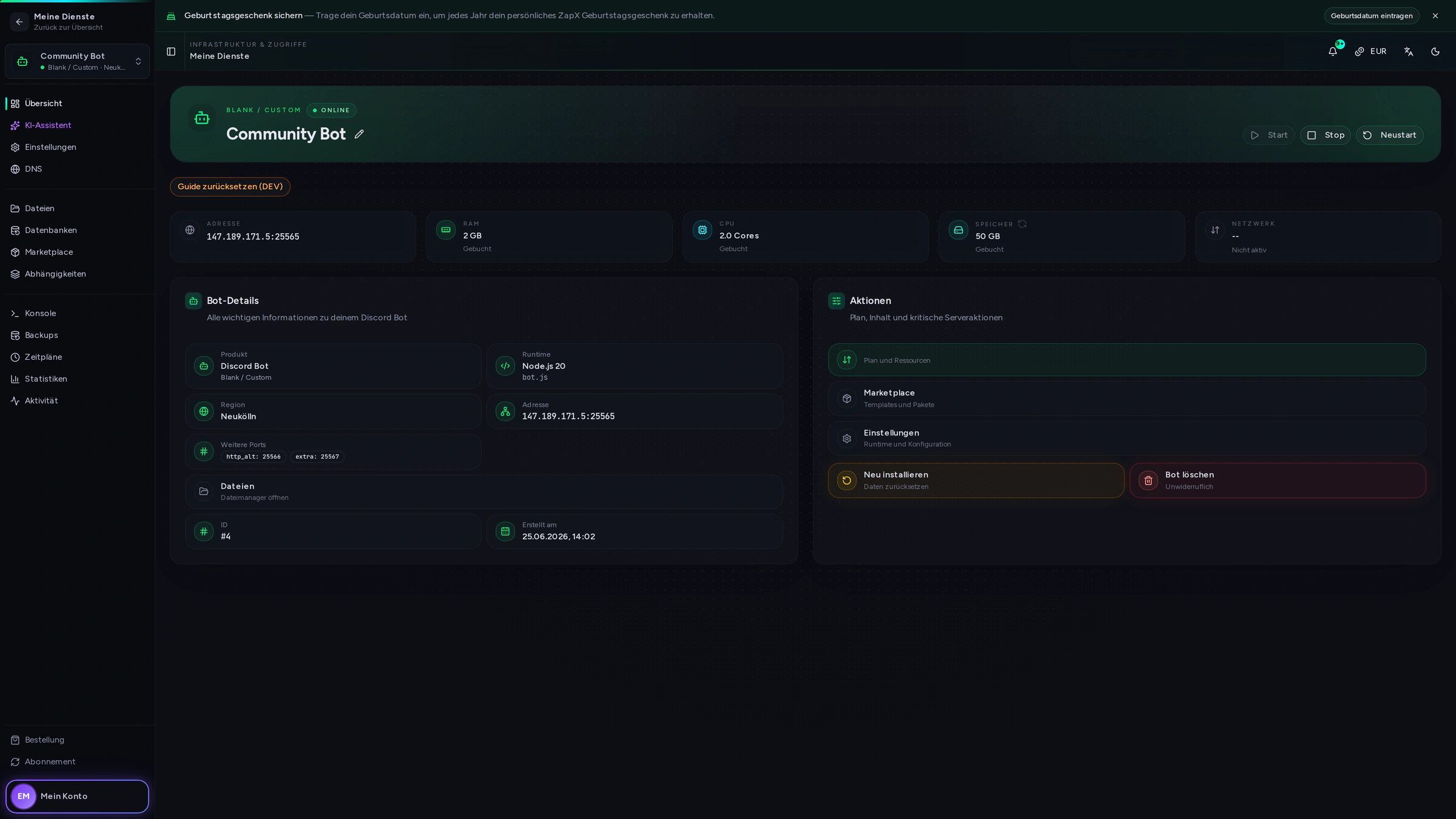
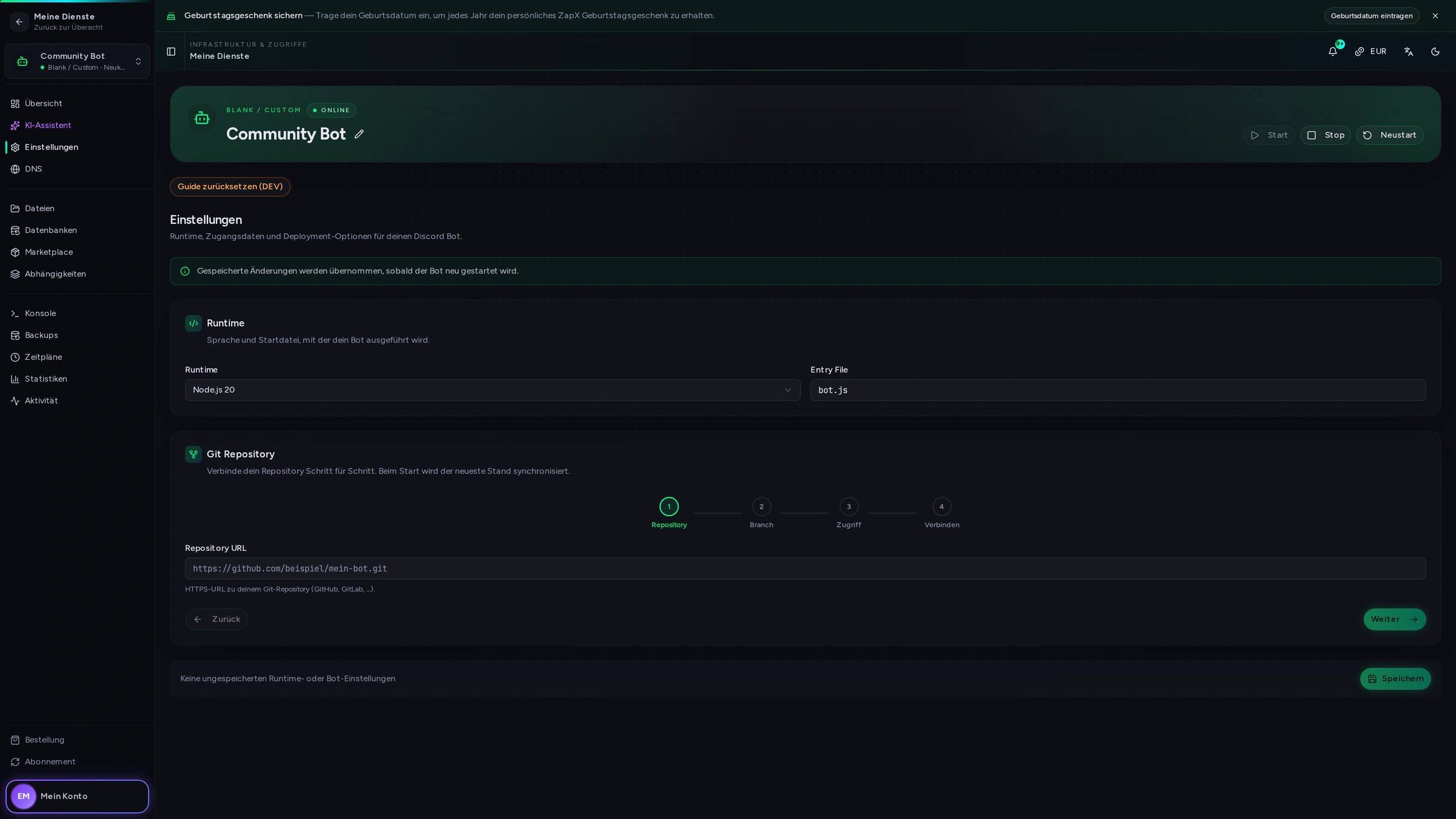
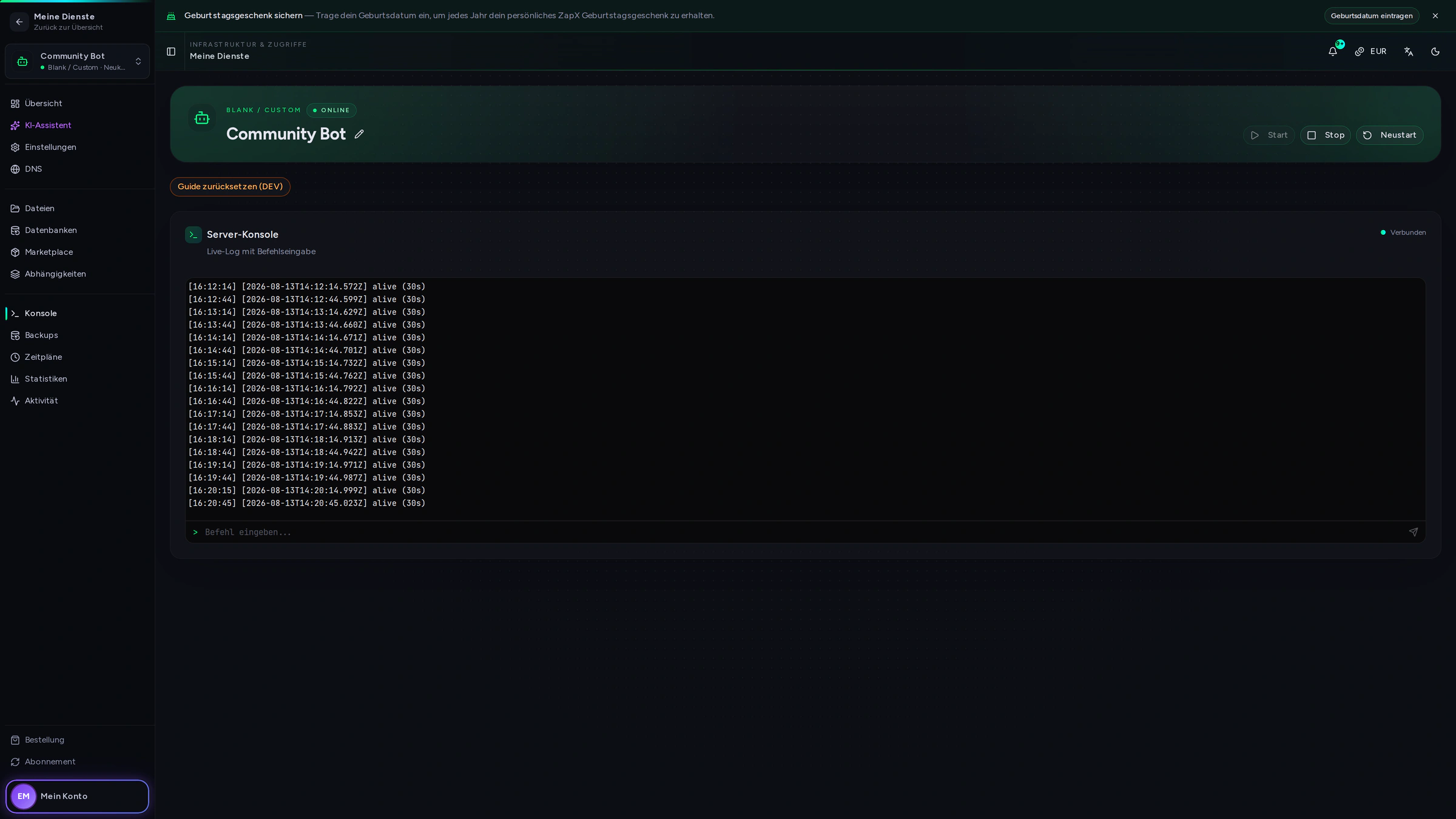
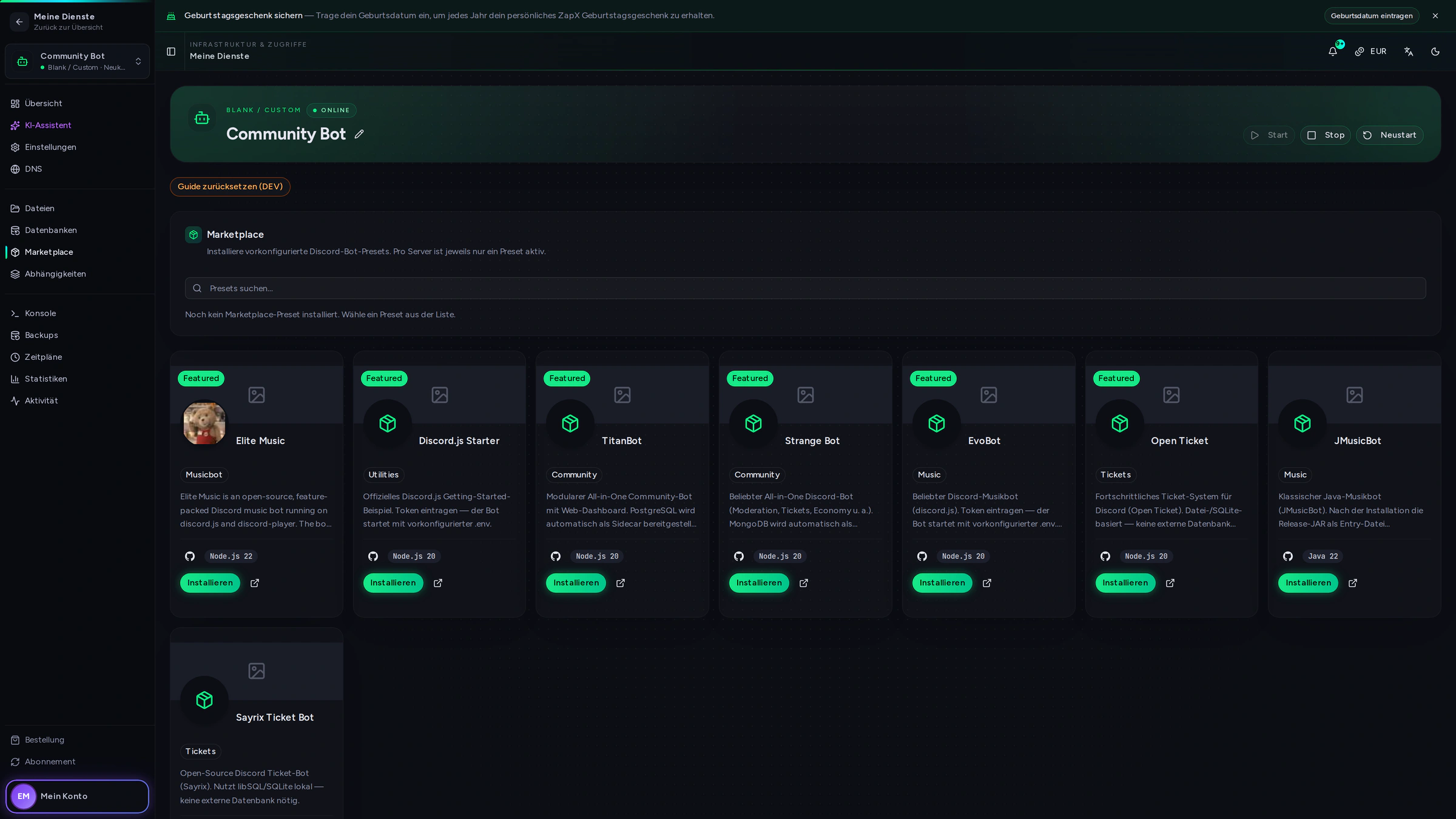
Status & overview
Online status, RAM, and runtime at a glance. Start, stop, and restart without SSH.
Locations
Closer to your community.
8 data centers worldwide — pick the location closest to your Discord community.
Europe


America


Asia-Pacific


Manage your Discord bot by chat.
The ZapX AI Agent in the panel deploys templates, connects Git and keeps your bot running - describe what you need and it does the steps. Requires an active ZapX Pass with AI access.
The ZapX AI Agent is part of ZapX Pass - together with your own Backups, restore and Lifetime access.
View ZapX PassZapX AI Agent
panel.zap-hosting.com
Reviews
What customers say about ZAP-Hosting
Real feedback on support and setup.
Great Service & User Experience
I had applied for partnership at ZAPX and the process and user panel is absolutely fire and very much friendly. Apart from that i have been using their VPS machine for quite a while and it has been great with almost no downtime.

 ZAP-HostingReply

great prices, good specs
the interface was great, migration was flawless and the interface is very user friendly. support team was very helpful aswell
 ZAP-HostingReply
I've been with them for a few years
I've been with them for a few years, and they're one of the best. The lifetime servers have really helped me, and now they've added auto-backup. 10/10!
 ZAP-HostingReply

From our operations
ZAP-Hosting in numbers
Real figures from our own systems, counted automatically every day.
Active Discord bots
DDoS attacks filtered (12 months)
Active servers in total
As of 23 November 2026. Active ZAP-Hosting servers, test accounts excluded, rounded down. DDoS: attacks detected and filtered at our Frankfurt location.
More hosting
Explore more at ZapX
Game servers, TeamSpeak and FiveM hosting for the same community - all from one provider.


Host your Discord bot today.
Host your Discord bot from a template or your own code, with auto-restart included. Build your setup and keep your community's bot online 24/7.
No setup. No risk. Online in seconds.