VPS plan
ZAP Spark
€7.29/ 30 days
- 4 GB RAM
- 2 CPU
- 60 GB NVMe
Root access, NVMe, Linux or Windows – online in 60 seconds.
from €7.29 / month · cancel anytime
Every package lists its vCores, RAM and NVMe storage, with live prices from the shop. Pick a runtime of 3, 30, 90, 180 or 365 days: longer runtimes are discounted, US locations have their own regional pricing, and Lifetime lets you buy once with ZapX Pass.
Plans 1–3 of 9
Configure yourself
No package fits? Choose CPU, RAM and storage freely and pay only for what your project actually needs.
Powerful CPUs
1 Gbit/s uplink included
up to 5 Gbit/s as an add-on
100 Gbit/s host network
Juniper Firewall
DDoS protection
 Visa
 Mastercard
 American Express
 PayPal
 Google Pay
 Apple Pay
 Klarna
 Amazon Pay
Operating systems
Select Debian, Ubuntu or Windows Server when you order, and reinstall from the panel whenever you need a clean system. Everything else boots from your own ISO.
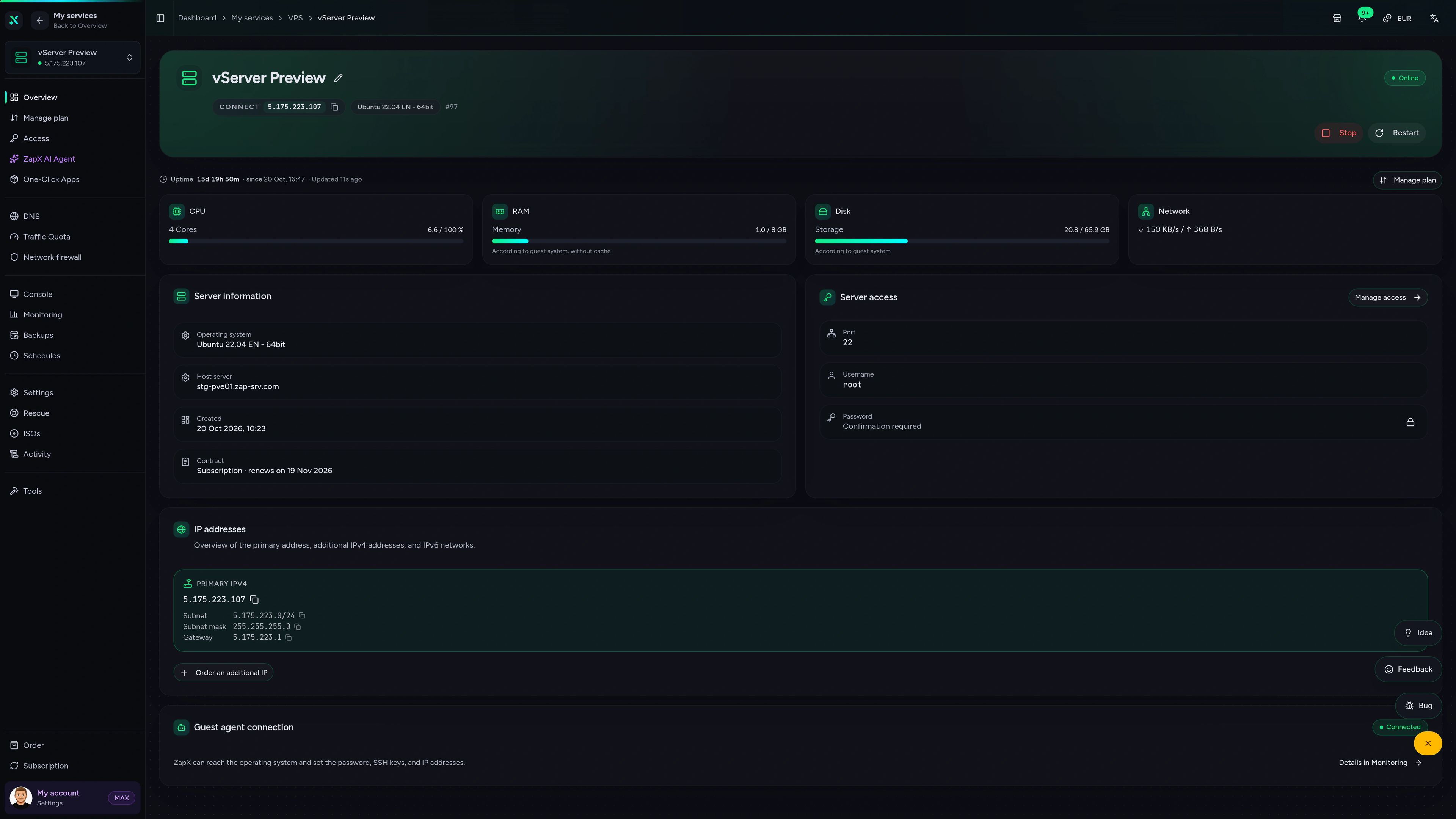
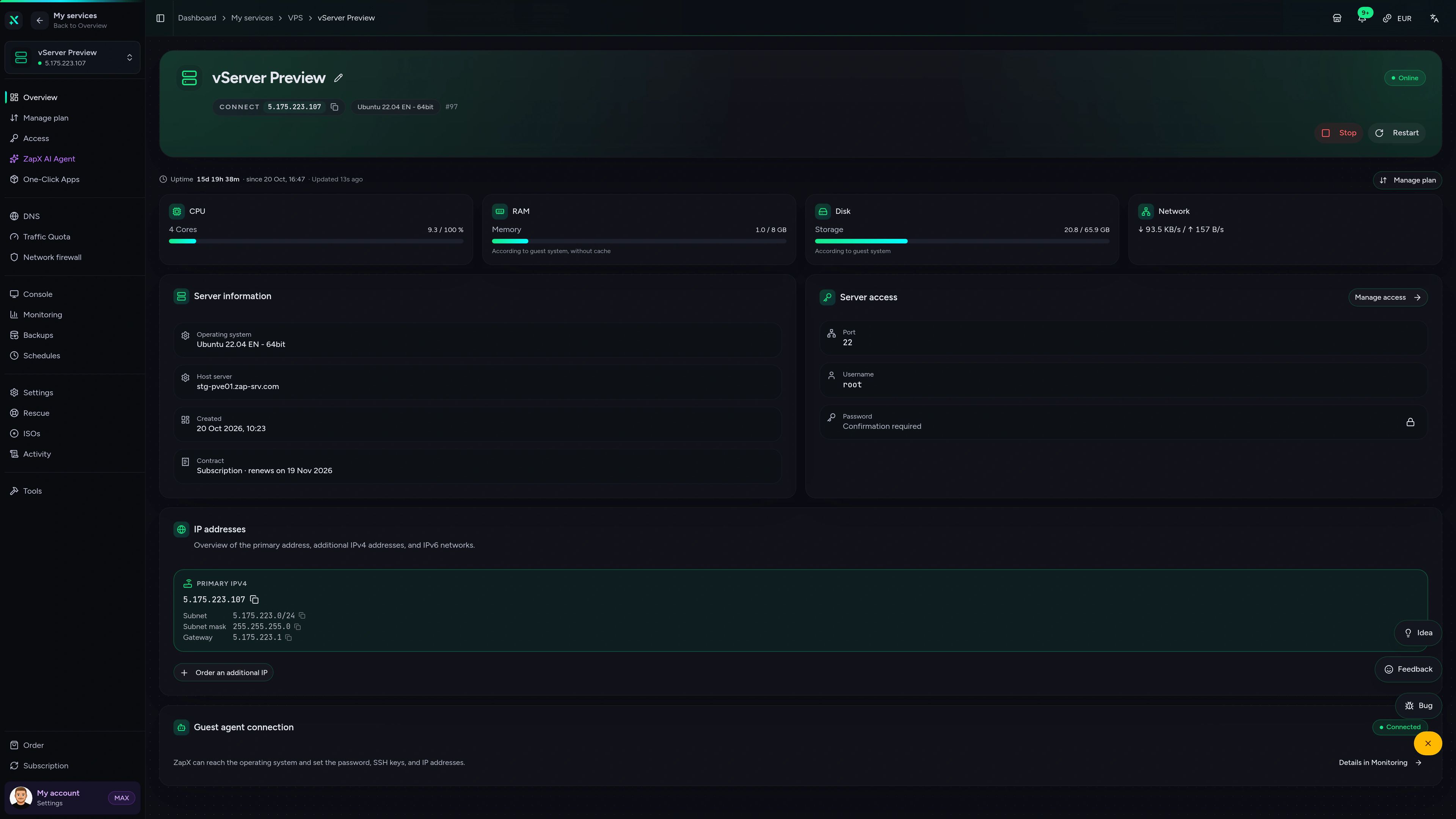
Web interface
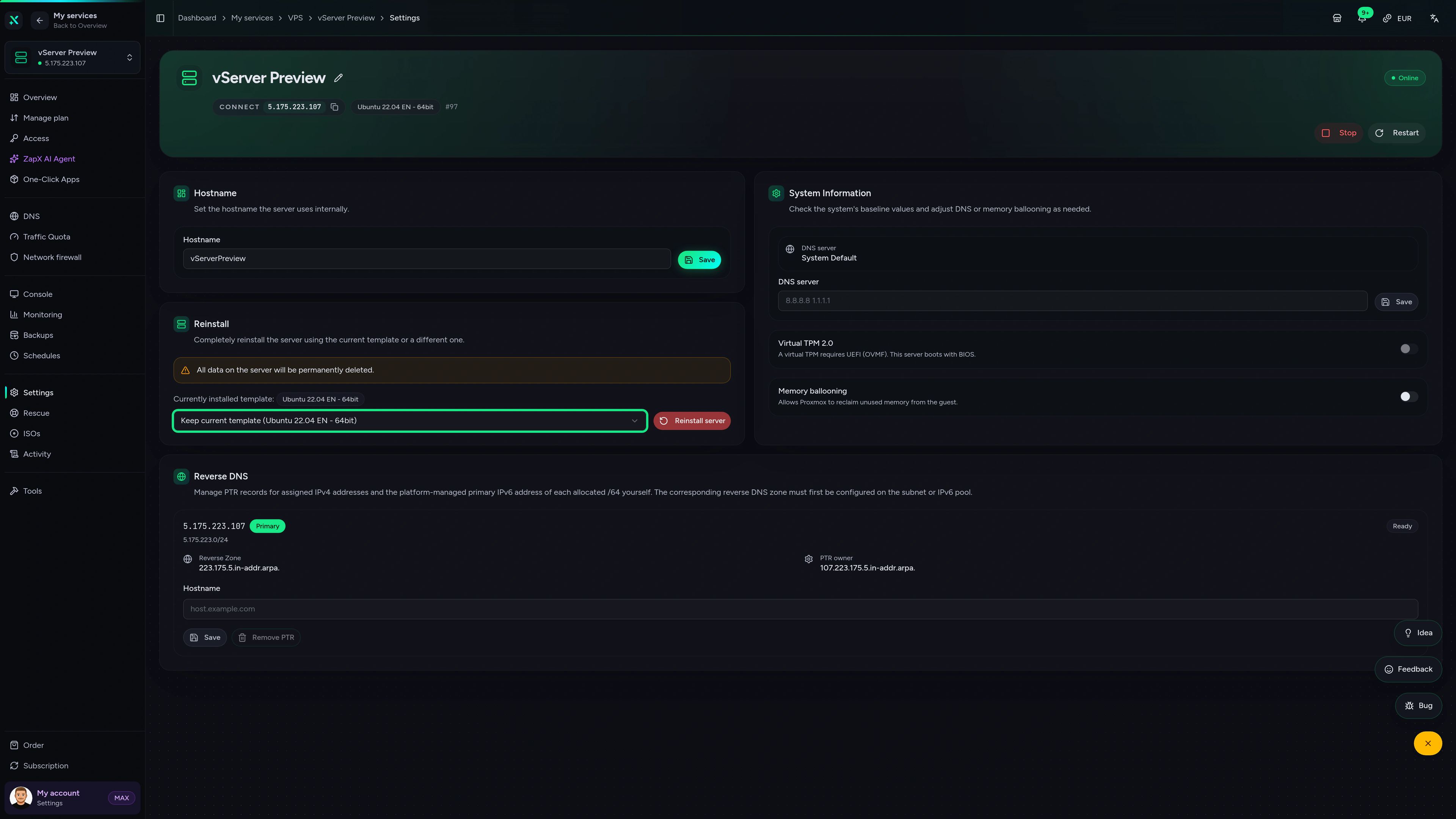
Overview, browser console, monitoring, firewall and rescue mode in one place, so you manage your VPS without juggling extra tools.
ZAP VPS #42
panel.zap-hosting.com
CPU, RAM, storage and network at a glance, plus IPs and status as soon as your VPS is up.
Connect ZAP-Hosting to Claude or ChatGPT via MCP and manage your VPS right in the chat.
Works with
What should I do for your server?
Ask anything …
The AI only makes changes after you approve them.
Step 1
Connect ZapX
Opens Claude with the connector already filled in. Confirm it there and sign in with your ZAP account.
Step 2
Start a chat
Opens a new chat with this text:
I want to rent a VPS at ZAP-Hosting. Use the ZapX connector by ZAP-Hosting: ask me what will run on it, recommend CPU, RAM and location with the price and then order it with me.
The text then sits in the message box – you still press send there.
Without a Pass you get status, start/stop and, except in ChatGPT, advice and ordering. Files, console and Backups come with a ZapX Pass. Your account is created when you connect.
One-Click Apps marketplace
Coolify runs as a One-Click App and becomes your marketplace and deploy panel. Launch Nextcloud, n8n, WireGuard and hundreds of other apps without writing Docker Compose files by hand. Custom Zap apps included.
Featured apps

Nextcloud
Nextcloud is a self-hosted, open-source platform that provides file storage, collaboration, and communication tools for seamless data management.
Recommended: 1 GB RAM
Some app icons from selfh.st/icons (CC BY 4.0, resized and reformatted)
 DDoS protection included
A VPS with DDoS protection built in, not sold as an add-on. PletX filters server traffic with dynamic rules that adapt to how your VPS is used, at Frankfurt / Eygelshoven, Ashburn, Dallas and Los Angeles, at no extra cost.
Partner
PletX
Dynamic filter rules that follow the traffic profile of your VPS.
Included
No extra cost
Active at Frankfurt / Eygelshoven, Ashburn, Dallas and Los Angeles, no add-on to book.
Capacity
Up to 4 Tbit/s
Filtering capacity via Frankfurt and Amsterdam, built for large attacks.
DDoS Manager
In the panel
Attacks, bandwidth and protection status live in the ZapX panel.
Get started now
Your VPS is protected and ready to go — host it now.
Benchmark
Your VPS hosting server runs on powerful server CPUs with NVMe storage and 100G network infrastructure. Storage and network are measured against a typical VPS provider, not taken from marketing sheets.
High-performance VPS, CPU model depends on the location
Typical VPS plans without a published host CPU
confirmed 2026-07-01
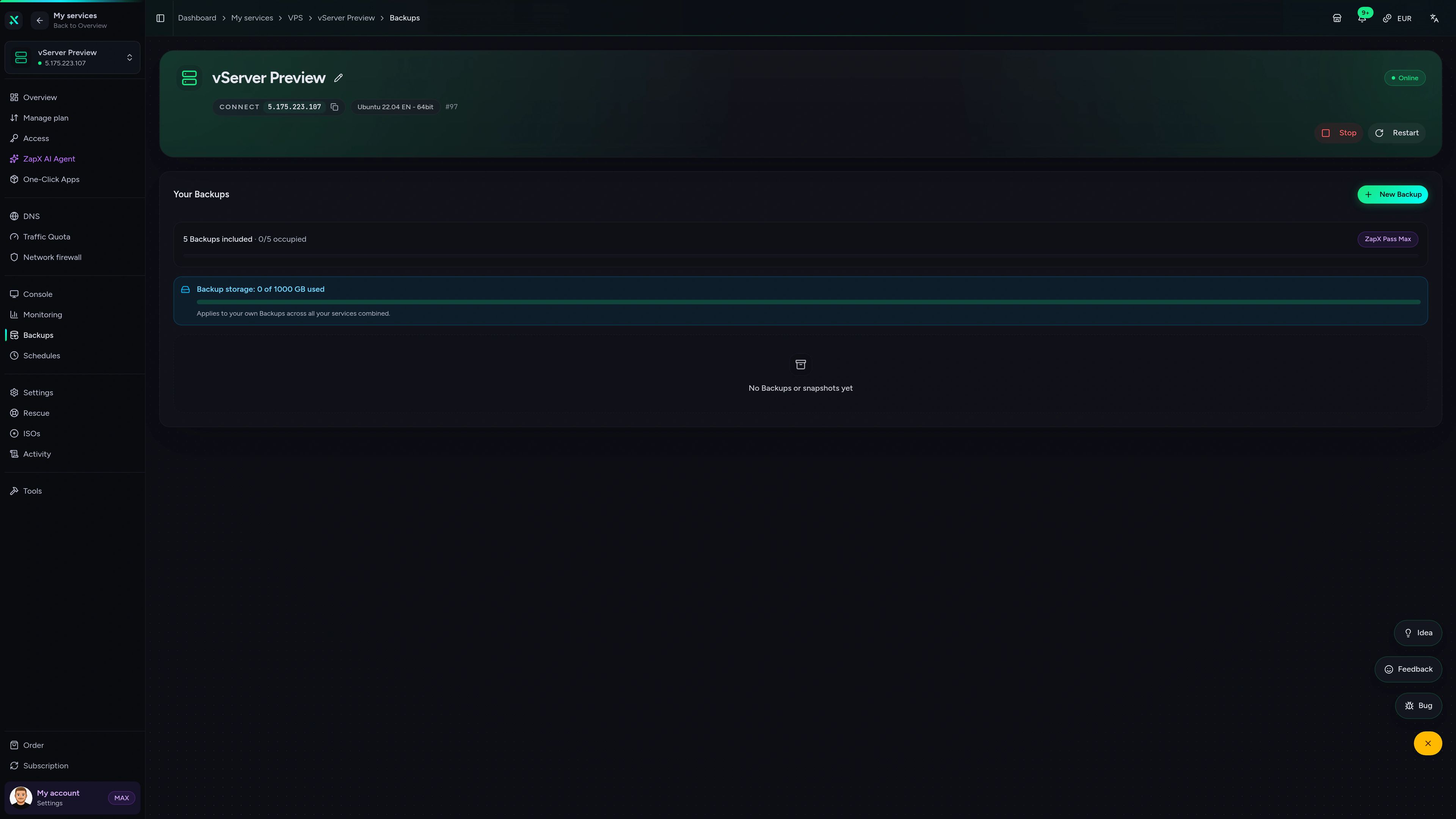
Backups & snapshots
ZapX Pass unlocks snapshots, so you can take one before an update and roll back in minutes if something breaks, plus restore, manual Backups and longer retention of the daily Backups.
More control with ZapX Passextra Backup storage, restore, Pass perks and Lifetime VPS without activity checks
Use cases
Host a website, deploy a Docker stack, keep a bot online or run a game server for your community. With full root access, your VPS runs whatever you install on it.
Locations & latency
Run your VPS in Germany at Frankfurt / Eygelshoven or in the US at Ashburn / New York, Dallas or Los Angeles. Many US projects start with Ashburn, Dallas or Los Angeles; pick the location closest to your users. Availability and prices may vary by location.


Select location
Your VPS runs where your users are — get started in 60 seconds.
The ZapX AI Agent in your panel installs apps, adjusts firewall rules, helps with domains and runs diagnostics. You describe the goal, it proposes the steps and asks before it changes anything. Requires an active ZapX Pass with AI access.
The ZapX AI Agent is part of ZapX Pass, together with your own Backups, restore and Lifetime access.
View ZapX PassZapX AI Agent
panel.zap-hosting.com
Trust
Real reviews from developers, communities and server admins who run their projects on ZAP-Hosting.
ZapX Panel
Console, Backups, DDoS Manager and settings for your VPS in one browser panel, no SSH detour needed.
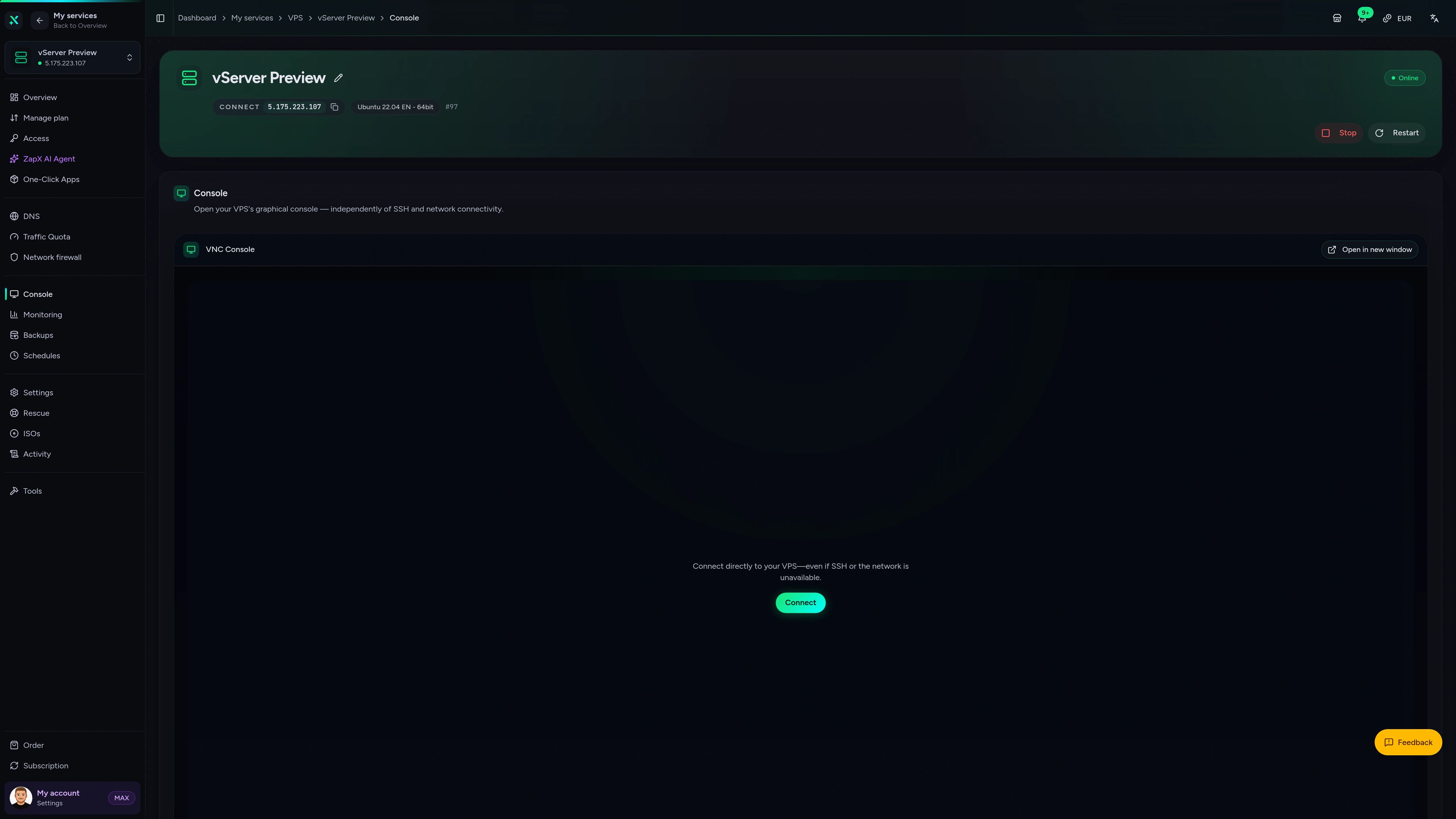
VPS Console tab
VPS Console tab
FAQ
Price, specs, locations and setup: what to know before you buy or rent a VPS server.
VPS hosting gives you a virtual private server: a KVM slice of a physical host with its own reserved vCores, RAM and NVMe storage and full root access. At ZAP-Hosting it runs on powerful server CPUs with PletX premium DDoS protection, managed in the ZapX panel.
You pick Debian, Ubuntu, Windows Server or your own ISO and install whatever you need: websites, Docker stacks, bots, a VPN or game servers. The panel adds a browser console, firewall, monitoring and rescue mode, and Coolify gives you One-Click Apps. Use your VPS as storageHost your database on a VPSHost your own apps with Docker
VPS plans start at €7.29 per month. Every package and its live price are listed in the plans above.
The monthly price depends on package, runtime and location. Rent for 3, 30, 90, 180 or 365 days: longer runtimes are discounted, and US locations have their own regional pricing. If no package fits, the configurator lets you set CPU, RAM and storage yourself, and with ZapX Pass you can buy once with a Lifetime VPS. Looking for cheap VPS hosting without weak hardware? Even the entry plans run on powerful server CPUs with NVMe storage and PletX DDoS protection. You pay by credit card, PayPal, Apple Pay, Google Pay or other payment methods, depending on your country and currency. All payment methods
Pick a package or configure your own, choose location, operating system and runtime, then check out. Setup runs automatically, and your VPS is online in 60 seconds.
After payment, your VPS is installed with the system you selected. The access data appears in the panel, and you connect via SSH or Remote Desktop. Reinstalls, firewall rules and the browser console are available in the ZapX panel from the start.
Linux for most stacks, a Windows VPS when your software requires it. Both come with full root or administrator access.
Linux (Debian or Ubuntu) is the standard for Docker, web apps, bots and automation. Windows Server is available when your tool needs a Windows environment and Remote Desktop, and you select either one at checkout. Need a specialized system like Proxmox? It is not a ready-made template, but you can install it from your own ISO.
Pick the location closest to your users: Frankfurt / Eygelshoven, Ashburn / New York, Dallas or Los Angeles.
All four are own ZAP-Hosting locations, and you select one when you order. Choose the location closest to the majority of your users for the lowest latency. Availability and prices may vary by location.
Yes. PletX premium DDoS protection is included at no extra cost, with up to 4 Tbit/s of filtering capacity via Frankfurt and Amsterdam.
PletX filters server traffic at Frankfurt / Eygelshoven, Ashburn, Dallas and Los Angeles, using dynamic rules that adapt to your traffic. The DDoS Manager in the panel shows attacks, bandwidth and protection status.
Self-managed: you get full root or administrator access and decide what runs on your server.
The ZapX panel gives you the browser console, firewall, rescue mode and reinstalls, Coolify adds One-Click Apps, and the 24/7 support chat helps with platform questions. Root or admin skills help, since software and updates inside your VPS are yours to manage. With ZapX Pass, the ZapX AI Agent assists with apps, firewall rules and diagnostics.
A VPS gives you a guaranteed KVM slice with root access and a low entry price. A dedicated server gives you exclusive hardware.
Websites, apps, bots and most game servers run well on a VPS with fixed, predictable resources. When a project outgrows a VPS or needs hardware no one else shares, a dedicated server at Frankfurt / Eygelshoven is the next step, with the same root access and ZapX panel. Only want to host a game without admin work? A managed ZAP game server is the easiest path.
A VPS is a reserved KVM slice of a shared physical host: its resources end where your package ends.
Your vCores, RAM and NVMe storage are reserved for you, but the physical host also runs other customers' VPS, so you don't get exclusive hardware. You manage the software yourself: the operating system, updates and everything you install are in your hands, while ZAP-Hosting runs the hardware, network and PletX DDoS protection. You can move to a bigger package later, but the disk can't be made smaller again. If you need exclusive hardware and the full power of one machine, a dedicated server is the next step.
It depends on the workload: start small for a website or bot, go bigger for Docker stacks, databases and game servers.
A single website, Discord bot or test environment usually runs fine on an entry package. A Coolify stack with several apps, a database-backed web app or n8n automation needs more headroom, so a mid-tier package is a better start. Game servers and heavy multi-app setups belong on the larger packages. You can upgrade to a bigger package later; disk downgrades are not supported.
Snapshots, restore and manual Backups are available with ZapX Pass.
With ZapX Pass you create snapshots and manual Backups through your Backup slots, and you can restore them when an update or deploy goes wrong. The daily Backups are kept longer, depending on your Pass tier. The Backup storage per account depends on your Pass tier, and a VPS counts only once, with the data stored on it rather than its disk size. The Pass also unlocks Lifetime VPS and the ZapX AI Agent.
Still have questions? Our support team is happy to help.
Contact SupportRelated hosting options
Need more power than a VPS, or a managed game server instead? Dedicated servers, game servers, TeamSpeak and more from one provider.
KVM VPS on powerful server CPUs with NVMe storage.
Exclusive hardware at Frankfurt / Eygelshoven when you outgrow a VPS.
The managed alternative with automated game setup.

Voice server for the community around your projects.

From an official FiveM provider, built for roleplay communities.

24/7 online, with templates or your own code.
Pick a package or configure your own, choose Linux or Windows and the location closest to your users, and start building today.
Automated setup. PletX DDoS included. Upgrade as you grow.